Home › Payroll Software in India › ESI Payroll Software
Payroll SoftwareESI Payroll Software with ESIC Calculation
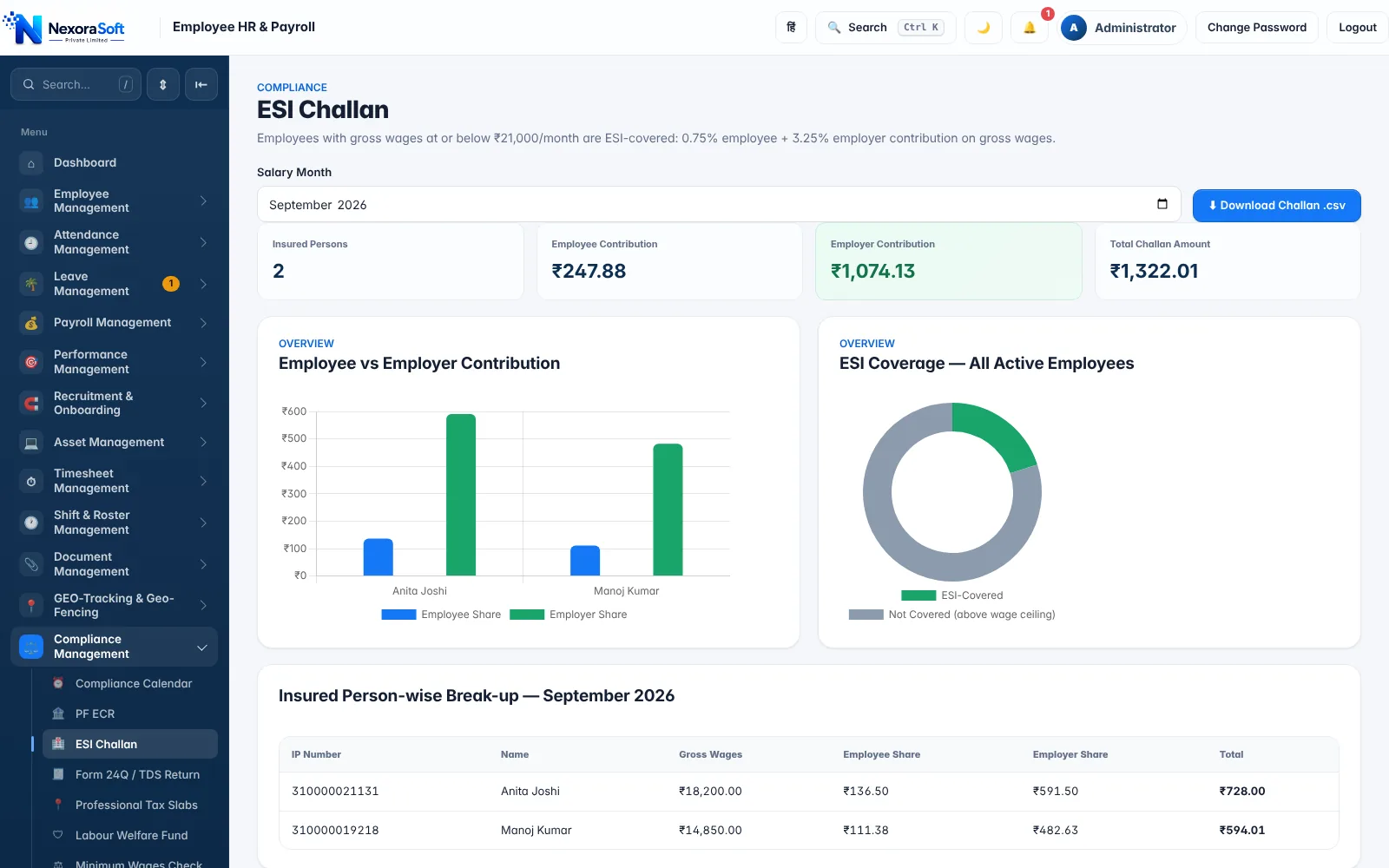
ESI is calculated on gross wages for covered employees only, and the covered list changes as salaries change. NexoraHRMS picks insured persons by the wage ceiling, works out employee and employer shares, and gives you the challan statement.
0.75% + 3.25%₹21,000 wage limitInsured person listChallan CSV
How ESI Is Calculated
Employees State Insurance applies to employees whose gross monthly wages are within the ceiling, currently ₹21,000 (higher for persons with disability). Contribution is a percentage of gross wages: 0.75% from the employee and 3.25% from the employer. Overtime and most allowances count as wages; a few payments such as employer contributions and gratuity do not.
In NexoraHRMS the wage ceiling, employee rate and employer rate are settings, and ESI can be switched on or off for the company. When it is on, covered employees are identified automatically from the month's gross wages.
ESI at a Glance
| Item | Rule (as configured by default) | In NexoraHRMS |
|---|---|---|
| Coverage | Gross wages up to ₹21,000 per month | Picked automatically each month; ESI number tracked on the employee record |
| Employee share | 0.75% of gross wages | Deducted on the payslip, shown on the challan |
| Employer share | 3.25% of gross wages | Reported on the challan and in accounting entries |
| Filing | Monthly contribution on the ESIC portal | Challan statement downloaded as CSV |
| Reminders | Due date each month | Compliance calendar with overdue alert |
Rates and ceilings are legal settings that can change. Confirm current ESIC rules before filing.
Insured Persons and Challan Statement
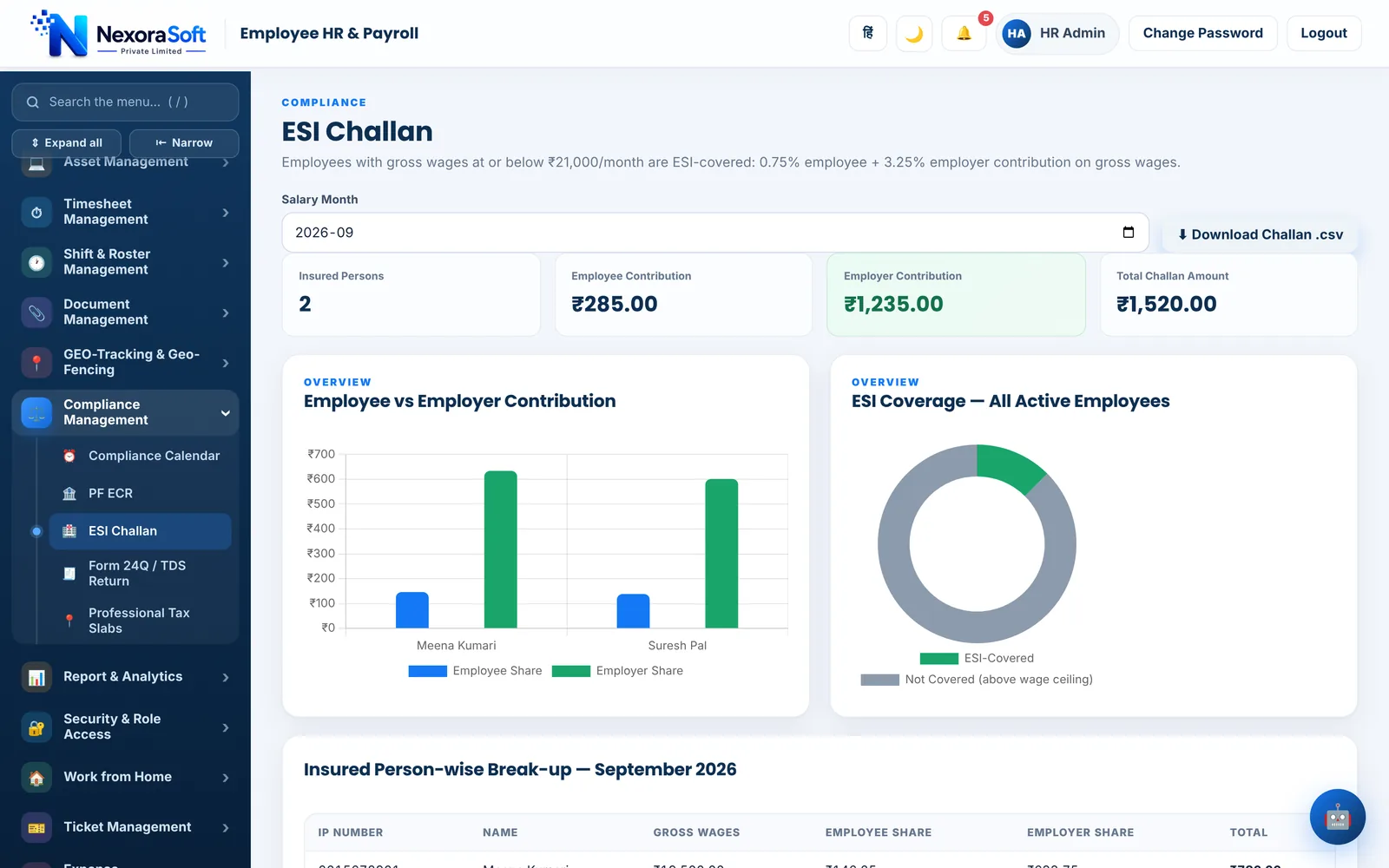
The ESI screen lists every insured person with gross wages and the employee and employer contributions, plus totals for the month. A coverage chart compares insured employees against those above the ceiling, which helps HR see who is about to cross it.
Download the challan statement as CSV and use it to prepare the monthly contribution on the ESIC portal. ESI numbers missing on covered employees are flagged by the pre-check.
- Insured person list with contributions
- Employee vs employer chart
- CSV download for the month
- Flag for missing ESI number
Practical Points Employers Ask About
Because coverage depends on wages, a pay rise can move someone out of ESI and a drop can bring them in. ESIC works in contribution periods, so check the current rules on when a person who crosses the ceiling stops being covered, and keep the ESI number current on the employee record. NexoraHRMS keeps the ceiling configurable so you can follow rule changes.
ESI sits alongside PF and Professional Tax in every salary run. See PF payroll software, Professional Tax software and ESI calculation in India for the full picture.
Related Payroll Guides
Payroll Software in India (full guide)PF Payroll SoftwareProfessional Tax SoftwarePayroll Compliance SoftwareManufacturing
ESI Payroll Software – FAQ
Yes. With ESI switched on, NexoraHRMS selects covered employees by gross wages and calculates 0.75% employee and 3.25% employer contributions.
₹21,000 gross wages per month for coverage (a higher limit applies for persons with disability). The ceiling is a setting in NexoraHRMS so you can update it if it changes.
The ESI challan screen downloads a CSV statement of insured persons and contributions that you use to prepare the monthly contribution on the ESIC portal.
ESI can be turned off in company settings. If no employee is within the ceiling, the screen shows none covered.
Overtime is generally part of gross wages for ESI. Check the treatment of each salary head with your advisor and set the salary structure accordingly.
Yes. ESI appears automatically as a deduction for covered staff and flows into the payroll report and Tally journal entry.
See NexoraHRMS Payroll on Your Own Data
Share your salary structure and get a free live demo of NexoraHRMS & Payroll. No commitment; we typically respond within 24 hours.