Home › Payroll Software in India › Professional Tax Payroll Software
Payroll SoftwareProfessional Tax Payroll Software State-wise PT Slabs
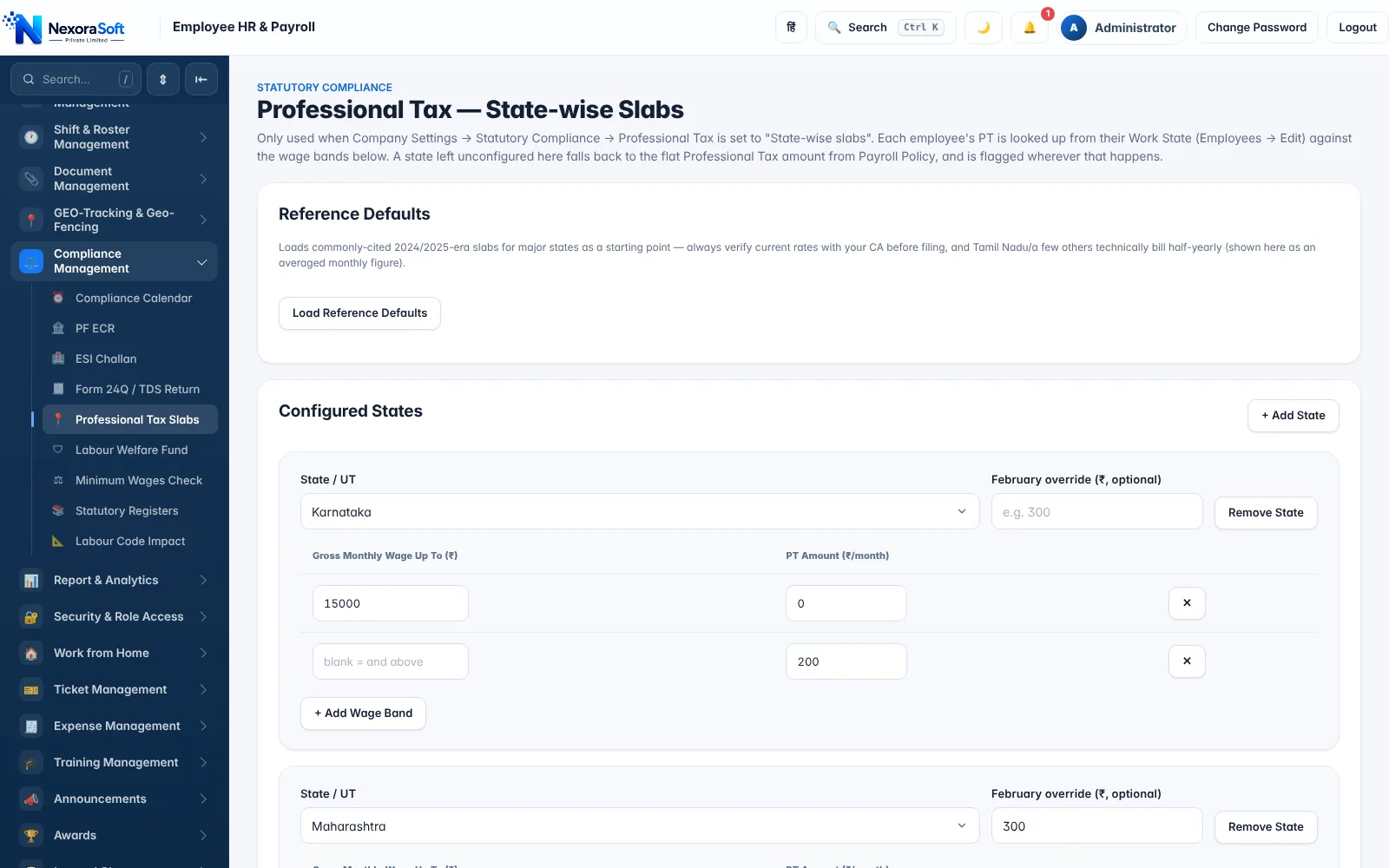
Professional Tax is a state levy, so the same salary can attract different PT in Maharashtra, Karnataka or Tamil Nadu and none at all in Delhi. NexoraHRMS looks up the slab of each employee's work state and deducts it automatically.
State-wise slabsFebruary overrideEditable bandsWork-state mapping
Why Professional Tax Needs State-wise Logic
Professional Tax is levied by state governments on salaried people and professionals, with a constitutional ceiling of ₹2,500 per year. Each state sets its own wage bands and monthly amounts, and some (for example Maharashtra and Karnataka) use a different amount in February so the annual total reaches the cap. Several states, including Delhi, Haryana and Uttar Pradesh, do not levy it at all.
A single flat PT amount for all employees is wrong the moment you have staff in more than one state. NexoraHRMS supports a flat amount for single-state companies and state-wise slabs for everyone else.
How PT Works in NexoraHRMS
Switch Company Settings to "State-wise slabs", then add each state you operate in and its wage bands: gross monthly wages up to a limit, and the PT amount for that band. An optional February override handles states with a special February amount. Each employee's PT is then looked up from their work state when payroll runs.
A state with no configured slab falls back to the flat amount and is flagged, so nothing is silently missed. Reference defaults load commonly published slabs as a starting point; always verify against your state's current notification before relying on them.
- Wage bands and monthly amount per state
- February override where applicable
- Fallback and flag for unconfigured states
- Editable when a state revises its slabs
PT Tasks Payroll Software Should Handle
Work-state mapping
Each employee has a work state, so a branch in Pune and one in Bengaluru deduct different PT automatically.
Reports for deposit
PT totals appear in the payroll report and the Tally journal voucher (PT ledger) for payment and books.
Slab revisions
When a state revises slabs, edit the bands in settings; no software upgrade is needed.
Due dates
Add PT due dates and registration details to your compliance calendar and track them with a mark-done log.
Frequently Missed PT Details
PT registration (enrolment and registration certificates) is per state and per employer; remember employees who change state, new joiners from mid-month and the February adjustment. For a state-by-state primer read Professional Tax calculation by state. PT is part of the payroll compliance checks alongside PF and ESI.
Related Payroll Guides
Payroll Software in India (full guide)PF Payroll SoftwareESI Payroll SoftwarePayroll Compliance SoftwareMulti-Branch Business
Professional Tax Payroll Software – FAQ
Yes. With state-wise slabs enabled, PT is looked up from each employee's work state and gross wages.
Many states do, including Maharashtra, Karnataka, West Bengal, Tamil Nadu, Telangana, Andhra Pradesh and Gujarat, while Delhi, Haryana and Uttar Pradesh do not. Check your state's current rules.
The Constitution limits PT to ₹2,500 per person per year.
Yes. Slabs are editable per state in the PT settings, with an optional February override.
The flat PT amount is used and the employee is flagged so you can add the state's slab.
Yes. The payroll journal voucher has a Professional Tax ledger line whose name you configure.
See NexoraHRMS Payroll on Your Own Data
Share your salary structure and get a free live demo of NexoraHRMS & Payroll. No commitment; we typically respond within 24 hours.