CRM & Sales ERP Software Leads, Funnel & Quotations
Track a lead from first enquiry to paid invoice without changing systems. Leads become opportunities, opportunities become quotations and orders, and the sales funnel shows where deals are stuck.
Lead managementOpportunitiesQuotationsSales funnelAppointments
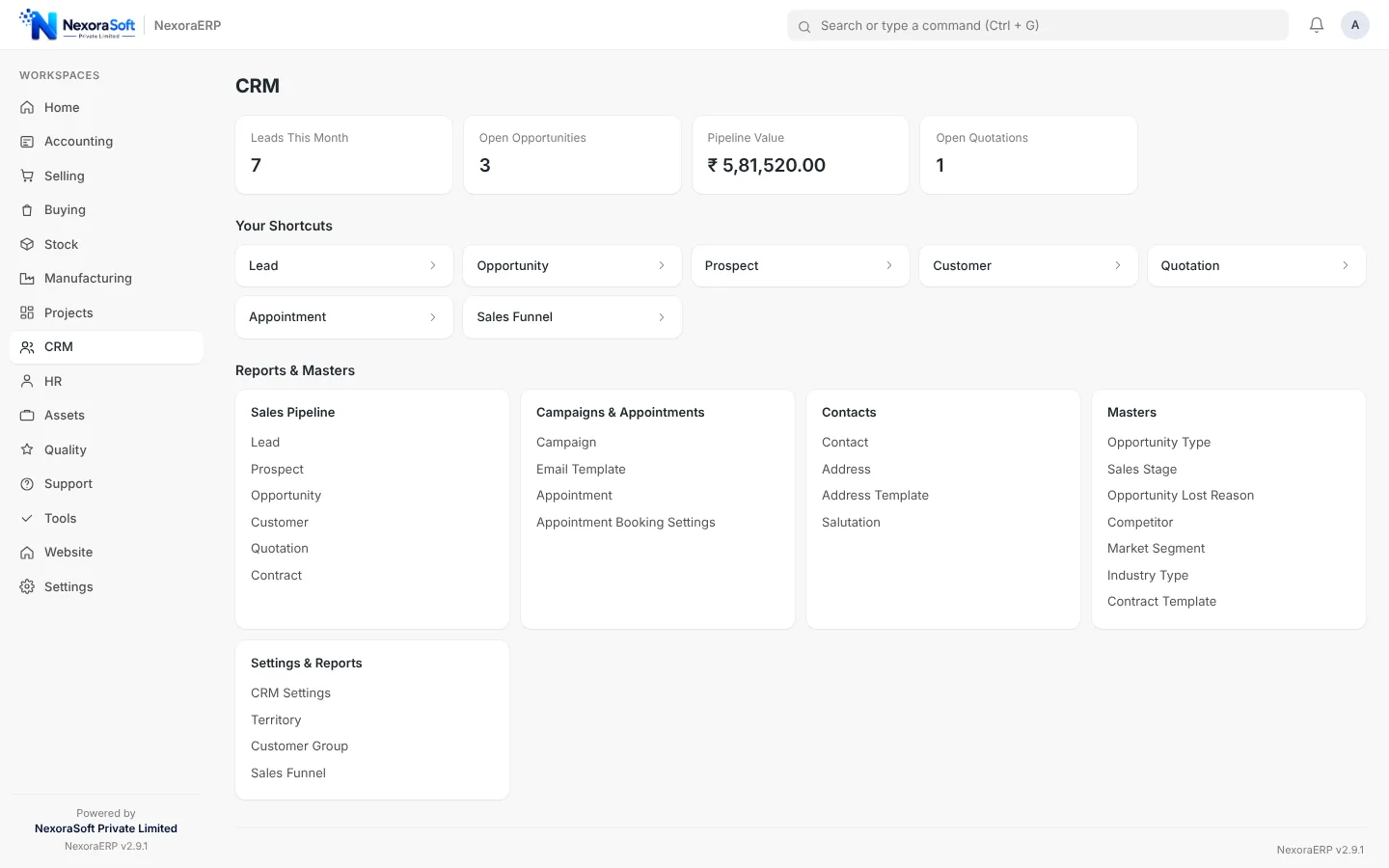
When CRM and billing are separate, the sales team promises one price and accounts invoice another. In NexoraERP the quotation in CRM becomes the sales order and the invoice, with stock and receivables following.
CRM Features
Pipeline management that connects to billing.
| Area | What NexoraERP provides |
|---|---|
| Leads | Capture leads with source, territory and owner; convert to customer or opportunity. |
| Opportunities | Opportunities with expected value and stage, linked to quotations. |
| Prospects and contacts | Prospect and contact records with address and communication history. |
| Quotations | Quotations with price lists and tax templates, then convert to sales order. |
| Sales funnel | Lead to opportunity to quotation to sales order counts with conversion percentage. |
| Appointments | Appointment booking page and calendar for customer meetings. |
| Contracts | Contracts with terms and fulfilment tracking. |
| Automation | Assignment rules, auto repeat, workflow, kanban views and email or SMS notifications. |
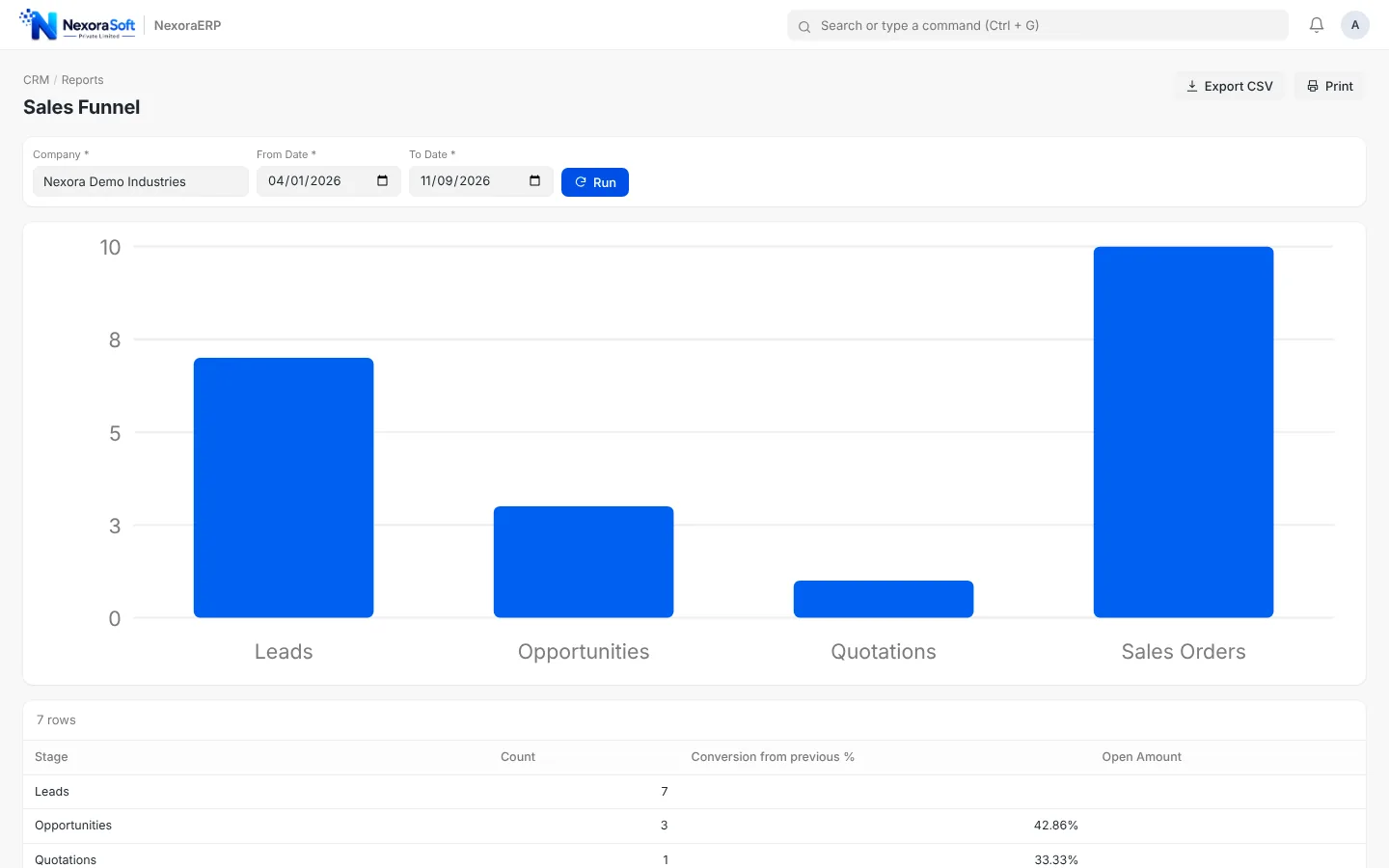
Sales Funnel with Conversion Rates
The Sales Funnel report shows how many leads, opportunities, quotations and sales orders you have and the conversion from the previous stage, so managers can see where the pipeline leaks.
- Counts at each stage
- Conversion from previous stage
- Date range and company filters
- Export and print
CRM Workspace for the Sales Team
The workspace puts leads, opportunities, prospects and quotations in one place with reports for the pipeline, campaigns and territories.
- Lead and opportunity shortcuts
- Sales pipeline and campaign reports
- Assignment rules for new leads
- Kanban views for follow-up
CRM Connected to Billing, Stock and Support
From enquiry to after-sales in one record.
Quotation to invoice
The same document flows to sales order, delivery and invoice.
Stock
Check availability while quoting.
Support
Issues with SLA and warranty claims linked to the customer.
Projects
Convert a won deal into a project with tasks and timesheets.
Notifications
Email and SMS notifications for follow-up.
Permissions
Territory and role permissions for sales teams.
Need CRM only?
If you only need a lead and follow-up system with telecalling and WhatsApp workflows, see NexoraCRM. NexoraERP is the right choice when quotes must flow to stock and accounts.
Connect Your Sales Pipeline to Billing
Book a demo and we will take a lead through to an invoice in one sitting.
Frequently Asked Questions
Yes. Leads, opportunities, quotations and the sales funnel are native modules, not a separate tool, so a quotation converts directly into a sales order and invoice.
Yes. The Sales Funnel report and CRM workspace show lead, opportunity, quotation and order counts with conversion rates.
Yes. Assignment rules distribute leads to sales users by territory, source or round-robin.
Yes. An appointment page lets customers pick a slot, and the booking appears for your team.
Those channel integrations are not part of the standard product. They can be scoped as custom work, or you can use NexoraCRM which is built around them.
Yes. User permissions can limit documents by territory or owner.
Use the Import Wizard to upload an Excel or CSV file of leads and map the columns to fields.