Accounting & GST ERP Software with Trial Balance, Ageing & Registers
Double-entry accounting that posts automatically from sales, purchase, stock and payroll. GST invoices with CGST, SGST and IGST, a GST Sales Register, bank reconciliation and the reports your accountant asks for.
Chart of accountsGST invoicesGST Sales RegisterTDS & TCSBank reconciliation
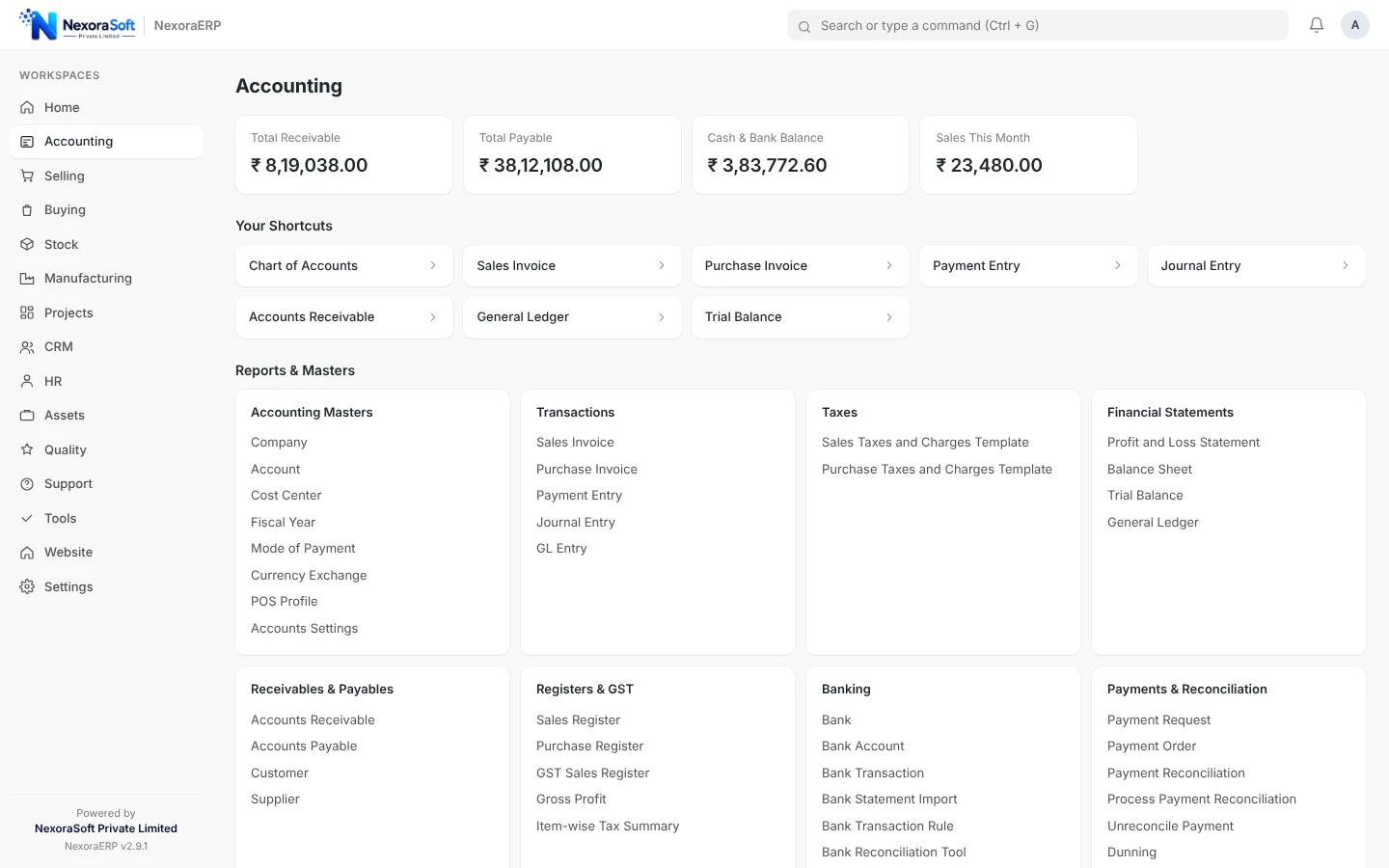
Every invoice, receipt, stock movement and salary posts to the general ledger as it happens, so the trial balance, profit and loss and balance sheet are always current. Setup creates a chart of accounts with GST accounts, and tax templates for in-state and out-of-state sales are ready to use.
What the Accounting Module Includes
Built around the way Indian accountants work: vouchers, ledgers, ageing and registers.
| Area | What NexoraERP provides |
|---|---|
| Chart of accounts | Account tree with groups, account types, tax accounts and per-company structure; setup with a GST-ready chart. |
| Vouchers | Journal entry and payment entry with allocation against invoices, multi-currency with exchange gain or loss. |
| Sales and purchase invoices | Invoices with returns and credit notes, tax templates, item-wise tax, due dates and payment terms. |
| GST | Output and input tax accounts for CGST, SGST and IGST, in-state and out-of-state templates, GSTIN and HSN fields and the GST Sales Register. |
| TDS and TCS | Tax withholding categories and automatic deduction on invoices and payments. |
| Banking | Bank accounts, bank transactions and reconciliation against payment entries. |
| Budgets and dimensions | Budgets by account, cost center and project; accounting dimensions for extra analysis. |
| Reports | General Ledger, Trial Balance, Profit and Loss, Balance Sheet, Accounts Receivable and Payable ageing, Sales and Purchase Registers, Gross Profit. |
| Fiscal year and finance books | Fiscal years, period handling and separate finance books when you need a second set of numbers. |
GST Invoices and the GST Sales Register
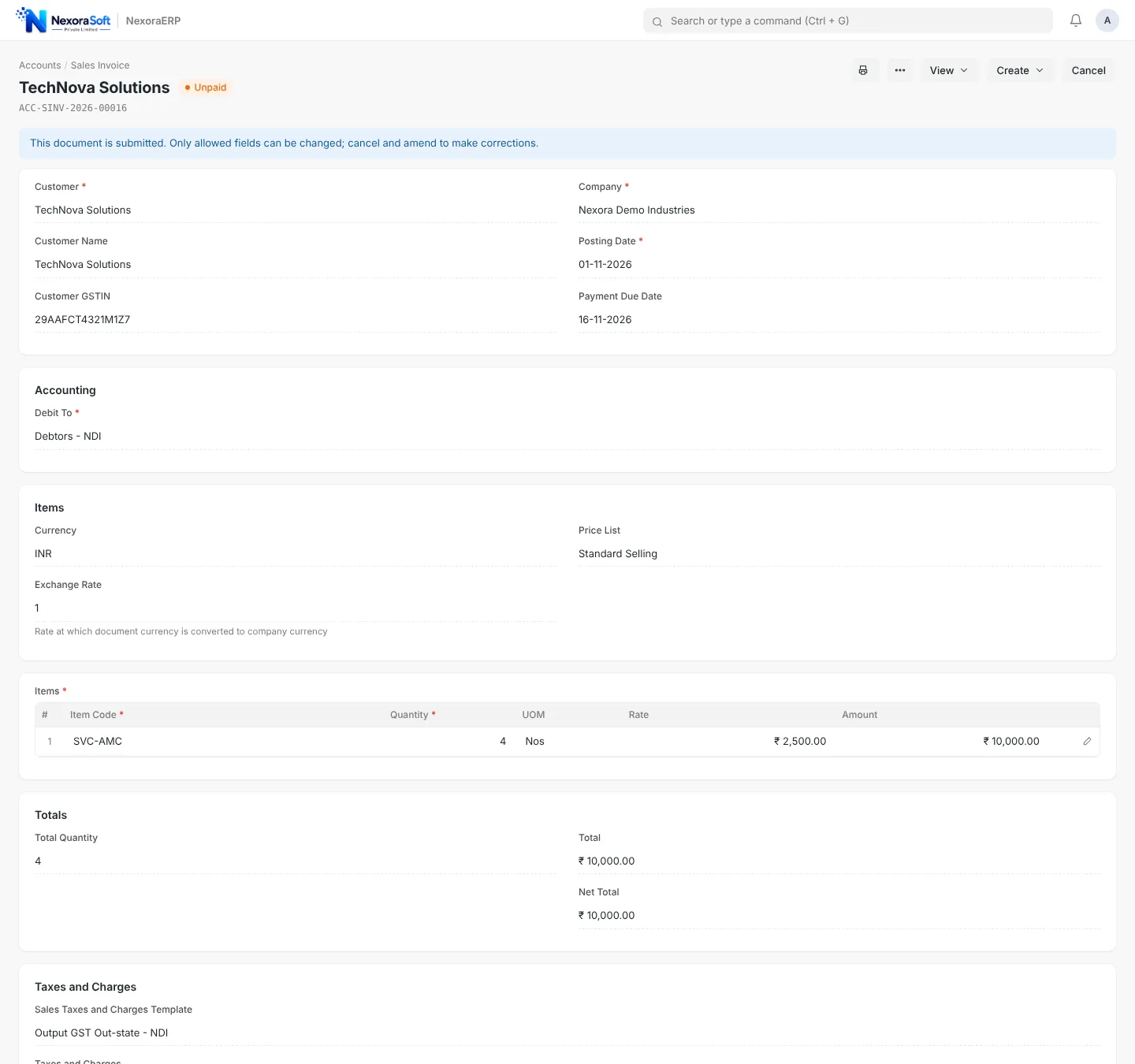
A sales invoice carries the customer GSTIN, place of supply, item HSN and a tax template. The right template splits tax into CGST and SGST for in-state sales or IGST for out-of-state sales, and the GST Sales Register lists every invoice with taxable value and tax by head so your accountant can reconcile it with returns.
- GSTIN and HSN on customer and item masters
- In-state and out-of-state output and input templates
- GST Sales Register with taxable value, CGST, SGST and IGST
- Print format for a professional GST tax invoice
Reports You Can Trust at Month End
Trial Balance, ageing and ledgers are computed from the same ledger entries, so what the dashboard shows is what the accountant signs. Accounts Receivable ageing groups dues into 0 to 30, 31 to 60, 61 to 90 and over 90 days for collection follow-up.
- Trial Balance with opening, debit, credit and closing columns
- Receivable and payable ageing by party
- Profit and Loss and Balance Sheet by period
- Export to CSV and print from any report
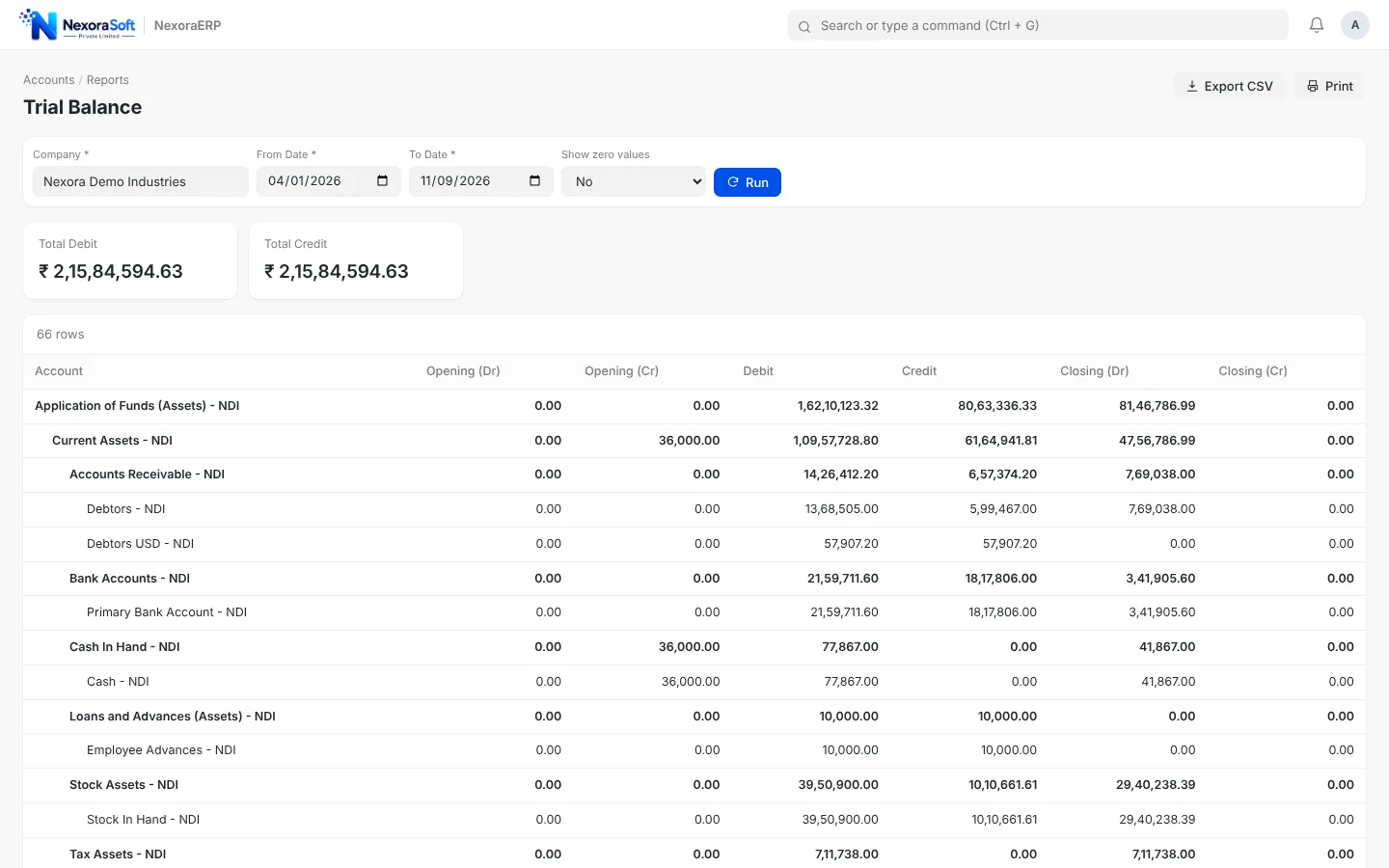
Chart of Accounts Built for Your Business
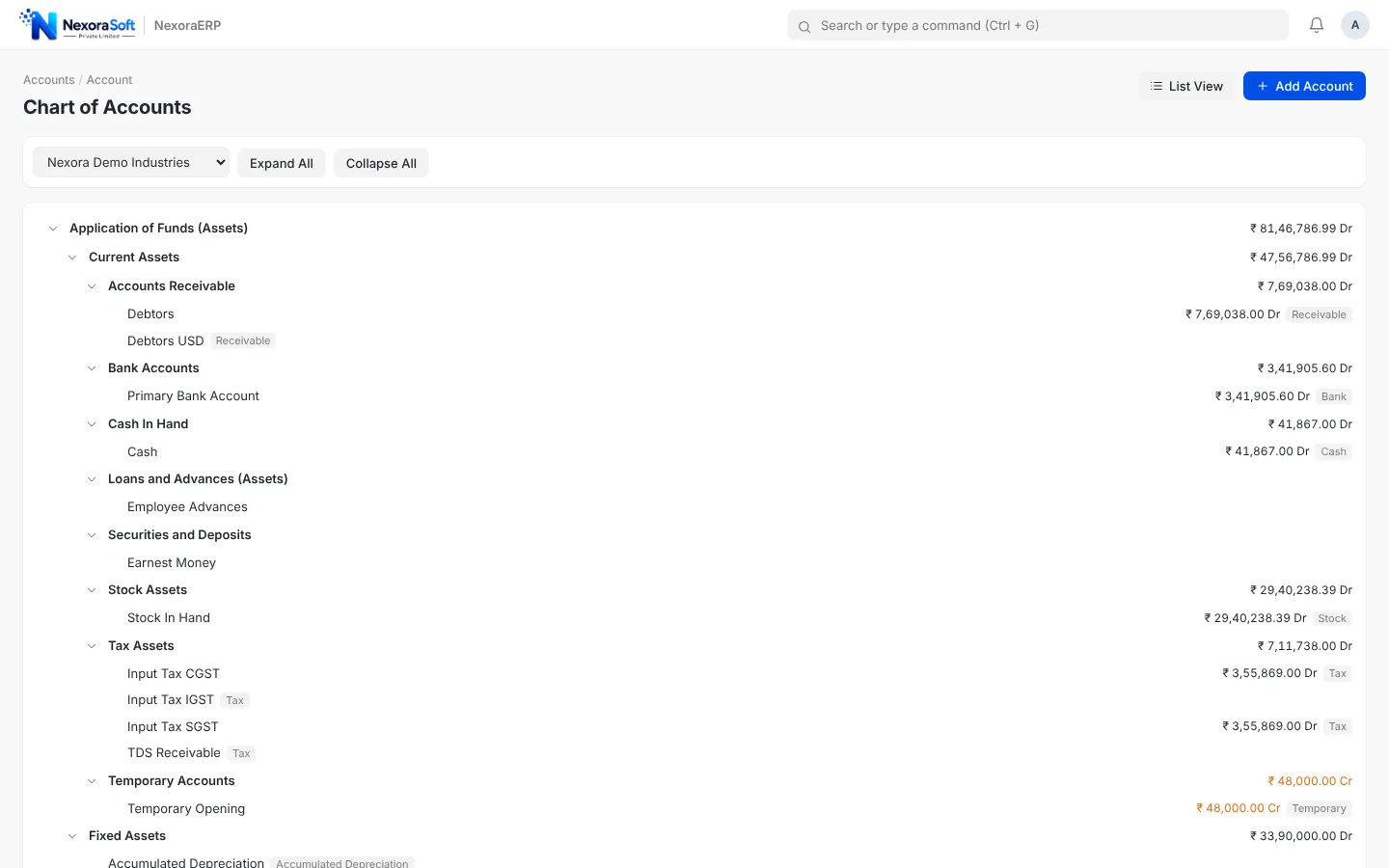
The account tree follows standard Indian groups, and you can add accounts, groups and cost centers without a developer. Opening balances can be loaded from Tally or from Excel at go-live.
- Standard groups for assets, liabilities, income and expenses
- Tax and TDS accounts created during setup
- Opening balances through Tally Import or Excel migration
- Role permissions for who can post and who can only view
Accounting Connected to Everything Else
No re-keying: documents in other modules create the accounting entries.
Sales and purchase
Delivery notes, receipts and invoices create receivables and payables automatically.
Stock valuation
Perpetual stock posts inventory value and cost of goods sold to the ledger.
Payroll
Salary slips and payroll entries post expenses and liabilities such as PF, ESI and TDS.
Assets
Depreciation schedules and capital work in progress post to fixed asset accounts.
Dashboards
Receivable, payable and sales trend cards on the home screen.
Audit trail
Version history and role permissions on every document.
What is and is not built in
NexoraERP produces GST-ready invoices and registers. Filing of GSTR returns through the GST portal, e-invoicing (IRN) and e-way bill generation are not part of the standard product. They are available as custom integration work if you need them, and we will tell you plainly what is standard and what is scoped before you commit.
Move Your Accounts to an ERP That Posts Automatically
Book a demo and we will walk through invoice to ledger to trial balance using your own sample data.
Frequently Asked Questions
Yes. It has CGST, SGST and IGST accounts, in-state and out-of-state sales and purchase tax templates, GSTIN and HSN fields, GST invoices and a GST Sales Register. Filing returns on the GST portal, e-invoicing and e-way bills are not built in and can be added as custom work.
For most businesses, yes. It covers vouchers, ledgers, ageing, registers, bank reconciliation and financial statements, and it can import ledgers and opening balances from Tally. Many teams run both in parallel for one month before switching.
Yes. You define withholding categories and rates and the system deducts tax on invoices and payments. Payroll TDS on salary is handled separately in the HR and payroll module.
Yes. Customers and suppliers can have their own billing currency, and exchange gain or loss is posted when payments are settled.
Yes. You can import bank statement transactions and match them against payment entries, then see reconciled and unreconciled balances.
Yes. Create a user with a read-only accounting role so your chartered accountant can view reports and ledgers without changing data.
Export masters and opening balances from Tally or use the Excel importers for parties, items, opening balances and outstanding invoices. A trial balance check at the end confirms that debit equals credit.