Home › Payroll Software in India › Full & Final Settlement Software
Payroll SoftwareFull & Final Settlement Software for Employee Exits
Settling an exit means pro-rated salary, leave encashment, notice recovery, gratuity and dues, all calculated correctly and on time. NexoraHRMS puts them in one worksheet, with the loans and recoveries pulled from the same system.
Pro-rated salaryLeave encashmentGratuity estimateLoan recovery
What Goes Into a Final Settlement
A full and final settlement typically combines: salary up to the last working day (pro-rated), encashment of unused leave as per policy, gratuity where the employee has completed the qualifying service, bonus or incentives due, and deductions for notice-period shortfall, loans, advances and company assets.
Which components apply depends on the company policy, the employment terms and the law, so the calculation is a starting point your HR and finance team verify.
The Settlement Worksheet
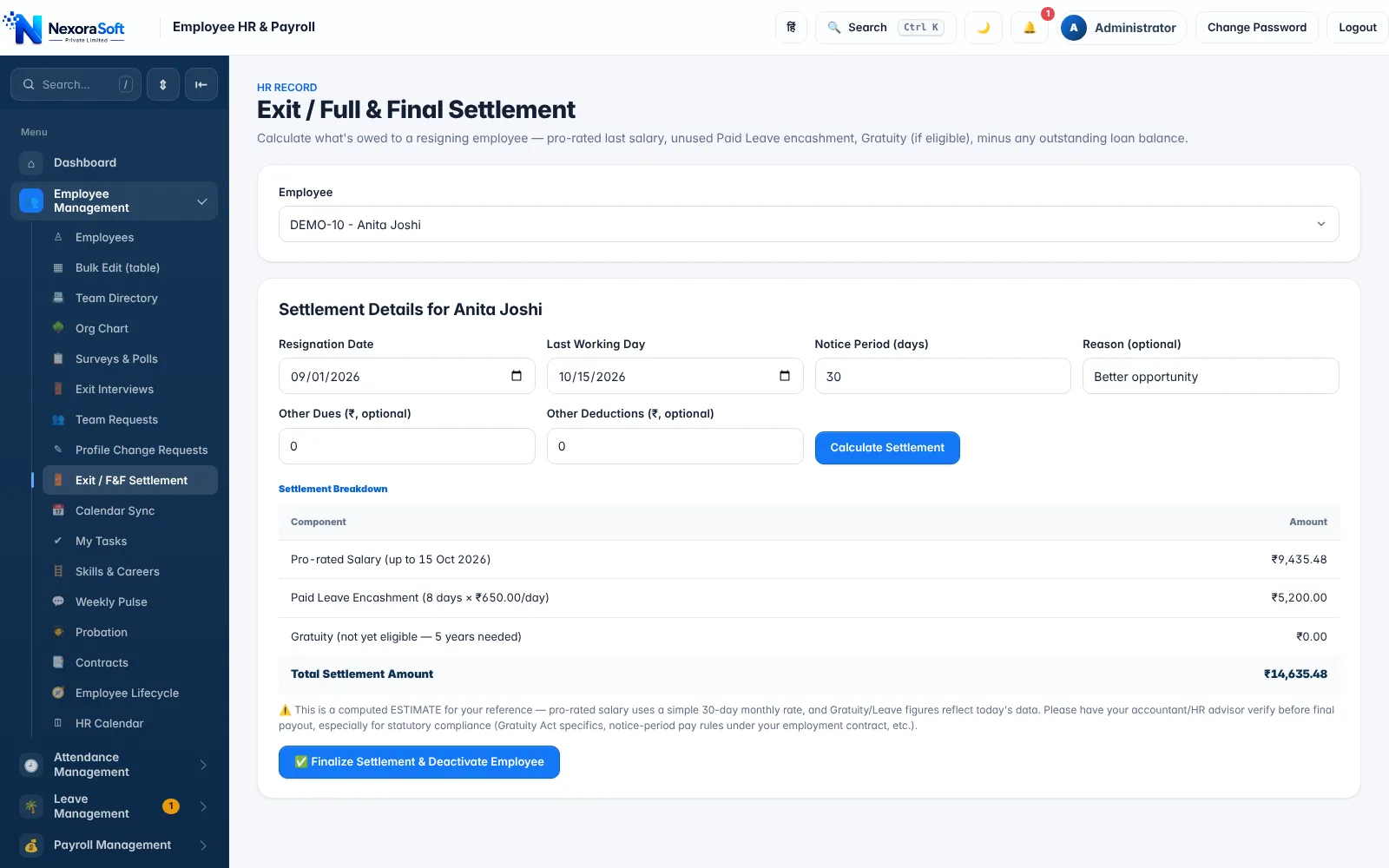
Choose the employee, enter the resignation date, last working day, notice period, and any other dues or deductions. NexoraHRMS calculates each component line by line and a total, and a button finalises the settlement and deactivates the employee record.
Unused paid leave is valued at the daily rate and limited by the encashment rules in your leave policy. Outstanding loans and advances are listed so they are recovered before the amount is paid.
- Pro-rated salary for the last month
- Leave encashment from the leave policy
- Gratuity for employees with 5 or more years of service
- Other dues and deductions you add
- Finalise and deactivate in one step
Gratuity Calculator for the Whole Team
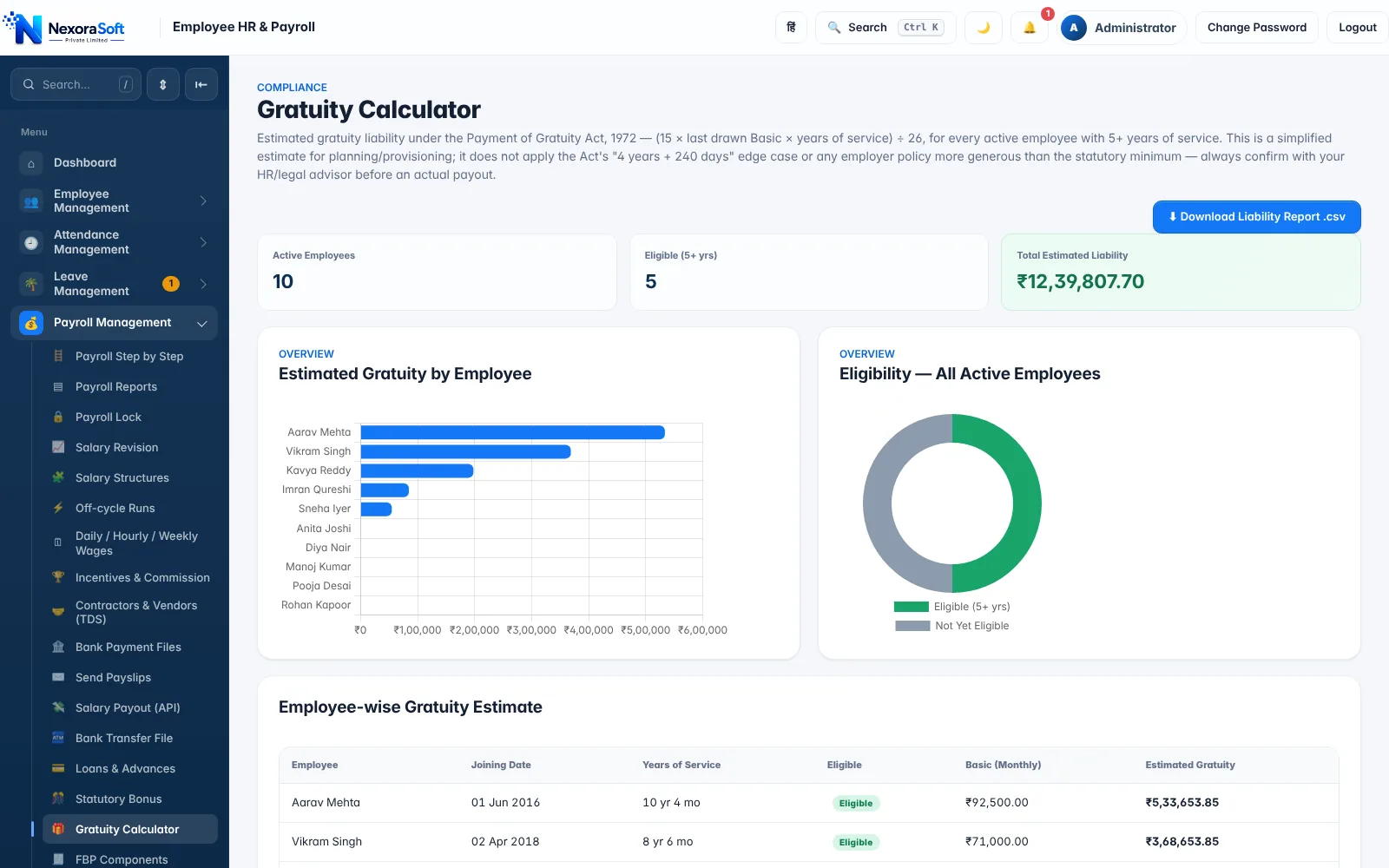
Gratuity is generally calculated as 15 days of last drawn basic salary for every completed year of service, using the formula (15 × last drawn basic × years of service) ÷ 26, subject to the statutory maximum. The gratuity calculator estimates the liability for every active employee, shows who is eligible, and exports a liability report for budgeting and provisioning.
Rules such as the qualifying period and wage definition are changing under the Labour Codes, so treat the numbers as estimates and confirm them before payment. A Labour Code impact simulator shows indicative changes.
- Eligibility by years of service
- Estimated gratuity per employee
- Liability report export
- Labour Code impact simulator
Exit Process Beyond the Money
Exit interviews, asset return and document checklists sit in the same HRMS, so HR can close an exit without chasing separate sheets. TDS on the settlement flows into the annual TDS statement. See full and final settlement calculation, HRMS software and payroll management software.
Related Payroll Guides
Payroll Software in India (full guide)Payroll Management SoftwareSalary Calculation SoftwareTDS Payroll SoftwareHRMS Software India
Full & Final Settlement Software – FAQ
Typically pro-rated salary, leave encashment, gratuity (if eligible), bonus or incentives due, minus notice-period shortfall, loans, advances and other dues.
Generally (15 × last drawn basic × completed years of service) ÷ 26, subject to the statutory limit. Confirm eligibility and wage definition with your advisor.
Unused eligible paid leave multiplied by the daily rate, subject to the encashment limit in your leave policy.
Outstanding loans and advances are shown on the exit screen so they can be recovered before payment.
It is a computed estimate; your accountant or HR advisor should verify it for the specific case before payment.
TDS on the settlement is part of the TDS data for the year and appears in the annual TDS statement.
See NexoraHRMS Payroll on Your Own Data
Share your salary structure and get a free live demo of NexoraHRMS & Payroll. No commitment; we typically respond within 24 hours.