Home › Payroll Software in India › TDS Payroll Software
Payroll SoftwareTDS Payroll Software New & Old Tax Regime
Salary TDS is projected for the whole year and deducted monthly. NexoraHRMS calculates it per employee under the New or Old regime, tracks declarations, and produces the annual TDS statement and quarterly return data your tax team needs.
New + Old regimeHRA, 80C, 80DAnnual TDS statementQuarterly summary
How Salary TDS Works
Employers deduct tax at source on salary using the employee's estimated total income for the year. Each employee chooses (or defaults to) a tax regime. In the New regime most exemptions and deductions fall away in exchange for lower slab rates; in the Old regime, exemptions such as HRA and deductions such as Section 80C and 80D reduce taxable income.
NexoraHRMS holds the regime and declarations on each employee record, projects the year's tax from salary so far and expected salary ahead, and deducts it in monthly amounts. You can also fix a manual TDS amount for an employee, or set TDS off.
What Is Calculated
Projected annual tax
Gross salary for the year, standard deduction and regime rules produce an annual tax estimate, with the balance spread over remaining months.
Old regime deductions
Rent paid (for HRA exemption), Section 80C up to the limit, and Section 80D medical insurance are used from each employee's declaration.
Joiners and mid-year changes
Annualisation months follow the joining date, and revised salary changes the projection from the month it takes effect.
Off-cycle and settlement TDS
TDS on off-cycle runs and settlements flows into the annual statement and Form 24Q data.
Annual TDS Statement and Quarterly Summary
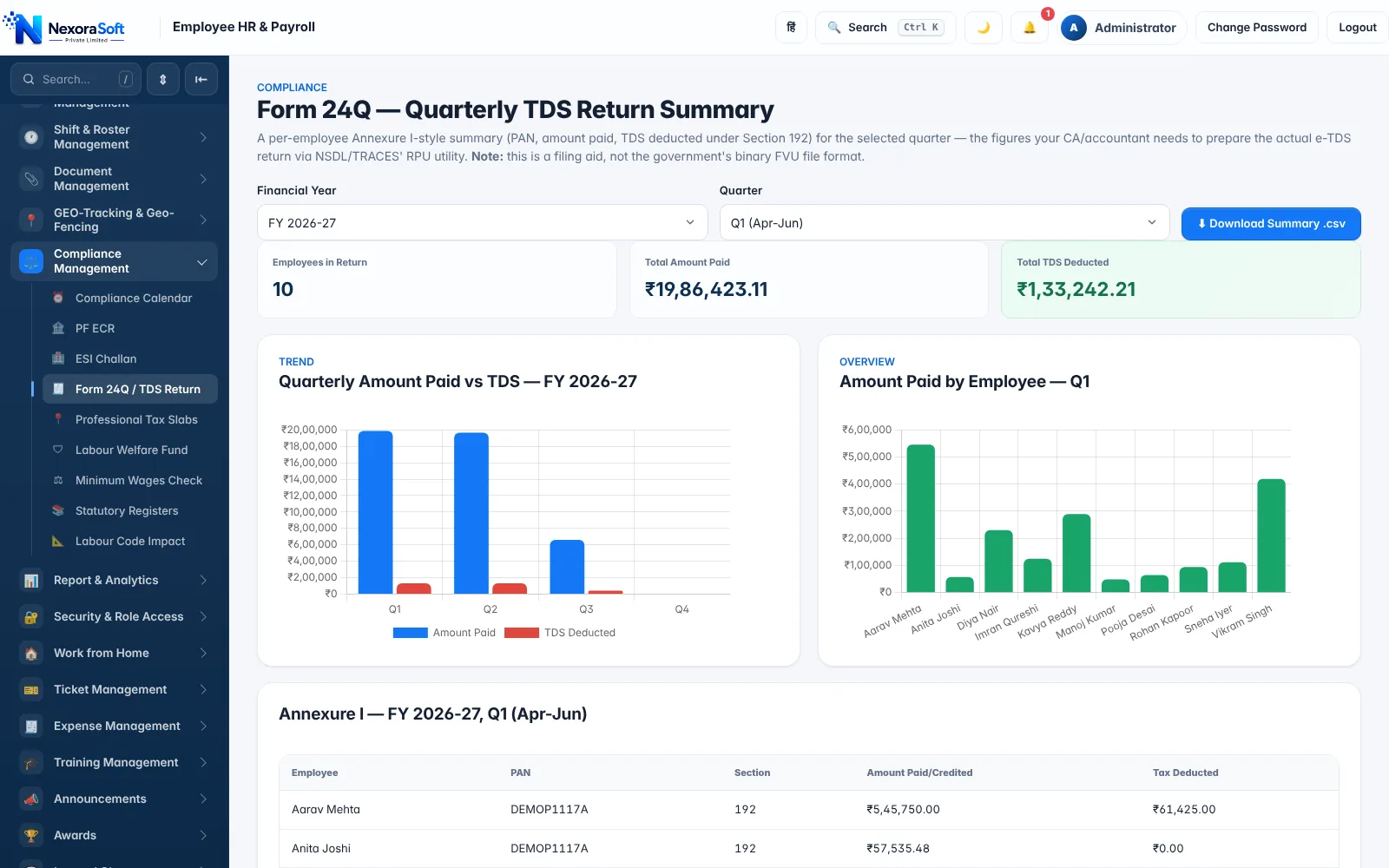
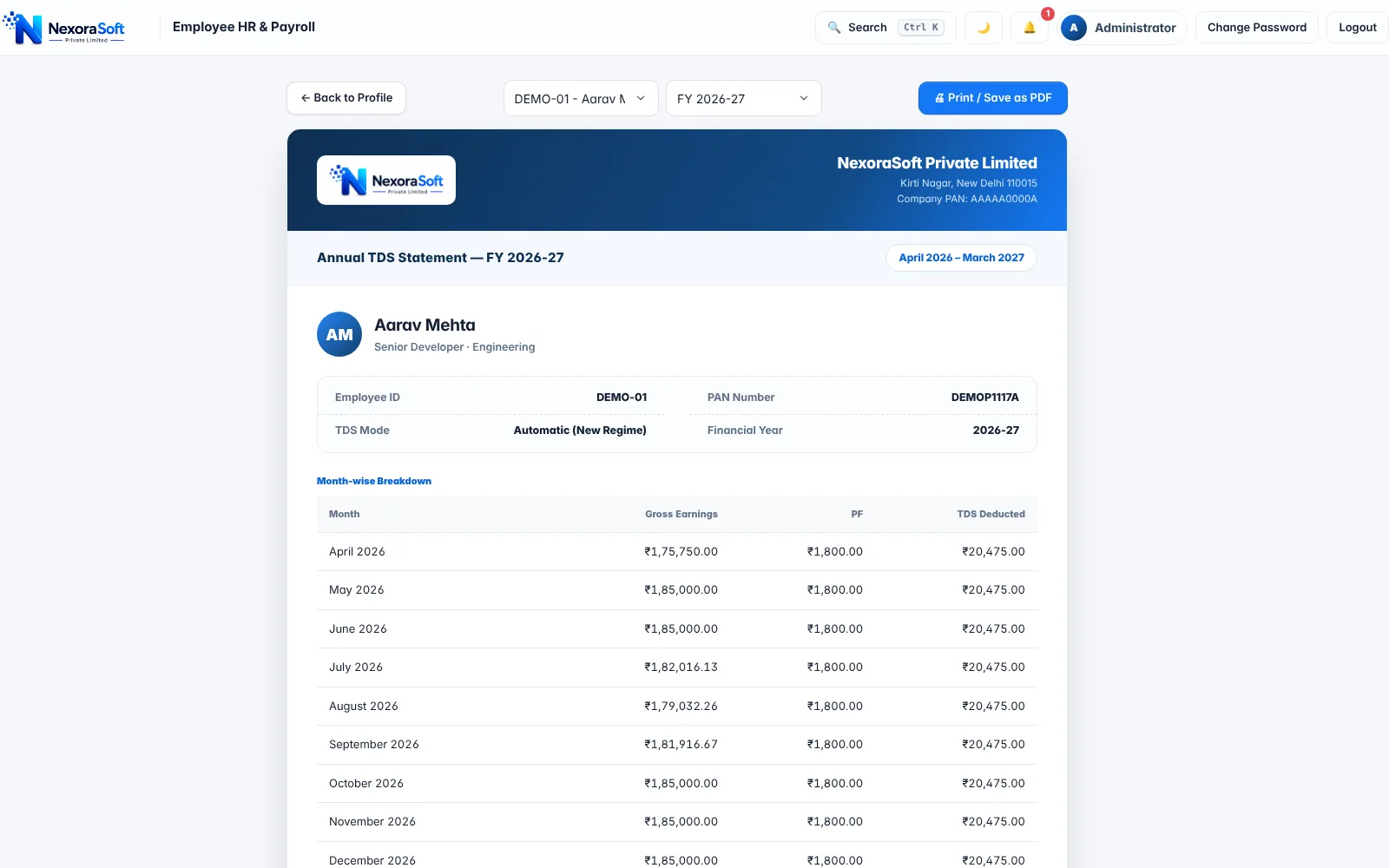
The annual TDS statement shows month-wise gross earnings, PF and TDS deducted for each employee across the financial year. The Form 24Q screen summarises each quarter: employees, total amount paid and TDS deducted, with an employee-wise annexure and CSV download.
It is a filing aid for your tax team or CA, not the final e-TDS file. The return itself is prepared and validated on the NSDL/TRACES utilities, and deductors without PAN details need them added first, which the pre-check flags.
- Month-wise gross, PF and TDS per employee
- Quarter-wise totals and annexure
- Employees without PAN flagged
- CSV summary download
A Note on the New Income-tax Act, 2025
The Income-tax Act, 2025 came into force on 1 April 2026 and renames several forms and sections, including the salary TDS certificate (Form 16 becomes Form 130 for tax year 2026-27 onwards) and the quarterly salary TDS return (Form 24Q becomes Form 138). NexoraHRMS produces the underlying salary, deduction and TDS data; the screens and exports still carry the familiar Form 16 and Form 24Q names. Always confirm current forms, rates and rebates with your tax advisor.
More on TDS and Payroll
See Form 16 software for certificates, the TDS on salary guide and payroll compliance software.
Related Payroll Guides
Payroll Software in India (full guide)Salary Calculation SoftwareForm 16 SoftwarePayroll Compliance SoftwareIT Companies
TDS Payroll Software – FAQ
Yes. NexoraHRMS projects each employee's annual tax under the New or Old regime and deducts it monthly, or uses a manual amount if you choose.
Yes. The regime is stored on each employee record, and declarations (rent, 80C, 80D) are used in the Old regime.
It generates a quarterly summary with employee-wise annexure as CSV for your tax team. The e-TDS return file is prepared and validated using the NSDL/TRACES utilities.
From 1 April 2026 the Act renames forms (Form 16 to Form 130, Form 24Q to Form 138 for salary TDS). Confirm current forms and rates with your advisor; NexoraHRMS provides the data.
Yes. Annualisation follows the joining date so tax is spread over the months remaining.
Yes. Set the TDS mode to manual with a monthly amount, or to none.
See NexoraHRMS Payroll on Your Own Data
Share your salary structure and get a free live demo of NexoraHRMS & Payroll. No commitment; we typically respond within 24 hours.