Home › Payroll Software in India › Form 16 Software for Payroll
Payroll SoftwareForm 16 Software Part B From Payroll Data
Form 16 consolidates a year's salary and tax for each employee. NexoraHRMS builds the Part B annexure and the annual TDS statement from the payroll you already ran, so nobody re-creates figures in a separate tool at year-end.
Part B annexureAnnual TDS statementRegime-awarePrint / PDF
What Form 16 Contains
Form 16 is the employer's certificate of tax deducted on salary. Part A carries the quarter-wise TDS deducted and deposited and is downloaded from the TRACES portal after the TDS return is filed. Part B is the annexure: gross salary, exemptions such as HRA, the standard deduction, deductions under chapter VI-A and the tax computation.
NexoraHRMS generates the Part B annexure and a month-wise annual TDS statement for every employee. Part A stays with TRACES because it depends on the filed return.
Part B in NexoraHRMS
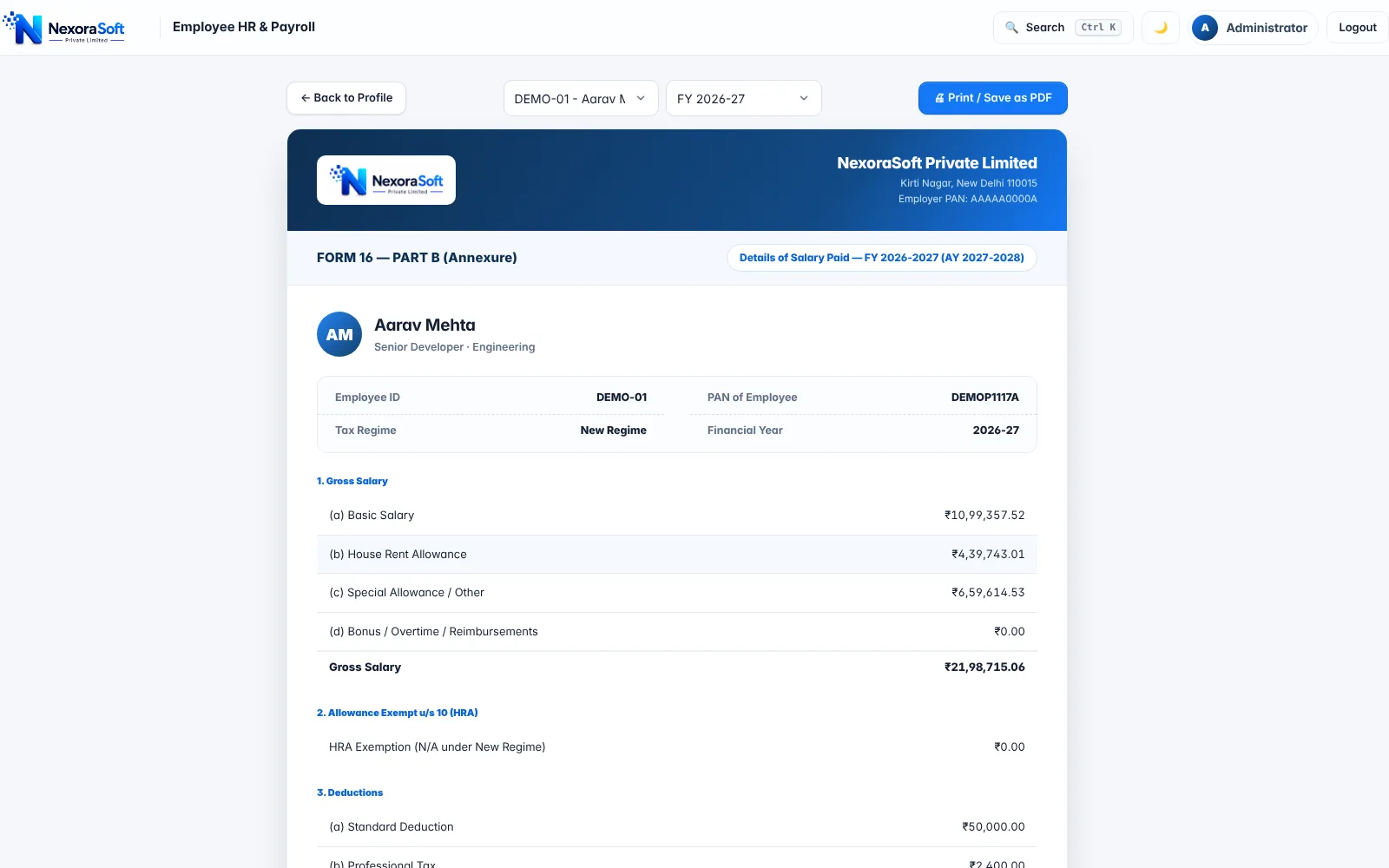
Open the Form 16 screen, choose an employee and financial year, and the Part B annexure is computed from payroll: gross salary and its components, HRA exemption under the Old regime, standard deduction, Professional Tax, deductions under 80C and 80D from the declaration, taxable income and tax. The regime is shown on the form, and a note warns when an employee has not submitted an investment declaration.
Print or save as PDF with company logo and PAN, for one employee or for everyone.
- Part B annexure per employee per year
- Regime-aware: HRA, 80C and 80D only in Old regime
- Warning when a declaration is missing
- Print or save as PDF
Form 16 After the Income-tax Act, 2025
For salary from 1 April 2026 (tax year 2026-27), the salary TDS certificate is issued as Form 130 under the Income-tax Act, 2025, and the quarterly return is Form 138; Form 16 and Form 24Q continue for earlier years. NexoraHRMS holds the salary, deduction and TDS data these documents need, and the screens use the familiar Form 16 / 24Q names. Confirm current formats with your tax advisor before issuing certificates.
A Year-End Checklist With NexoraHRMS
Collect declarations
Employees submit rent, 80C and 80D declarations; HR reviews pending ones.
Lock the months
Lock March payroll so payslips and TDS are frozen.
Check the statement
Review the annual TDS statement against challans and the quarterly summary.
Issue certificates
Print Part B for each employee and attach Part A from TRACES.
Related Guides
Read Form 16: what it is and how it is generated, TDS payroll software and payslip software.
Related Payroll Guides
Payroll Software in India (full guide)TDS Payroll SoftwarePayslip SoftwareFull & Final Settlement SoftwarePayroll Compliance Software
Form 16 Software for Payroll – FAQ
NexoraHRMS generates the Part B annexure and an annual TDS statement. Part A is downloaded by the employer from TRACES after the TDS return is filed.
Part A shows TDS deducted and deposited by quarter, with PAN and TAN details. Part B is the annexure with the salary breakup, deductions and tax computation.
Yes. HRA exemption, 80C and 80D appear only for employees in the Old regime; the New regime is computed under its own rules.
Under the Income-tax Act, 2025, salary TDS certificates for tax year 2026-27 onwards are issued as Form 130. Confirm current formats with your advisor.
Employees can view and download annual tax statements from the self-service portal; HR can print Part B for any employee.
The form shows a warning, and tax is computed on the declarations available (none in the Old regime), so collect declarations before the final months.
See NexoraHRMS Payroll on Your Own Data
Share your salary structure and get a free live demo of NexoraHRMS & Payroll. No commitment; we typically respond within 24 hours.