Payroll processing is the monthly cycle that turns attendance and salary structures into paid salaries and filed returns. Here is the complete sequence for an Indian business, with what to check at each step.
The monthly payroll cycle
- Freeze attendance and leave. Close the month: resolve missing punches, approve corrections and leave. Days with no record should follow your written policy (paid or unpaid).
- Collect inputs. Overtime, incentives, reimbursements, arrears, loan EMIs, joiner and leaver details, and salary revisions effective this month.
- Update master data. New employees with PAN, bank, UAN and ESI numbers; changes in bank accounts or tax regime.
- Run the calculation. Payable days, earnings, then PF, ESI, Professional Tax, TDS and other deductions, giving net pay.
- Pre-check. Look for duplicate PAN/bank accounts, missing IFSC or UAN, zero or negative net pay, unusual jumps from last month.
- Approve and lock. A reviewer and an approver sign off; the month is locked so figures do not change.
- Pay. Generate the bank file, test with a small file if the bank is new, and release salary by the due date.
- Send payslips. Email or share PDFs; employees can also download from a portal.
- Book entries. Post the salary journal in your accounting system (for example a Tally journal voucher).
- File and deposit. PF and ESI contributions and returns, PT in applicable states, TDS deposit, and quarterly TDS return data.
Typical monthly deadlines to track
| Item | Usual timing |
|---|---|
| PF contribution and ECR | By the 15th of the following month |
| ESI contribution | By the 15th of the following month |
| TDS on salary deposit | By the 7th of the following month |
| Professional Tax | State-specific monthly or annual dates |
| TDS return | Quarterly |
| Statutory bonus | Within the statutory period after the accounting year |
📌 Dates and penalties are set by law and can change. Treat this table as a prompt to check current rules with your CA.
Common processing mistakes
Late attendance
Payroll started before attendance is final leads to corrections after salary is paid.
Missing UAN or ESI number
Contributions are deducted but the ECR or challan cannot include the employee.
Unlocked months
Edits after payslips are issued create disputes and audit gaps.
Bank file errors
A wrong IFSC fails a row or a whole batch. Preview before upload.
How software shortens the cycle
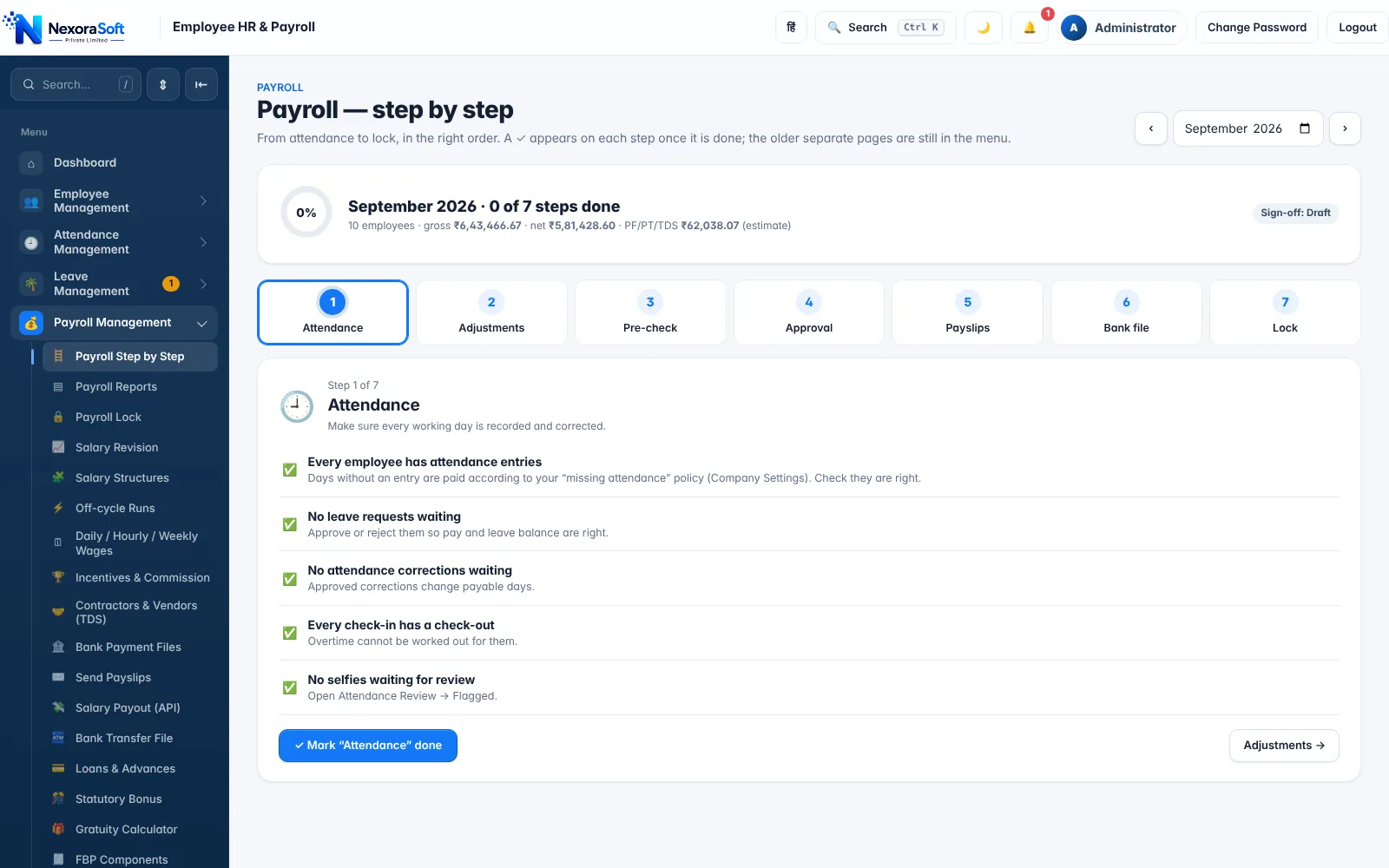
NexoraHRMS presents these steps as one screen, Payroll Step by Step: Attendance, Adjustments, Pre-check, Approval, Payslips, Bank file and Lock. Each stage shows what is done and what is pending. See payroll management software and how to automate monthly salary processing.
Related guides: Payroll Software in India (complete guide)
Payroll Management SoftwareSalary Calculation SoftwareSalary Bank Transfer SoftwareWhat Is Payroll Software? Complete Guide for Indian BusinessesHow to Automate Monthly Salary ProcessingPayroll Compliance Checklist for Indian Companies
See NexoraHRMS Payroll in Action
Book a free live demo and see payroll, PF, ESI, TDS and payslips run on your own salary structure.
Book a Free Demo +91 98115 51004