HR & Payroll ERP Software PF, ESI, Professional Tax & TDS
Employees, attendance, leave, shifts, expenses, recruitment and payroll in the same system as your accounts. Salary structures use formulas, and TDS follows the new or old tax regime.
Salary structure formulasPF, ESI & PTTDS new & old regimeLeave & attendanceRecruitment
When payroll lives in a separate tool, the journal entries are typed in by hand each month. In NexoraERP a payroll entry creates salary slips for the selected employees and posts expenses and payables to the ledger, so accounts and HR always agree.
HR and Payroll Features
Everything between hiring and the salary slip.
| Area | What NexoraERP provides |
|---|---|
| Employee records | Employee master with department, designation, branch, grade, bank details and lifecycle (onboarding, promotion, transfer, separation). |
| Attendance | Daily attendance, shifts and employee check-in, shift assignment and request workflows. |
| Leave | Leave types, allocation, applications, approvals, leave balance and holiday lists. |
| Expense claims | Claim submission and approval linked to accounts. |
| Recruitment | Job opening, applicant, interview, offer letter and the hiring lifecycle. |
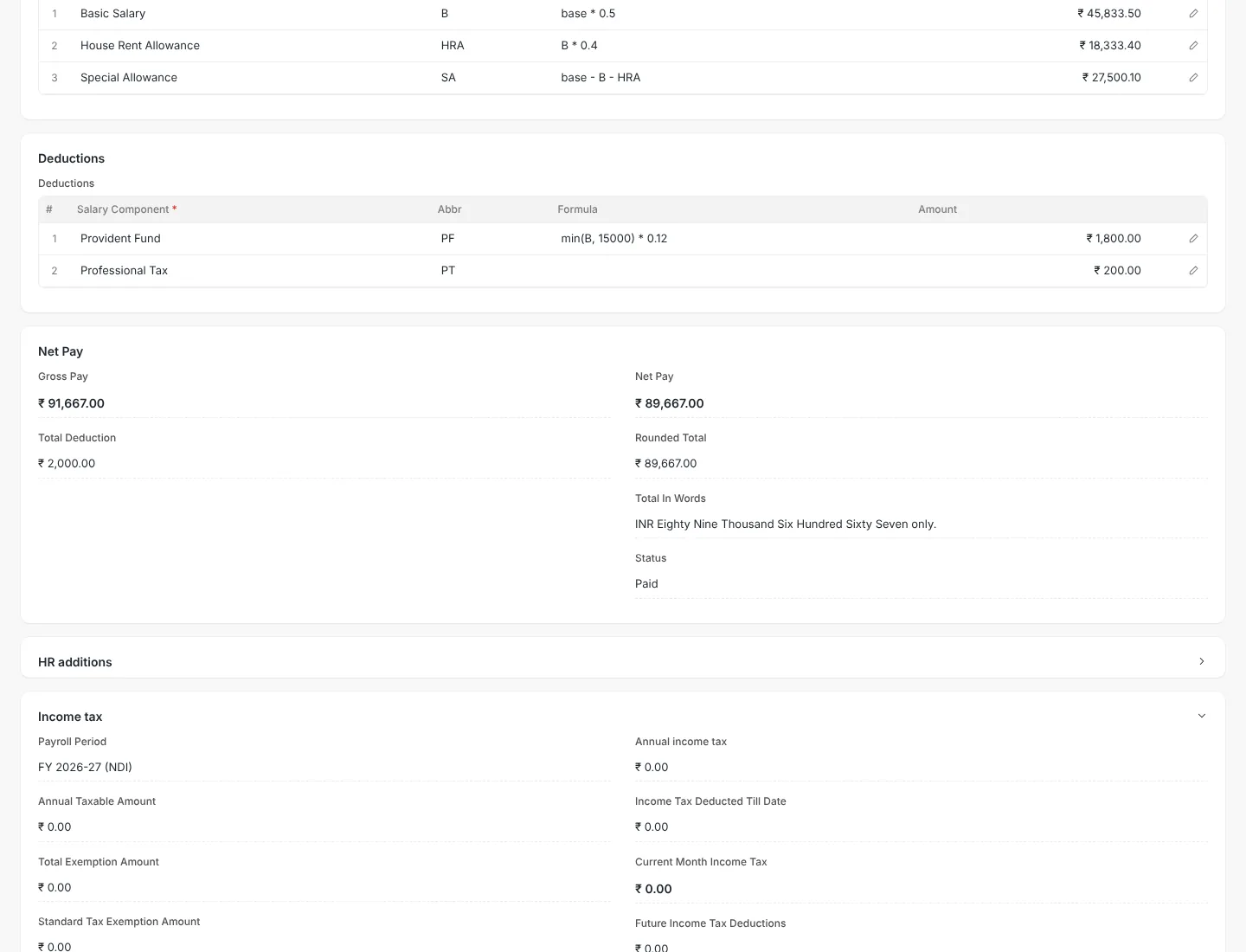
| Salary structure | Earnings and deductions with formulas, for example HRA as a percentage of basic. |
| Statutory components | Provident Fund, Employee State Insurance and Professional Tax components are set up ready to use. |
| Income tax | TDS on salary using India new and old regime slabs, with exemption categories under sections such as 80C. |
| Payroll entry | Run payroll for many employees at once, with arrears, bonuses and additional salary. |
| Gratuity | Gratuity rules and calculation based on service period. |
Salary Slips with Earnings, Deductions and Net Pay
A salary slip applies the salary structure to attendance and leave, calculates earnings and deductions and shows net pay. Payroll entry creates all slips in one run and posts the totals to accounts.
- Formula-based salary structure
- PF, ESI and professional tax deductions
- Arrears, bonus and additional salary
- Print format for salary slips
HR Workspace for Daily Operations
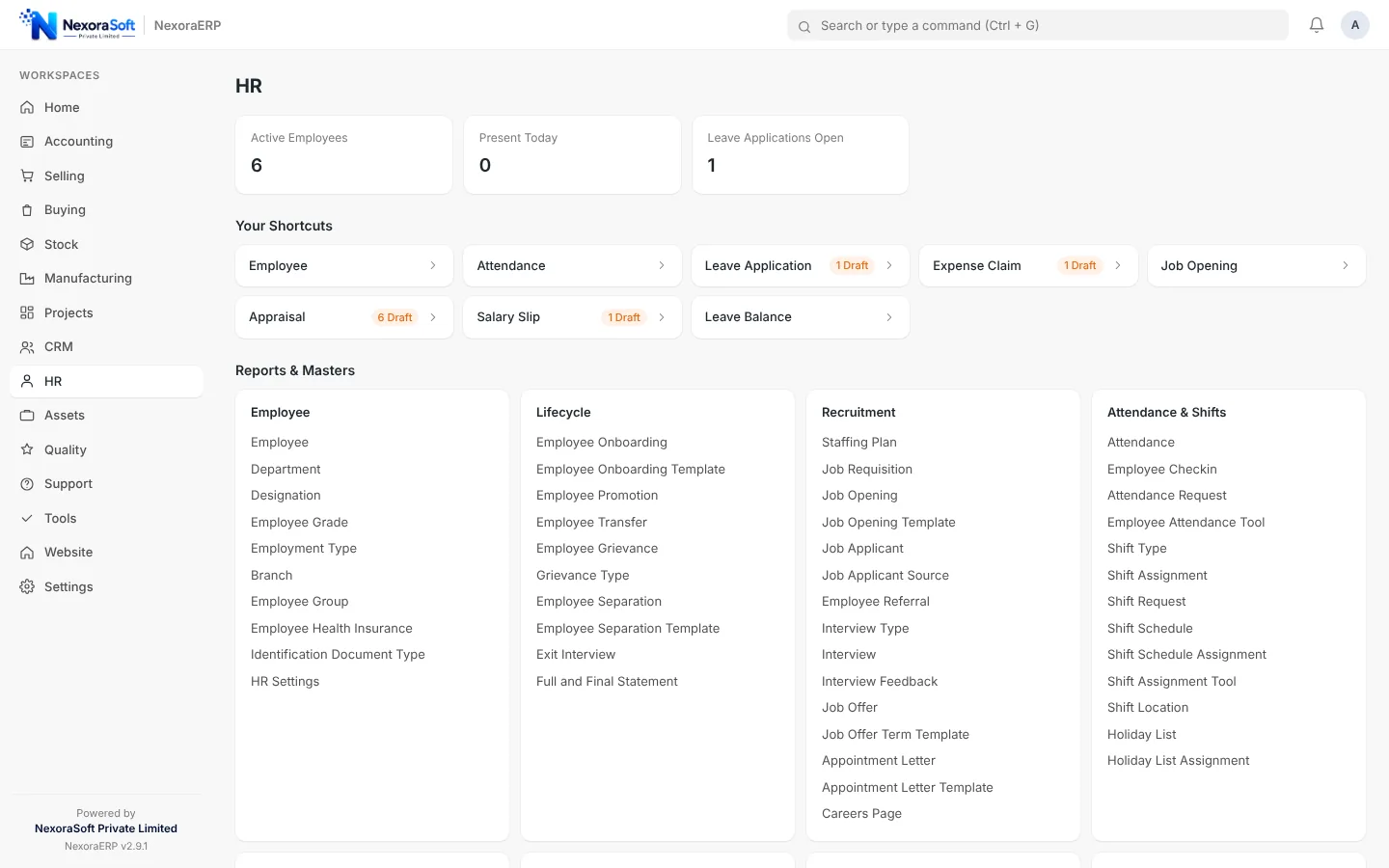
The HR workspace gives HR managers one page for employees, attendance, leave and expenses, and for hiring from job opening to offer letter.
- Employee, attendance and leave shortcuts
- Shift and check-in management
- Recruitment pipeline
- Holiday list and employee lifecycle
Payroll Connected to Accounts and Projects
Payroll that closes the loop with finance.
Accounts
Salary expense and PF, ESI, PT and TDS payables post automatically.
Projects
Timesheets and project costing use employee hours.
Manufacturing
Factory shifts and attendance feed salary for operators.
Workflow
Approval flows for leave, expense and hiring.
Email and SMS
Notifications for approvals and payslips.
Permissions
Role-based access so salary data stays with HR and finance.
Statutory filings
NexoraERP calculates PF, ESI, professional tax and TDS and records them in the books. Generating portal files such as ECR, ESI challan and Form 16 is not part of the standard product. For payroll-only needs with these outputs, see our dedicated NexoraHRMS and payroll software.
Payroll That Posts Straight to Your Books
Book a demo and we will run a sample payroll and show the ledger entries it creates.
Frequently Asked Questions
Yes. Provident Fund and Employee State Insurance are available as salary components with employer and employee shares, and they post to payable accounts.
Yes. TDS on salary supports India new and old regime slabs, and the old regime supports exemption categories such as section 80C.
Yes. Components can be a fixed amount or a formula, for example HRA as a percentage of basic, so structures stay consistent across employees.
Yes. Payroll entry posts salary expense and liabilities to the general ledger, and payment entries clear them.
Yes. Employees can apply for leave and managers approve through workflow, and balances update automatically.
Form 16 and portal return files are not part of the standard product. They can be added as custom work, or you can use the dedicated payroll product.
Yes. You can create job openings, record applicants and interviews, issue offer letters and convert a selected applicant to an employee.