Hospital Bed Management Software with Live Bed Status
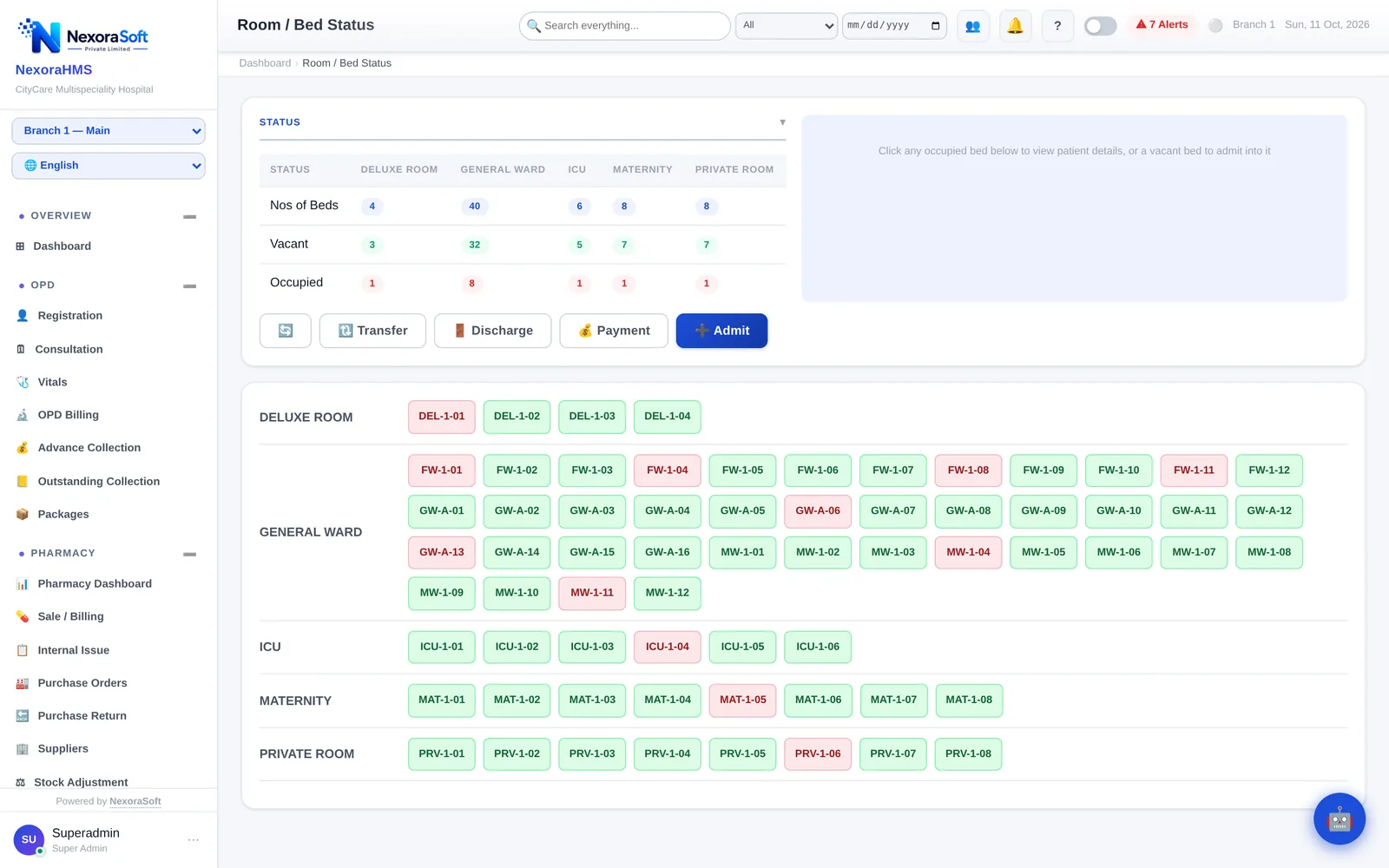
Red beds are occupied, green beds are vacant. The NexoraHMS bed board shows every ward at a glance, and one click on a bed lets staff admit, transfer or discharge a patient.
Works offlineCGHS rate masterTPA, ECHS & PM-JAYOne-time licenceEnglish + Hindi
When bed status lives on a whiteboard or in a nurse's memory, the reception desk cannot answer a simple question: is there a bed? Patients wait, transfers are missed on the bill and occupancy reports are guesswork.
NexoraHMS updates bed status from the same actions that create the bill. An admission occupies the bed, a transfer moves the patient and the charges, and a discharge frees the bed. The board is always current because nobody has to update it separately.
Bed Management Features
Bed status is a by-product of admissions, transfers and discharges, so it is never out of date.
- Live bed status by ward: vacant, occupied and category totals
- Ward and room categories such as general ward, private, deluxe, ICU and maternity
- Admit directly from a vacant bed
- Bed and ward transfers that keep the charge history intact
- Room rent by bed category posted daily to the IPD bill
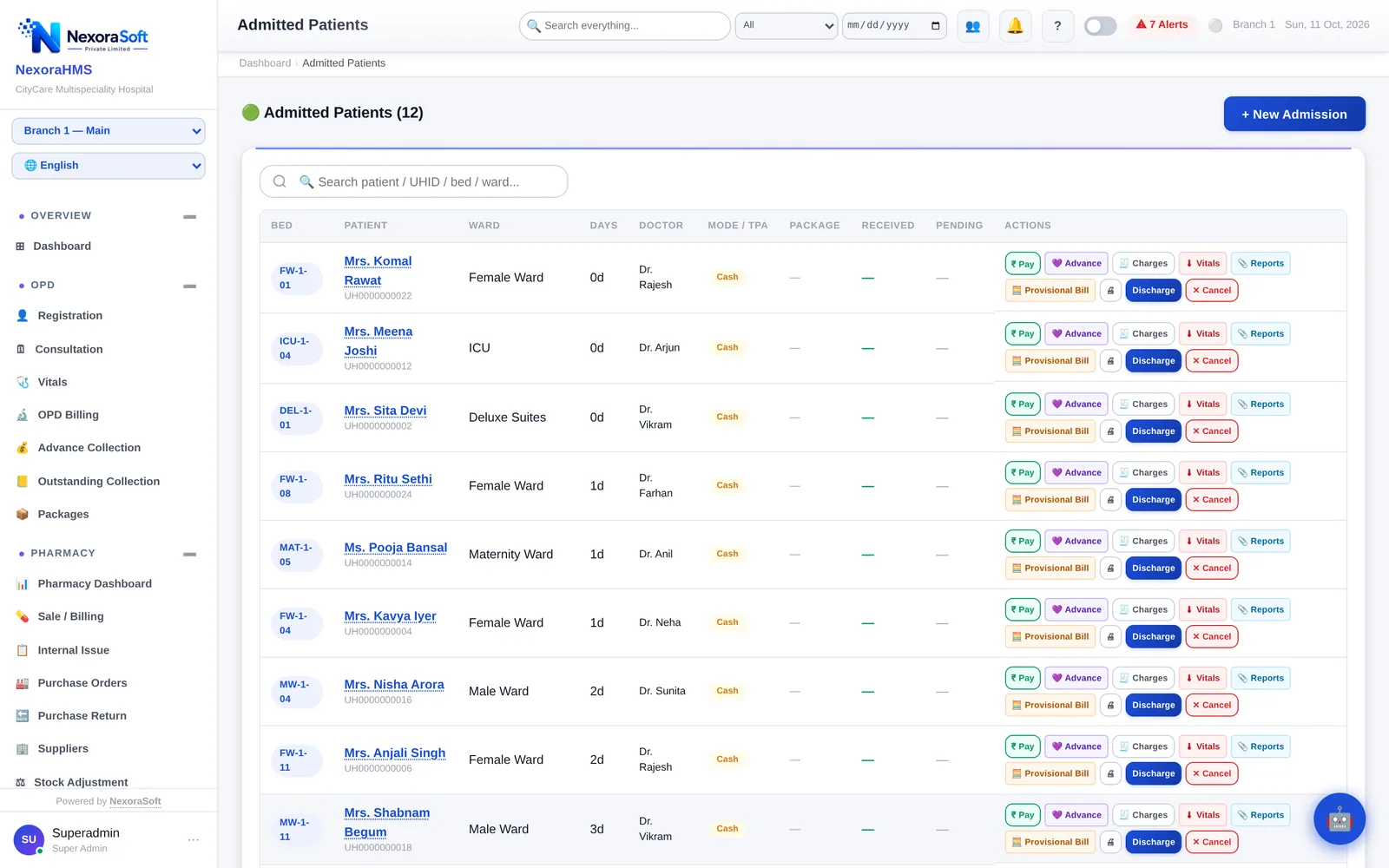
- Admitted patients list with ward, bed and doctor
Bed Management in Four Steps
Set up wards
Create wards, rooms and beds with their category and daily rent.
Admit from the board
Click a vacant bed to open the admission form with the bed pre-selected.
Transfer when needed
Move the patient to another bed or ward; the rent changes from the transfer date.
Discharge
The bed turns vacant as soon as the discharge is completed.
From Bed Board to Admitted Patient List
- Every admitted patient with ward, bed and treating doctor
- One-click advance, charges, discharge and reports per patient
- Nursing station board linked to the same admissions
- IPD KPI entry for occupancy and other management reports
Who Uses NexoraHMS Bed Management
Hospitals with ICUs and private rooms
Different categories and rents tracked without manual work.
Nursing homes
Quick answer to bed availability for incoming patients.
Maternity and surgical centres
Short stays, frequent transfers and accurate room charges.
NexoraSoft installs NexoraHMS on site across Delhi NCR from our Kirti Nagar, New Delhi office, sets up masters, migrates data and trains staff. Hospitals elsewhere in India are set up remotely.
Bed Management: FAQ
The bed board shows each ward with vacant and occupied beds and category totals. Status changes automatically on admission, transfer and discharge.
Yes. The new bed's category rent applies from the transfer, and the earlier charges stay on the bill.
Yes. Clicking a vacant bed opens the admission with that bed selected.
Yes. Wards and rooms are configured with their category and rent, for example general ward, private, deluxe, ICU or maternity.
No. It is part of the NexoraHMS IPD module and shares data with billing, nursing station and discharge.
Ready to Digitalise Your Hospital?
Get a free demo of NexoraHMS — live on your computer, with your hospital's sample data. No commitment, no pressure.