Home › Inventory Management Software › Inventory Software for Small Business in India
Industry Inventory SoftwareInventory Software for Small Business
You do not need an enterprise system to stop guessing your stock. NexoraIMS starts simple (products, purchases, GST invoices, stock) and lets you switch on batch tracking, bins, POS or manufacturing only when you need them.
Guided setupExcel importGSTPacksBackups
Small Business, Real Needs
A small business usually has one or two locations, a few hundred products and a handful of staff. It needs correct stock, GST invoices and to know who owes what, without hiring an IT person.
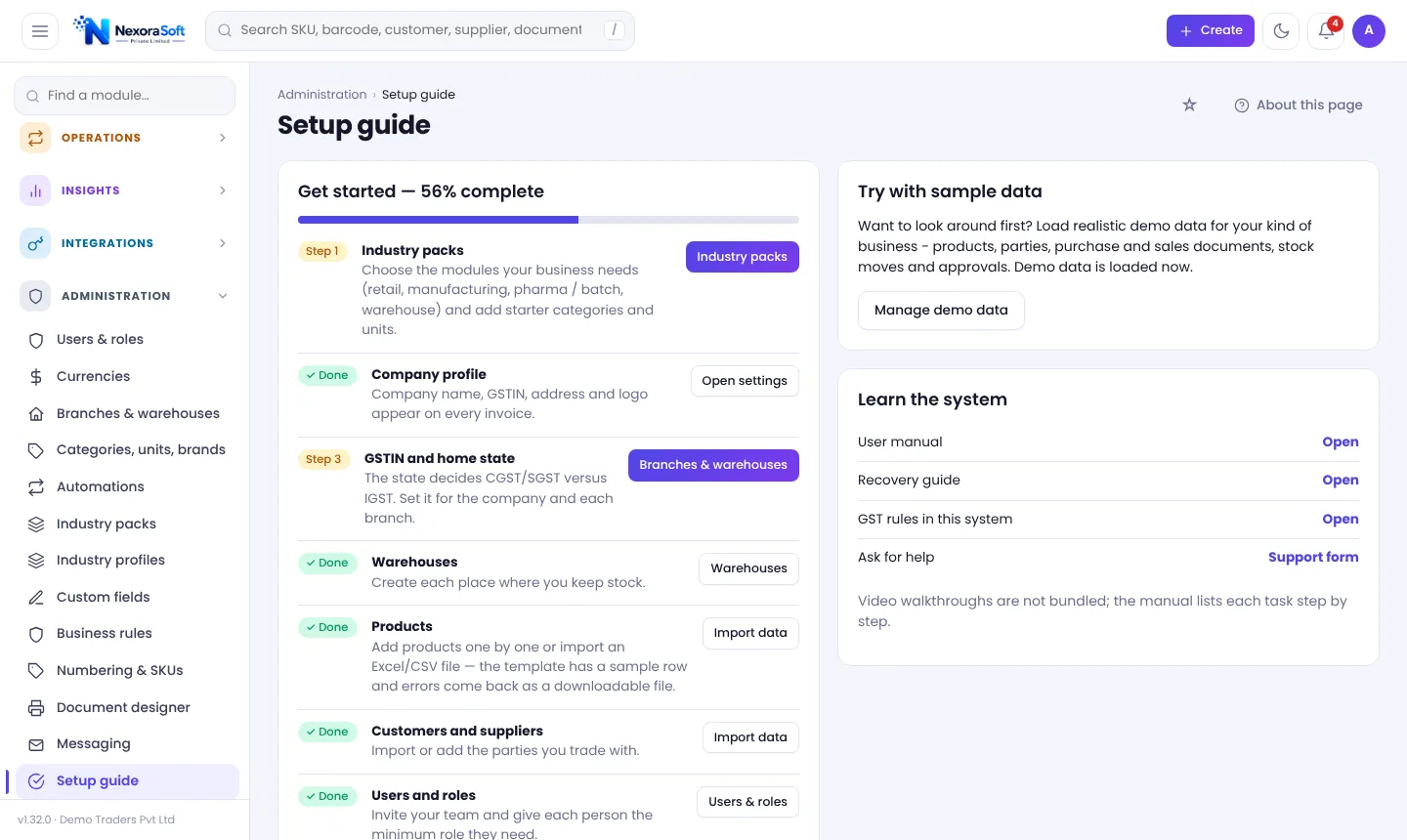
NexoraIMS has a guided setup (company, GSTIN and state, warehouses, products, parties, users, two-step verification and backups), a sample-data tour and an Excel import, so a trader can start in a day.
Challenges and How NexoraIMS Handles Them
Guided setup
A progress checklist from company details to backups.
Excel import
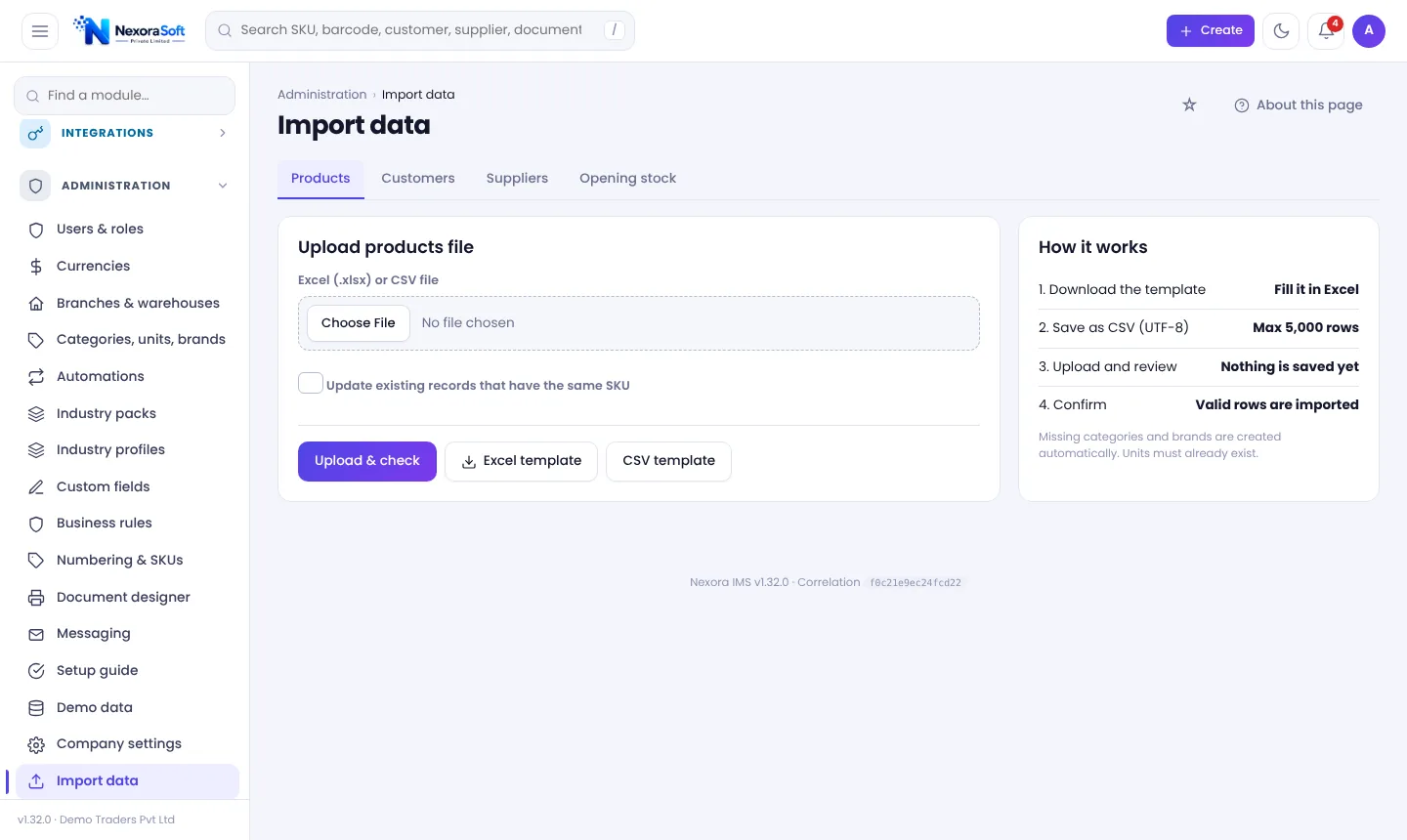
Import products, customers, suppliers and opening stock with a dry-run error report.
Industry packs
Switch off modules you do not use; nothing is deleted.
GST invoices and credit
Invoices, receipts, ageing and reminders.
Safe by default
Roles, two-step verification and verified backups.
Support
Help & support requests with a reference number; NexoraSoft assists with setup.
Start in a Day, Grow Later
Load the sample data to learn the screens, remove it with one click, then import your own products and opening stock. Each page has an About this page guide that explains what to do and what each button means.
As you grow, add warehouses, batch tracking, purchase approvals or POS without changing the system.
- Sample data you can remove
- About this page guide on every screen
- Hover tooltips on menus and buttons
- Excel and CSV import
Small Business at a Glance
| Need | NexoraIMS answer |
|---|---|
| Start quickly | Setup guide and Excel import |
| Learn safely | Sample data and guides |
| Pay for what you use | Industry packs |
| Stay compliant | GST-ready invoicing |
| Protect data | Roles, MFA, backups |
See the pricing page for how NexoraSoft quotes.
Getting Started
Pick a profile
Pick the profile closest to your business (Trading, Retail, Pharma/food, Manufacturing or Warehouse).
Import data
Load products, parties and opening stock from Excel or CSV with a dry-run check.
Set rules
GST, numbering, approvals, reorder levels and users.
Try with sample data
Load a sample set, explore, then remove it with one click.
Go live
Parallel run for a short period, then switch.
Inventory Software for Small Business in India – FAQ
No. Start with products, purchases, invoices and stock and ignore modules you do not need.
Yes, products, customers, suppliers and opening stock with a dry-run check.
A simple trader can be live in a day; larger data needs more time.
No. NexoraIMS runs on standard hosting and NexoraSoft helps with installation.
Yes. Call +91 98115 51004.
See the small business buyer's guide and pricing.
See NexoraIMS on Your Own Stock
Share your products, warehouses and billing flow and get a free live demo of NexoraIMS. No commitment; we typically respond within 24 hours.