Home › Inventory Management Software › Stock Management Software in India
Inventory SoftwareStock Management Software with an Unbreakable Ledger
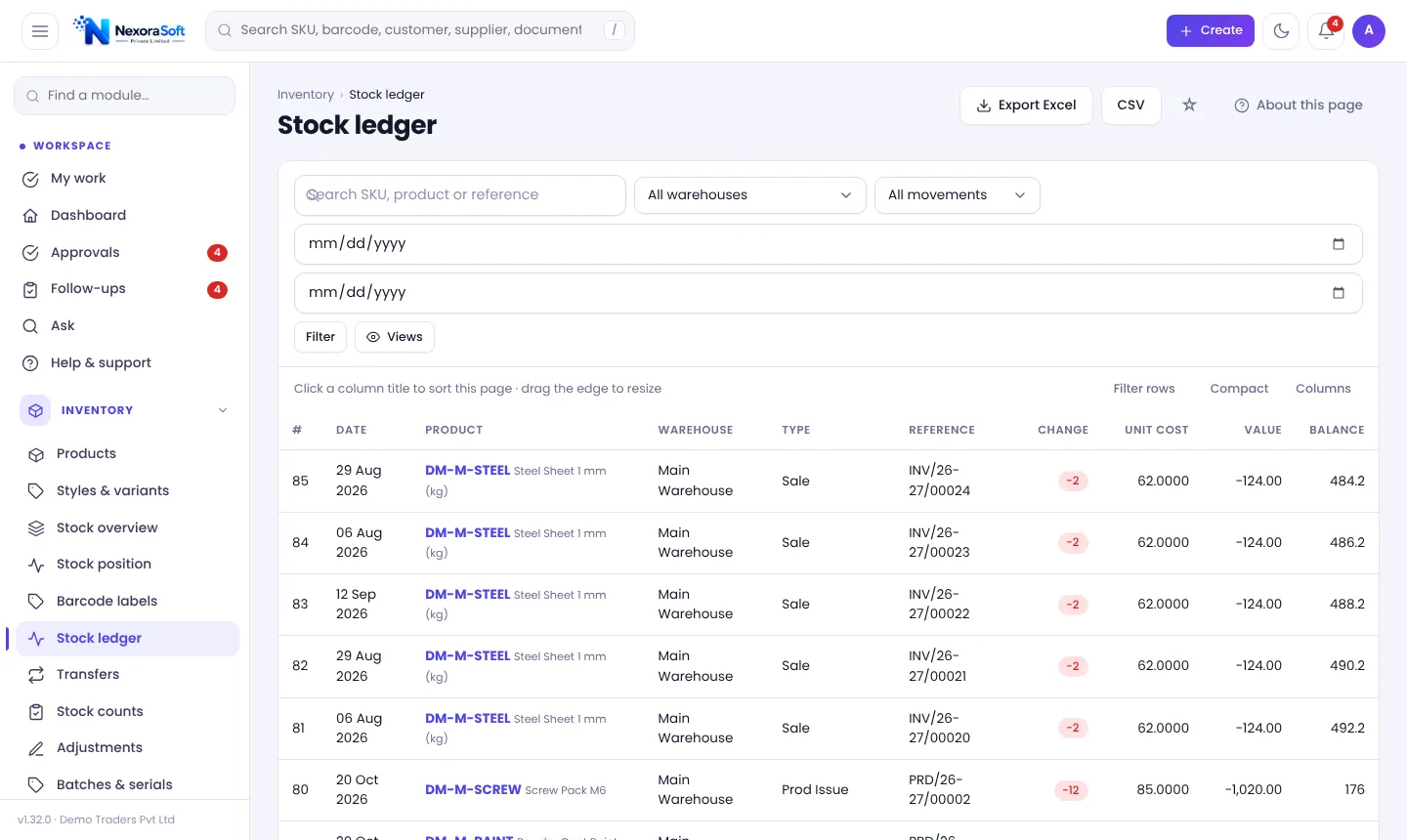
Every receipt, sale, return, transfer, adjustment and production entry writes to one append-only stock ledger. Quantities, average cost and stock value are always the sum of real movements, never a typed number.
How Stock Management Should Work
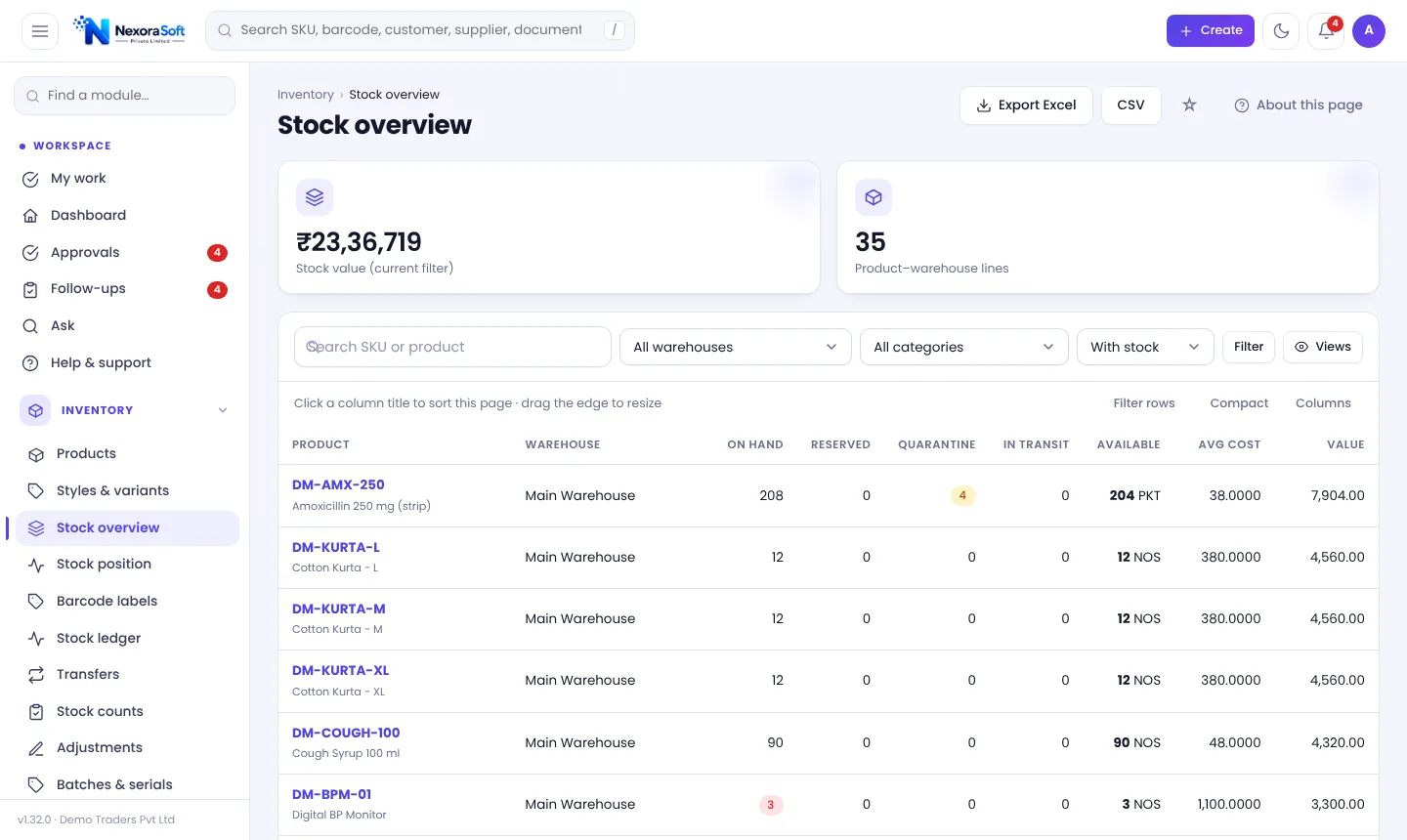
Stock is not a number you type; it is the result of everything that happened. Stock management software keeps those events, so any quantity can be explained. When a count differs from the system, you can see which documents moved the item and fix the cause, not just overwrite the total.
NexoraIMS enforces this with an append-only ledger (an application rule backed by database triggers), gap-free document numbers and a reconciliation check that compares balances with the ledger.
Stock Features in NexoraIMS
Append-only ledger
Movements cannot be edited or deleted; corrections are new, reversing entries with a reason.
Stock buckets
On hand, reserved, quarantined, damaged, in transit, on order and committed, with available and projected calculated for you.
Weighted-average cost
Receipts update cost automatically; stock valuation and margin use it.
Stock ageing
See how long stock has sat on the shelf, with FEFO for expiry products.
Variants and units
Size and colour variants as separate products; alternate units in masters.
Period lock and backdating
Posting dates cannot be in the future, are limited by a backdating limit and stop after the period lock.
The Stock Ledger and Position
The Stock ledger lists every movement with date, product, warehouse, type, reference, change, unit cost, value and running balance. Click a reference to open the document behind it.
The Stock position page then gives the buckets: Available = on hand − reserved − quarantined − damaged. Projected = available + in transit + on order − committed. These two lines answer most "can I promise this order?" questions.
- Every row links to its document
- Running balance per item and warehouse
- Export to Excel or CSV
- Reconciliation check against balances
From Document to Stock Value
Post
A receipt, invoice, return or transfer is posted.
Ledger
One or more immutable ledger rows are written.
Balances
On-hand and bucket balances update from the ledger.
Cost
Average cost changes on receipt; sales use it for margin.
Check
Reconciliation compares balances with the ledger.
Stock Control at a Glance
| Question | Where to look |
|---|---|
| What do I have? | Stock overview |
| Can I promise it? | Stock position (available, projected) |
| Why did it change? | Stock ledger |
| What is it worth? | Stock valuation report |
| What is old? | Stock ageing and inventory health |
Serial-number products do not yet support transfers, counts or adjustments.
Stock Management Software in India – FAQ
A chronological, append-only list of every stock movement. Balances and values are derived from it, so they can always be explained.
Weighted average cost, updated on every receipt.
No. Posted movements are immutable; you reverse a document or post an adjustment, and the audit log records who did it.
Run a stock count, then check the Stock ledger for the product, and use the reconciliation check on the Health page.
Yes. Sales orders reserve stock, and available excludes reserved, quarantined and damaged quantity.
Yes, through the import wizard from Excel or CSV with a dry-run check.
See NexoraIMS on Your Own Stock
Share your products, warehouses and billing flow and get a free live demo of NexoraIMS. No commitment; we typically respond within 24 hours.