Home › Restaurant POS Software › GST Billing Software for Restaurants
Restaurant POS SoftwareGST Billing Software for Restaurants
Print bills with the right CGST and SGST, issue a B2B tax invoice when a company needs one, and give your CA clean GST data. NexoraRMS-POS keeps tax settings per item and reports them by rate.
What GST Billing Means for a Restaurant
GST on restaurant service depends on the type of outlet and how it is registered, so the correct rate and input credit treatment should be confirmed with your CA. The software’s job is to apply the rates you set consistently and report them clearly. See GST on restaurant bills in India for a practical overview.
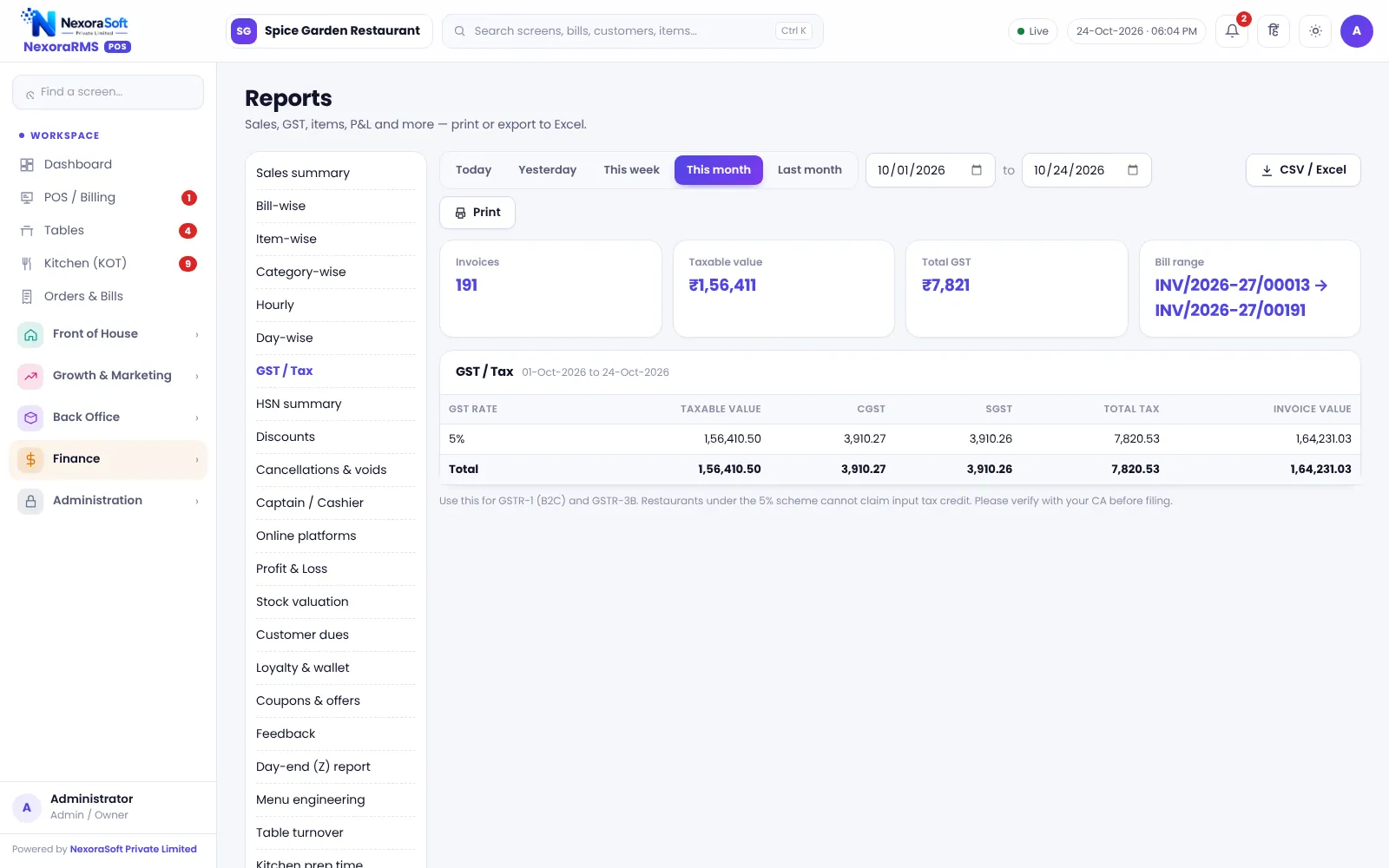
NexoraRMS-POS stores tax per item and prints CGST and SGST on every bill. Reports summarise sales by tax rate and HSN and give GSTR-1 B2B and B2CS style data your CA can use. The software does not file returns.
GST Features
GST bill format
Restaurant name, GSTIN, FSSAI, bill number, CGST and SGST, round-off.
B2B tax invoice
Capture the buyer’s GSTIN and print a tax invoice for a company.
Tax reports
GST summary by rate, HSN summary and GSTR-1 B2B and B2CS data.
Service charge, packing, delivery
Charges added as set, with tax following your configuration.
Tally XML export
Export sales for TallyPrime so your accountant need not re-key.
Locked numbering
Bill numbers run per financial year from the server.
Reports Your CA Will Ask For
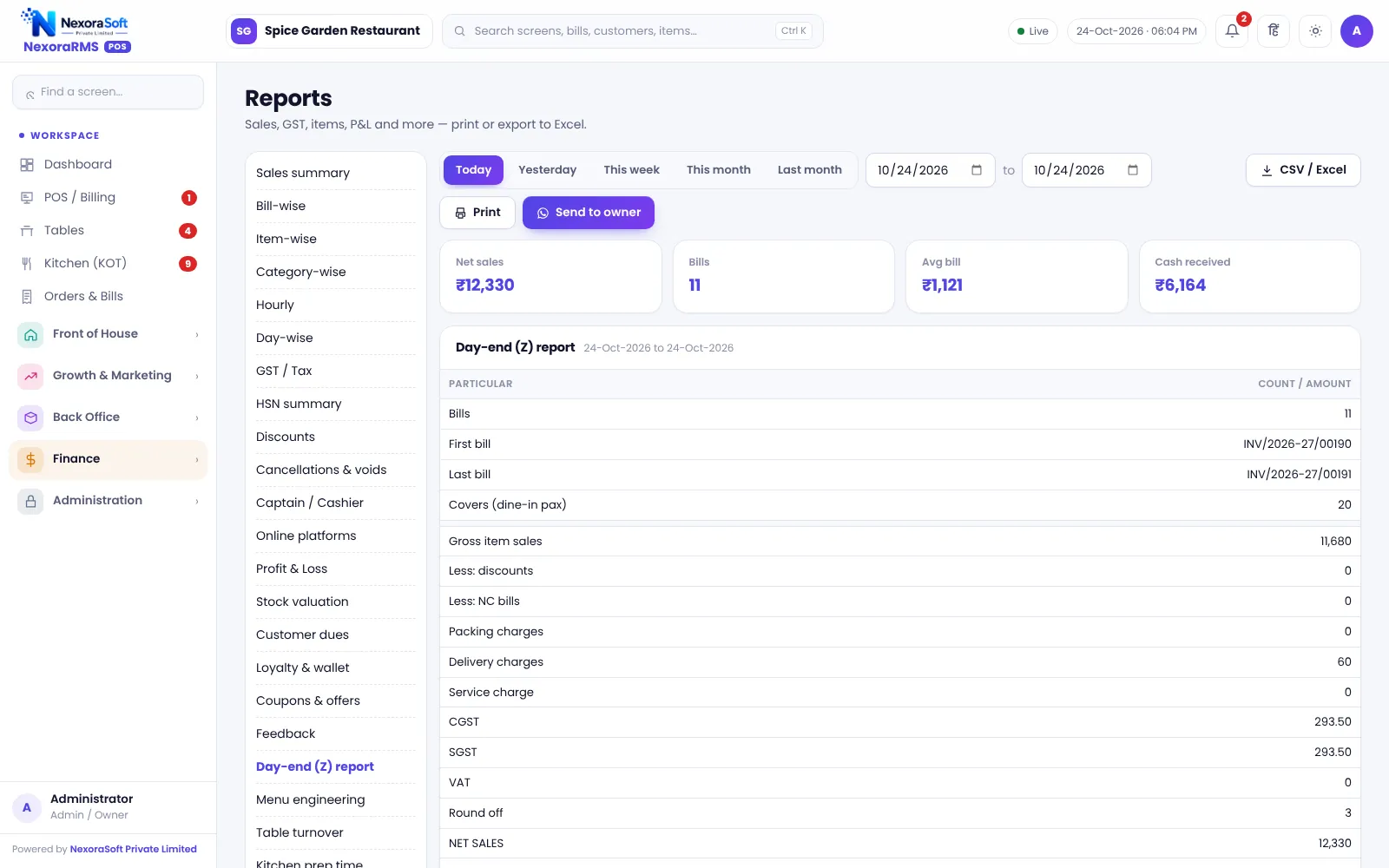
At month-end your CA usually needs the GST summary, B2B sales with buyer GSTIN, and a day-wise sales register. These come from the Reports module as screen or export, filtered by date.
The Tally export carries sales as vouchers. Ledger names should be tested on a trial company first, and the export is one-way.
- GST summary by rate
- HSN-wise summary
- GSTR-1 B2B and B2CS data
- Day-end Z report for daily tally
- Tally XML export
GST Workflow
Set tax
Choose the tax rate per item category and enable charges.
Bill
Print bills with CGST and SGST.
B2B
Add the buyer GSTIN for company invoices.
Review
Check GST and HSN reports.
Share
Export for the CA or Tally.
GST at a Glance
| Need | NexoraRMS-POS feature |
|---|---|
| Correct bill | CGST and SGST per item |
| Company invoice | B2B with GSTIN |
| Month-end | GST, HSN, GSTR-1 data |
| Accounting | Tally XML export |
| Filing | Not included; done by your CA |
NexoraRMS-POS does not file GST returns or generate e-invoice IRN or e-way bills. Confirm rates and treatment with your CA.
GST Billing Software for Restaurants – FAQ
No. The software provides GST-wise sales, HSN and GSTR-1 style data to share with your CA or filing tool, but it does not file returns. Always confirm the filing process with your CA. Confirm tax rates and treatment for your outlet with your CA; NexoraRMS-POS prints and exports the data.
No. IRN and e-way bill generation are not part of this version. Restaurants usually do not need these for B2C dine-in billing, but check with your CA if you issue large B2B invoices. Confirm tax rates and treatment for your outlet with your CA; NexoraRMS-POS prints and exports the data.
Yes. Enter the buyer's GSTIN to create a B2B tax invoice, and these sales are separated in GST reports. Confirm invoice requirements for your case with your CA. Confirm tax rates and treatment for your outlet with your CA; NexoraRMS-POS prints and exports the data.
The right rate depends on your registration, AC or non-AC status and scheme, so confirm it with your CA. NexoraRMS-POS lets you set item tax rates and prints CGST and SGST by rate on every bill.
Yes. Liquor VAT can be configured for outlets that need it, with liquor items billed on the right tax treatment. Excise records are not maintained, so confirm the tax rules with your advisor.
Yes. Sales can be exported as Tally XML for your accountant. The export is one-way, so import it first into a trial company and check ledger names before using it on live books. Confirm tax rates and treatment for your outlet with your CA; NexoraRMS-POS prints and exports the data.
See NexoraRMS-POS in Your Own Restaurant
Share your menu, tables and billing flow and get a free live demo of NexoraRMS-POS. No commitment; we typically respond within 24 hours.