Home › Restaurant POS Software › Restaurant Billing Software in India
Restaurant POS SoftwareRestaurant Billing Software with GST and Split Payment
Take the order, send it to the kitchen and print a correct GST bill in a few taps. NexoraRMS-POS handles dine-in, takeaway, delivery and online bills with sizes, add-ons, combos, discounts and split payment.
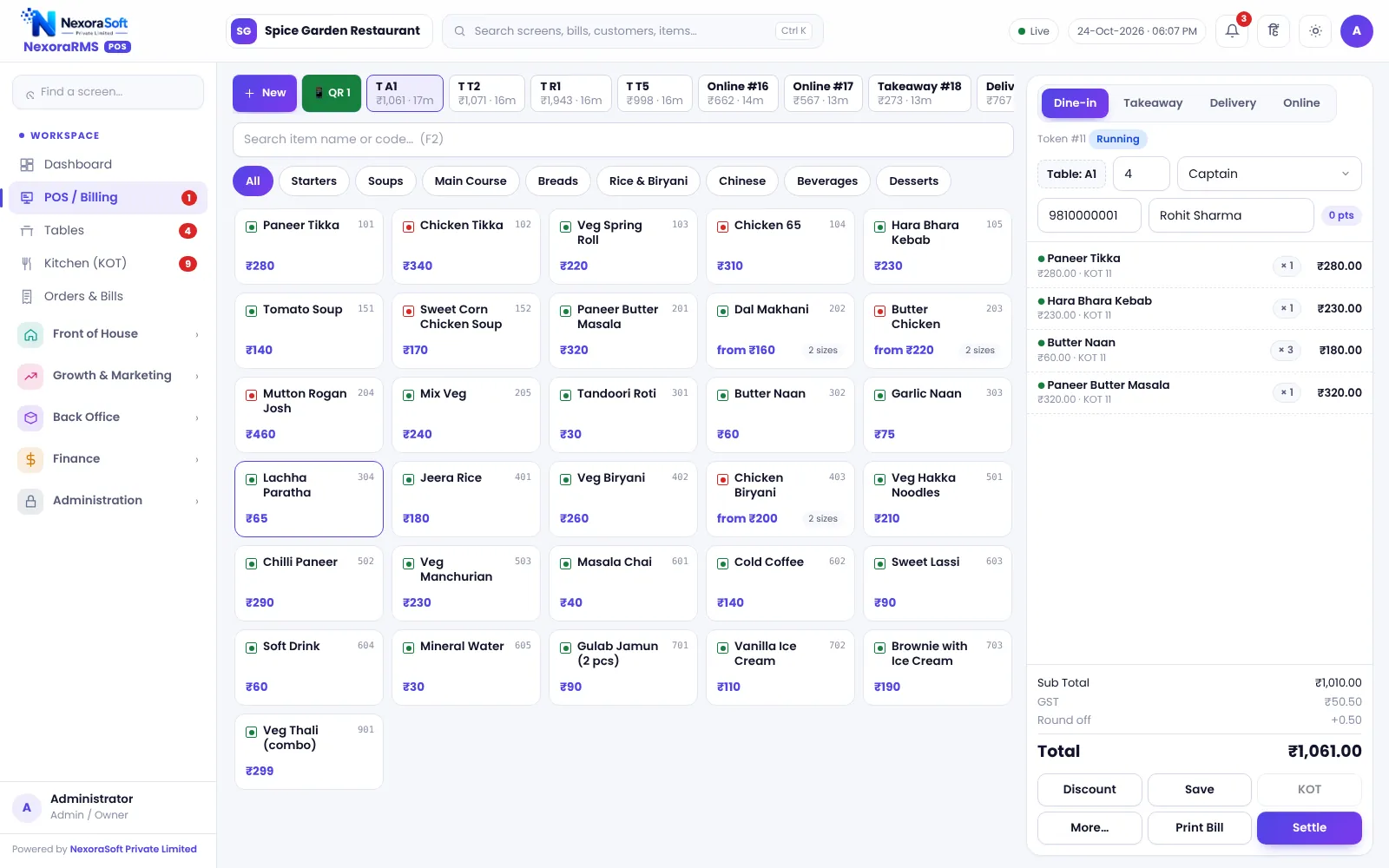
What Restaurant Billing Software Should Do
A restaurant bill is more than a total. It must follow the order mode (dine-in, takeaway, delivery, online), apply the right tax, handle sizes and add-ons, reflect discounts that someone approved, and leave a trail if it is changed later. A billing counter also has to be fast at 9 pm on a Saturday, with a queue of guests.
NexoraRMS-POS puts the order and the bill on one screen. The menu is a tap grid with search and item codes. The bill totals as you add items, and the same order feeds the kitchen ticket, stock deduction, loyalty points and the day-end report.
Billing Features in NexoraRMS-POS
Four order modes
Dine-in with table and covers, takeaway with token, delivery with address and charges, and online orders with a platform order ID.
Sizes, add-ons and combos
Half and full portions, add-on groups (some compulsory), and combo meals that bill as one item.
Discounts with a reason
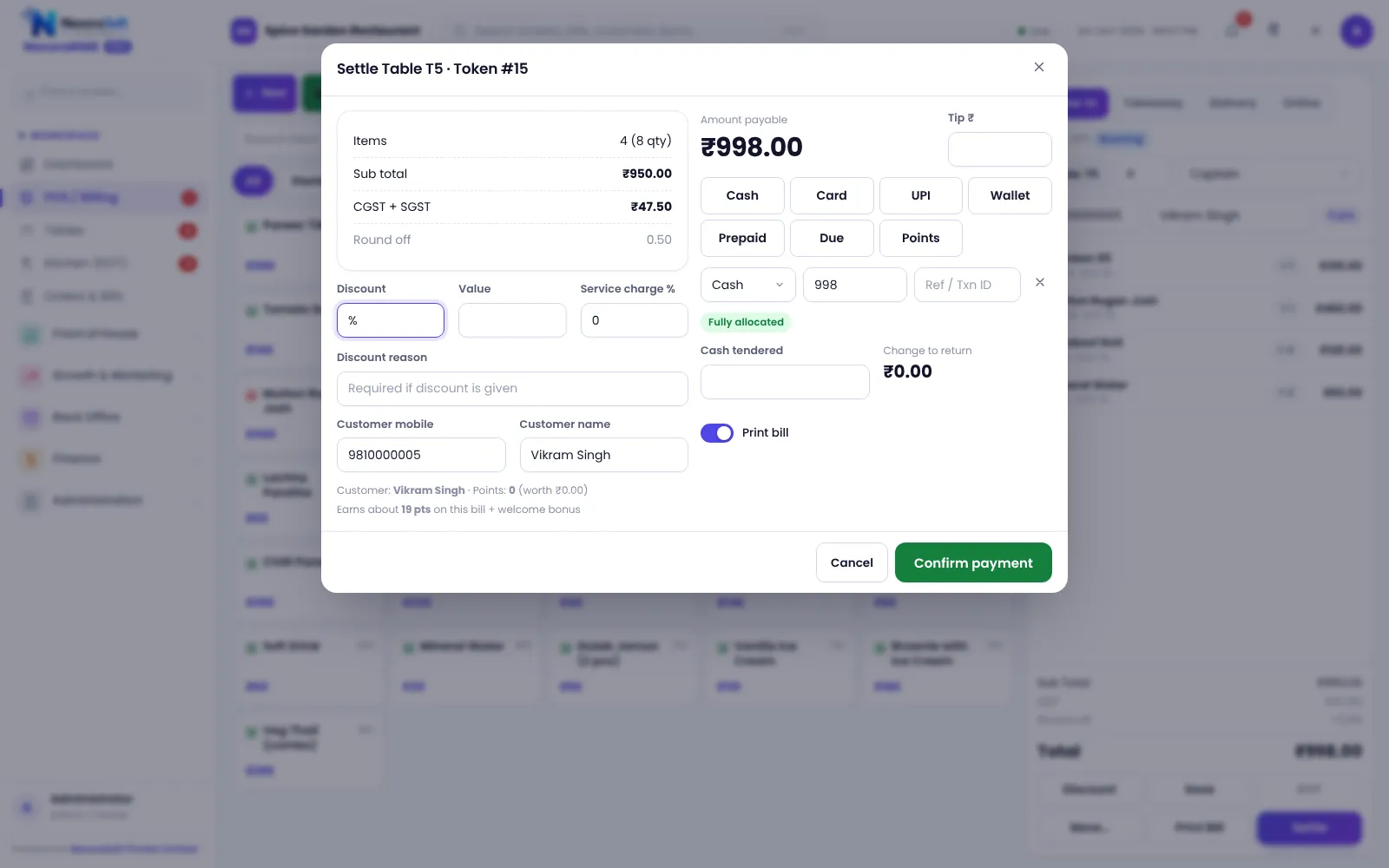
Percentage or amount discounts with a reason recorded. Manager PIN can be required.
Split payment
Pay one bill by cash, card, UPI and wallet together, with change calculated.
UPI pay QR
Show a UPI QR on the bill or settle screen for the exact amount.
Reprint and duplicate control
Reprint is marked as a duplicate and can be limited to roles or a manager PIN.
Settle the Bill Your Way
The settle screen shows the total, tax split and payment boxes. Staff enter what the guest pays in cash, card, UPI or wallet, redeem loyalty points if the guest has them, and the system completes the bill in one transaction: the payment, the stock deduction, the loyalty points and the customer dues are saved together.
Bill numbers are issued by the server and run per financial year, such as INV/2026-27/00001, so two counters can never print the same number.
- Cash, card, UPI and wallet in one bill
- Service charge, packing and delivery charges where enabled
- Tips and round-off
- Customer dues for credit guests
- NC (non-chargeable) bills and complimentary items
A Typical Billing Shift
Open shift
Count opening cash and start the cash register shift.
Take orders
Open a table or a takeaway order, add items, send KOT.
Bill and settle
Print the bill, take payment, close the table.
Handle changes
Discounts, item cancels and reprints with approvals.
Close shift
Count cash, close the shift and read the Z report.
Restaurant Billing at a Glance
| Need | NexoraRMS-POS feature |
|---|---|
| Right bill for every channel | Dine-in, takeaway, delivery, online with price lists |
| Menu complexity | Sizes, add-ons, combos, menu timings |
| Tax | CGST and SGST by item, B2B invoice with GSTIN |
| Payment | Cash, card, UPI, wallet, split |
| Control | Discount reason, manager PIN, reprint log, audit |
| Language | English and Hindi interface |
It prints through the browser to your thermal or A4 printer. Test your printer model in the demo.
Restaurant Billing Software in India – FAQ
Yes, with GSTIN, FSSAI number, CGST and SGST by rate and a yearly bill number. Confirm the tax rates for your outlet with your CA. See GST billing software for restaurants. Confirm tax rates and treatment for your outlet with your CA; NexoraRMS-POS prints and exports the data.
Yes. You can split payment across modes, and move items to a new bill with the split bill option. See table management. Ask for a free live demo of NexoraRMS-POS with sample restaurant data to see this on screen.
Yes. Takeaway orders get a token number, and delivery orders hold the address and charges. NexoraSoft gives a written quote after a free demo, based on outlets, users and modules.
Yes. Discounts need a reason, and a manager PIN can be required for discount, void, cancel and reprint. You can verify this in a free live demo of NexoraRMS-POS using your own menu and tables.
Yes, a UPI pay QR for the bill amount on the bill and settle screens. Staff record the payment; the software does not confirm it from the bank. You can verify this in a free live demo of NexoraRMS-POS using your own menu and tables.
No. It needs a connection to the server. See POS vs manual billing. Keep a reliable broadband line and a mobile hotspot as backup, because offline billing is not part of this version.
See NexoraRMS-POS in Your Own Restaurant
Share your menu, tables and billing flow and get a free live demo of NexoraRMS-POS. No commitment; we typically respond within 24 hours.