Home › Inventory Management Software › Manufacturing Inventory Software with BOM
Inventory SoftwareManufacturing Inventory Software with BOM and Production Orders
Control raw material, work in progress and finished goods in one system. Define multi-level recipes, issue material to production orders, record scrap and actual time, plan what to buy and make, and see the real cost per unit.
Inventory Is Different for Manufacturers
A factory's stock is not only what it sells. Raw material turns into work in progress and then finished goods, and the cost of a finished unit is the cost of everything that went into it. Without a recipe and production orders, that cost is a guess.
NexoraIMS models this with recipes (BOM), production orders that issue components and receive finished goods, and a planning screen that nets demand against stock and open orders.
Manufacturing Features
Multi-level BOM
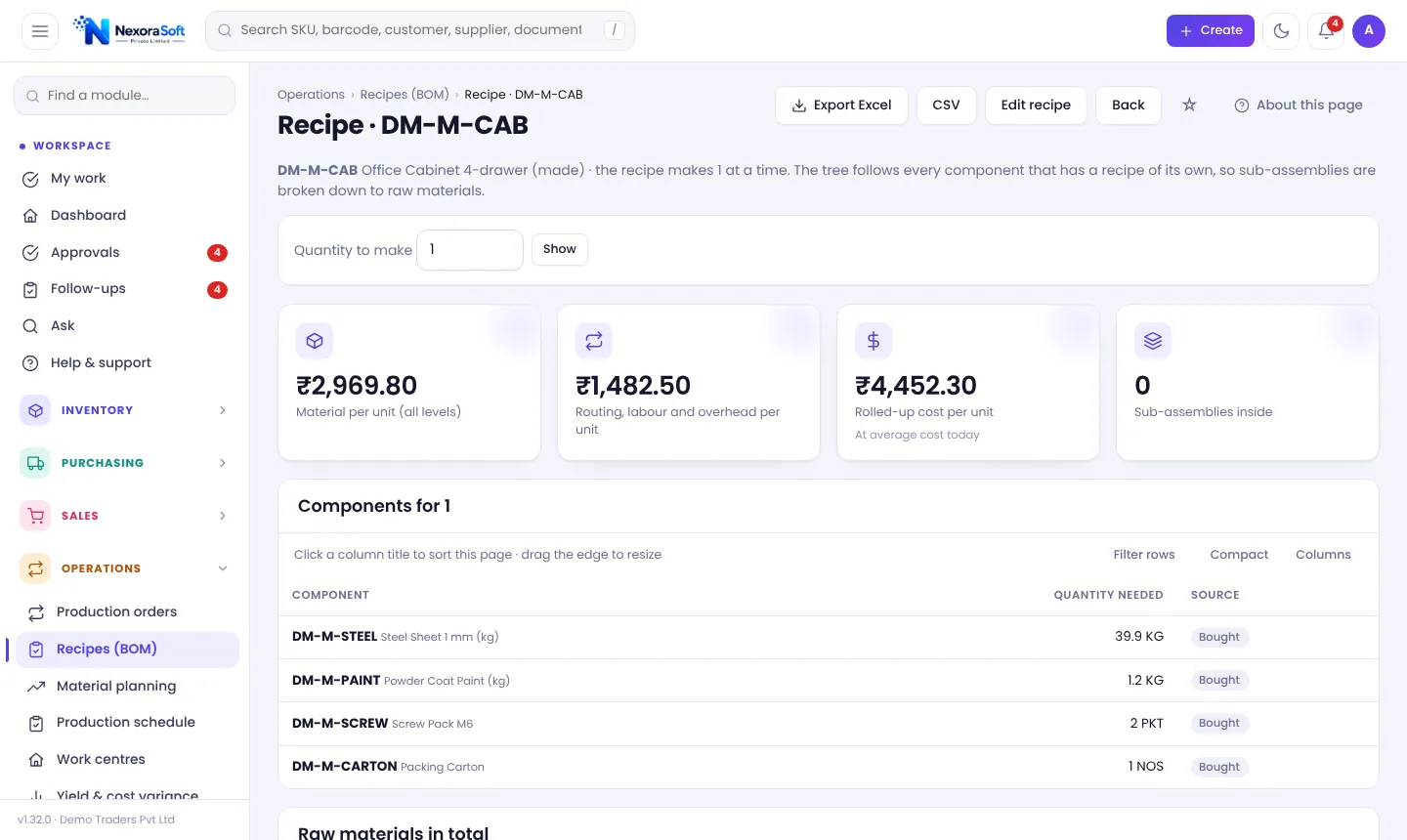
Recipes with scrap %, optional labour and overhead, and sub-assembly explosion with rolled-up cost.
Routing and work centres
Operations per recipe at work centres with hourly cost, daily capacity and maintenance or breakdown windows.
Production orders
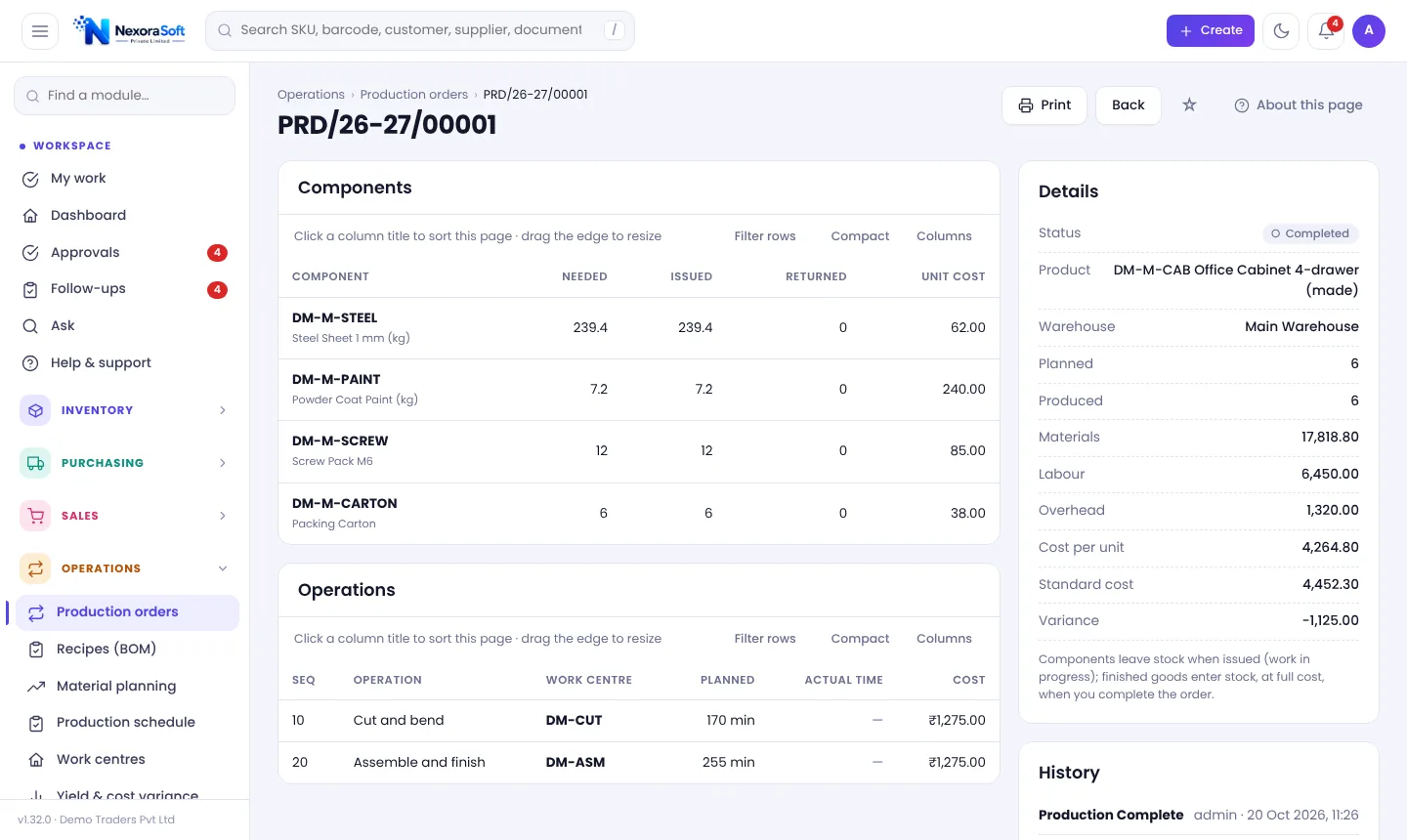
Issue components, record actual minutes, scrap and extra material, return unused material and receive finished goods.
Material planning
Level-by-level netting against stock and open orders, what-if quantities, then draft production orders and a draft requisition.
Production schedule
Hours per day against capacity for each work centre, with overloaded days flagged.
Yield and cost variance
Planned vs produced, scrap rate and actual unit cost against standard cost.
From Recipe to Costed Finished Goods
Create a recipe for a finished item (for example an office cabinet), list components with scrap, and add operations at work centres. The recipe page rolls up material, routing, labour and overhead into a cost per unit and explodes sub-assemblies so you can see raw material in total.
On a production order, issuing components takes material out of stock as work in progress. When done, enter the quantity actually produced and receive finished goods; the unit cost is calculated from actual consumption, and labour comes from actual minutes.
- Standard cost recorded when the order is created
- Actual cost compared with standard
- Cancel before completion to return components
- Rework orders and finite scheduling are not included
Production Cycle
Plan
Material planning shows what to make and buy.
Order
Production order with dates and standard cost.
Issue
Components leave stock as WIP.
Produce
Record actual minutes, scrap, output.
Review
Yield and cost variance report.
Manufacturing at a Glance
| Question | NexoraIMS page |
|---|---|
| What goes into a product? | Recipes (BOM) tree |
| How much material do I need? | Material planning |
| Is the line overloaded? | Production schedule |
| What did it really cost? | Yield and cost variance |
| Is raw material enough? | Stock position and reorder |
Not included: rework orders, automatic finite scheduling and serial-number manufacturing.
Manufacturing Inventory Software with BOM – FAQ
Yes, multi-level recipes with scrap, operations, labour and overhead, and a rolled-up cost.
Yes, Material planning nets demand against stock and open orders level by level and creates drafts.
From actual material consumed plus labour from actual minutes and overhead, compared with the standard cost recorded when the order was created.
Yes. Scrap is recorded on the order and shown in yield reports.
NexoraIMS covers inventory, purchasing, sales and basic manufacturing. For finance and HR, see NexoraERP.
Read the BOM and production inventory guide.
See NexoraIMS on Your Own Stock
Share your products, warehouses and billing flow and get a free live demo of NexoraIMS. No commitment; we typically respond within 24 hours.