Home › Inventory Management Software › Inventory Analytics & ABC Analysis Software
Inventory SoftwareInventory Analytics Software with ABC-XYZ and Health Score
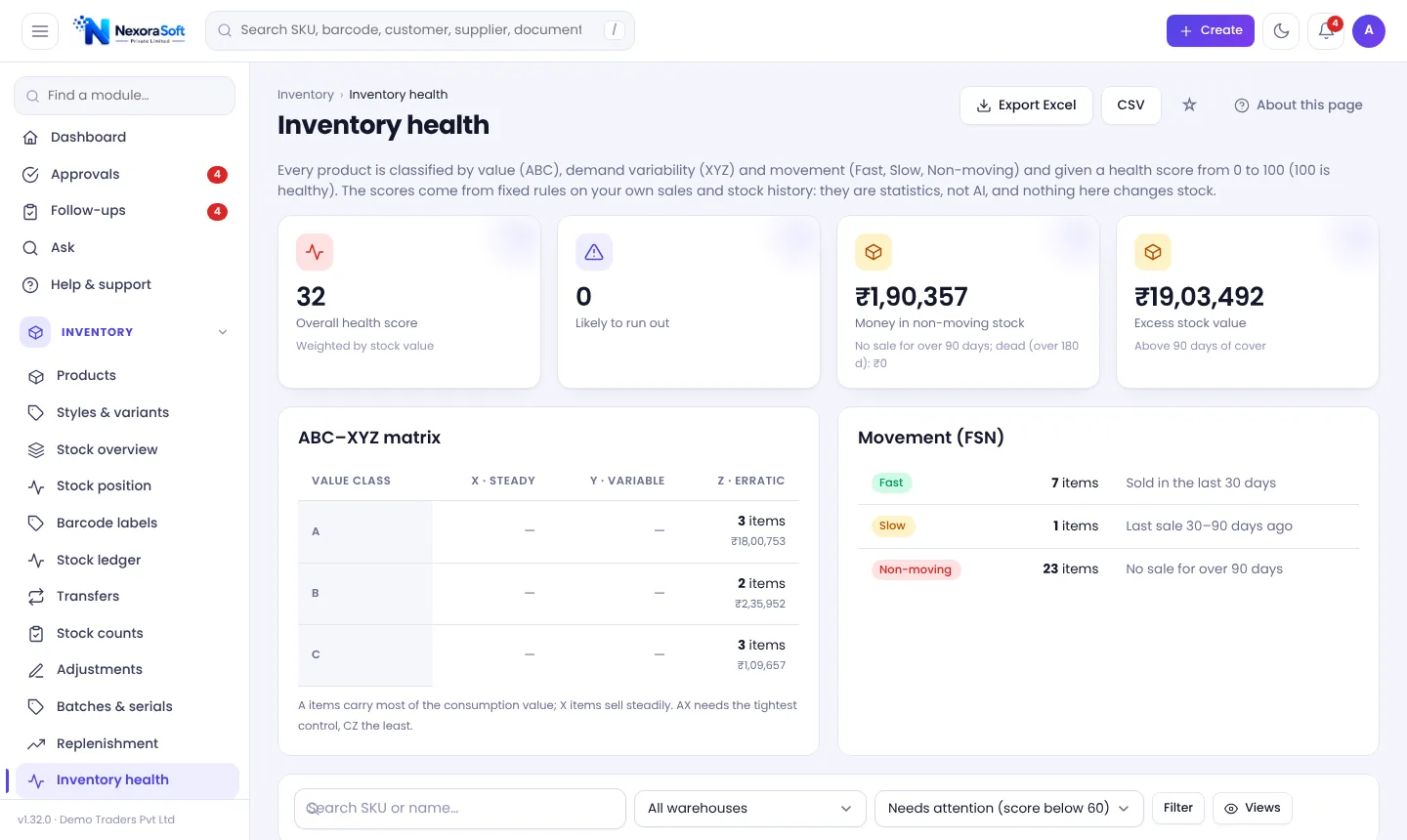
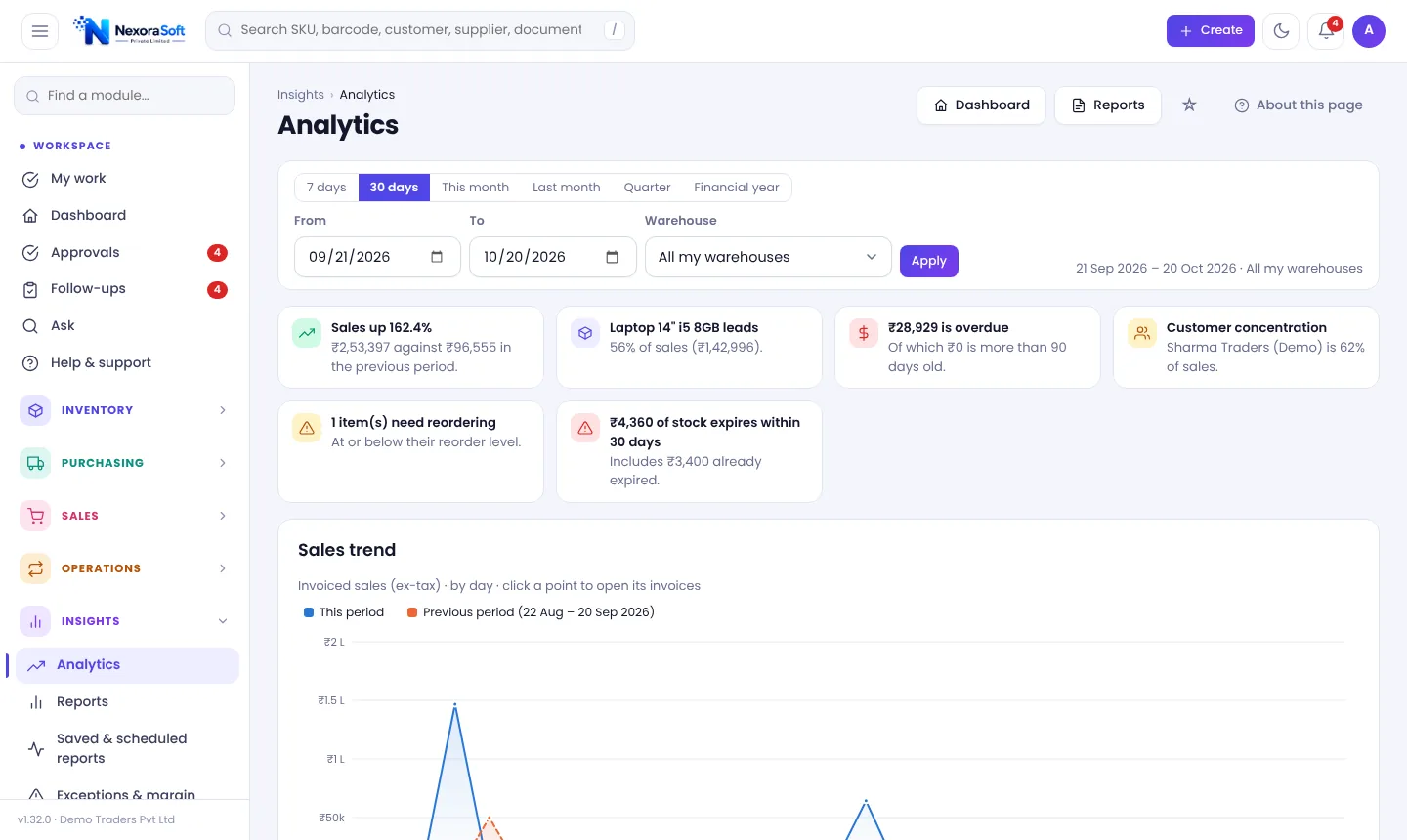
See where your money is locked. NexoraIMS classifies every product by value (ABC), demand steadiness (XYZ) and movement (fast, slow, non-moving), scores inventory health 0-100 and shows the reason, with dashboards and charts you can drill into.
Analytics That Lead to Action
A report that lists everything is not analytics. The questions that matter are few: which items make my money, which are sitting, what will run out, and where is cash tied up. NexoraIMS answers these with fixed, explainable rules on your own ledger.
These are statistics, not AI. Day limits for fast, slow, dead and overstock are adjustable, every line shows its reason, and nothing changes stock by itself.
Analytics Features
Inventory health
ABC value class, XYZ demand steadiness, Fast/Slow/Non-moving, a 0-100 score and run-out, overstock and obsolescence risk.
Money locked in stock
Totals for non-moving, excess and dead stock so you can decide what to clear.
Interactive charts
Sales vs previous period, margin, categories, top products and customers, receivables ageing, stock value and expiry exposure.
Inventory copilot
Five fixed questions: what runs out soon, what holds my money, what to order, where branches are out of balance, what expires unsold.
Saved and scheduled reports
Save report filters, schedule Daily, Weekly or Monthly CSVs and download them from Insights.
Daily summary
One short morning e-mail with sales, receipts, overdue, bills due, low stock, approvals and GST due dates.
ABC-XYZ Classification Explained
ABC ranks products by value of consumption: A items are the small set that make most of the money, C items are many and minor. XYZ ranks demand steadiness: X is steady, Z is erratic. A "Z" item with high value needs the most care.
Movement (Fast, Slow, Non-moving) uses days since last sale against limits you can change. The health score combines these into one number per product with the reason beside it. Read the ABC analysis guide and dead stock guide.
- A, B and C classes by value
- X, Y and Z by demand steadiness
- Fast, slow and non-moving movement
- Adjustable day limits and reasons
From Numbers to Decisions
Classify
ABC-XYZ and movement for each item.
Spot
Health score highlights risk.
Decide
Clear, discount, transfer or reorder.
Act
Create drafts; approve normally.
Track
Charts and scheduled reports show change.
Analytics at a Glance
| Question | Where to look |
|---|---|
| What makes my money? | ABC class and gross margin by product |
| What is stuck? | Non-moving and dead stock totals |
| What will run out? | Forecasts and copilot |
| How is the month? | Dashboard and Analytics |
| Who owes me? | Credit and ageing, receivables chart |
Statistics on your own data. Estimates are marked, and nothing changes stock automatically.
Inventory Analytics & ABC Analysis Software – FAQ
No. It uses fixed, explainable statistical rules on your ledger. The Ask page answers fixed question types, including in Hinglish.
Ranking items by their value contribution into A, B and C. See ABC analysis in inventory.
Yes. Save a report with filters and schedule it daily, weekly or monthly as CSV.
Yes, on the dashboard and by product in reports.
Yes, the day limits can be changed by someone allowed to change settings.
Yes. Excel and CSV on every list, plus a full data export as a ZIP of CSV files.
See NexoraIMS on Your Own Stock
Share your products, warehouses and billing flow and get a free live demo of NexoraIMS. No commitment; we typically respond within 24 hours.