Home › Inventory Management Software › Multi-Warehouse Inventory Software in India
Inventory SoftwareMulti-Warehouse Inventory Software for Branches and Godowns
See stock by warehouse, move it with a proper in-transit step, balance shortages between sites, and give each user access only to their own warehouse. NexoraIMS keeps every location on one ledger.
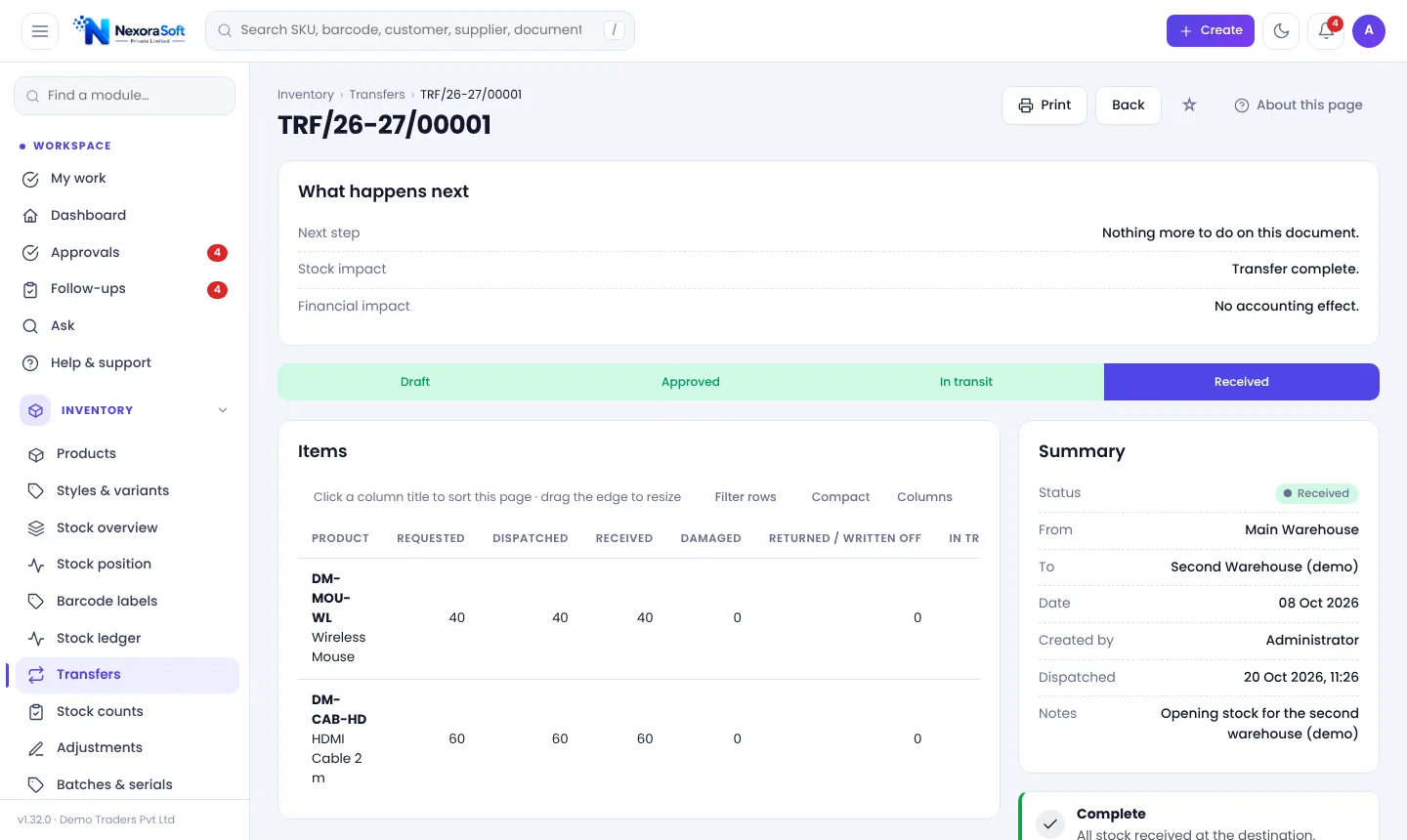
Why Multi-Warehouse Inventory Is Hard in Excel
Two godowns and a shop can already be too many tabs. Stock "goes" to a branch the moment it is typed, even if the truck has not left. Nobody knows what is in transit, and one warehouse runs out while another holds a three-month stock of the same item.
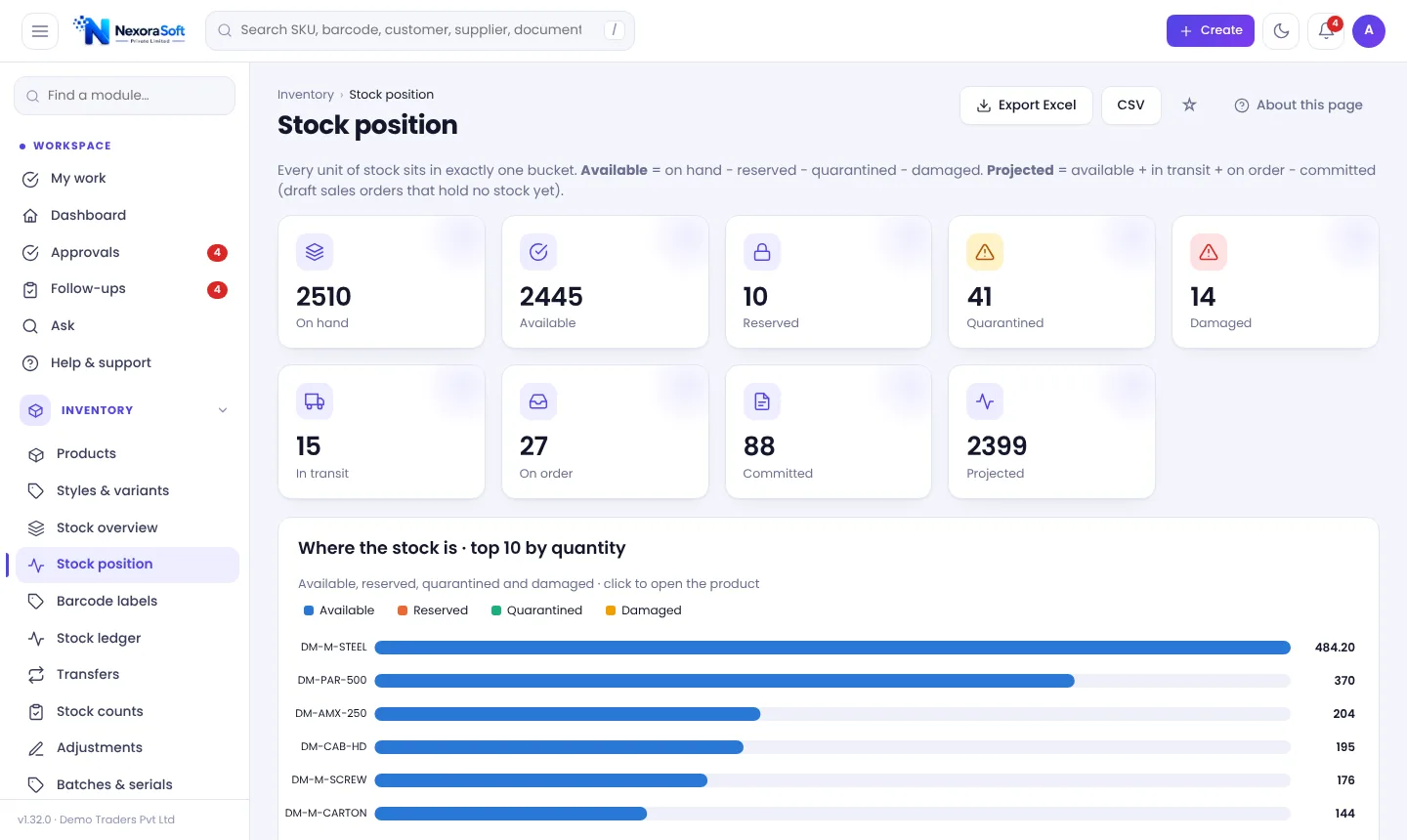
NexoraIMS treats a warehouse as a first-class location. Every movement has a warehouse, transfers go through dispatch and receipt, and the stock position shows on hand, reserved, quarantined, damaged, in transit, on order and committed for each location.
Multi-Warehouse Features
Transfers with in-transit
Create, submit, dispatch (stock goes in transit) and receive at the destination. Damaged quantity on arrival is recorded.
Warehouse-wise stock
Stock overview, valuation and reports filter by warehouse; every document names its warehouse.
Stock balancing
Suggests transfers from warehouses with spare stock to ones about to run short, based on each warehouse's own sales rate.
Warehouse scoping
Limit each user to the warehouses they work in; branch managers see only their own stock.
Transfer lanes
Set cost per unit and delivery days for each warehouse pair so balancing shows cost and lead time.
Branch reporting
Dashboard and reports can be filtered by warehouse to compare branches.
Stock Balancing Between Warehouses
The Stock balancing page compares each warehouse's cover (days of stock left at its own sales rate) and suggests moving stock from a warehouse that holds more than it keeps to one about to run short. Reserved and blocked stock is never offered.
It shows cover before and after, lane cost and lead time, and an estimated margin protected. Tick suggestions and create draft transfers; quantities are recalculated from current stock and you submit and receive each transfer yourself. Nothing moves automatically.
- Needs two or more warehouses
- Draft transfers only, never auto-posted
- Cover before and after each suggested move
- Lane cost and delivery days included
Moving Stock Between Warehouses
Create
Pick source and destination warehouses and lines.
Approve
Submit; approval can be required by a setting.
Dispatch
Stock leaves the source and shows as in transit.
Receive
Destination confirms received and damaged units.
Reconcile
Ledger and balances stay in agreement.
Multi-Warehouse Controls
| Question | Answer in NexoraIMS |
|---|---|
| Where is stock right now? | Stock position by warehouse and bucket |
| Is it still on the truck? | In-transit bucket until received |
| Who can see which site? | Warehouse scoping per user |
| Which branch is short? | Reorder, forecasts and stock balancing |
| Can numbers differ by branch? | Document numbering with branch code |
Separate legal entities with their own GSTIN are best run in separate installations.
Multi-Warehouse Inventory Software in India – FAQ
Yes. Each warehouse has its own stock, bins and users, and transfers move stock between them with an in-transit step.
Yes. Warehouse scoping limits what each user sees and posts.
On dispatch stock leaves the source and is held in transit. The destination receives it, and damaged units are recorded separately.
Yes. Stock overview and Stock position show all warehouses, with filters for one.
Yes, Stock balancing suggests draft transfers. You review and submit them; nothing moves on its own.
Each company installs its own copy with its own database. Branches and warehouses of one company share a copy.
See NexoraIMS on Your Own Stock
Share your products, warehouses and billing flow and get a free live demo of NexoraIMS. No commitment; we typically respond within 24 hours.