Home › Products › NexoraUNMS › Network Alert Management Software
NexoraUNMS · FeatureNetwork Alert Management Software Less Noise, Faster Fixes
A monitoring tool that raises two hundred alerts a day trains people to ignore alerts. Good alert management does the opposite: fewer, clearer, routed to the right person, and escalated if nobody responds.
Severity and statusDe-duplicationEscalation policiesOn-call schedulesNotifications
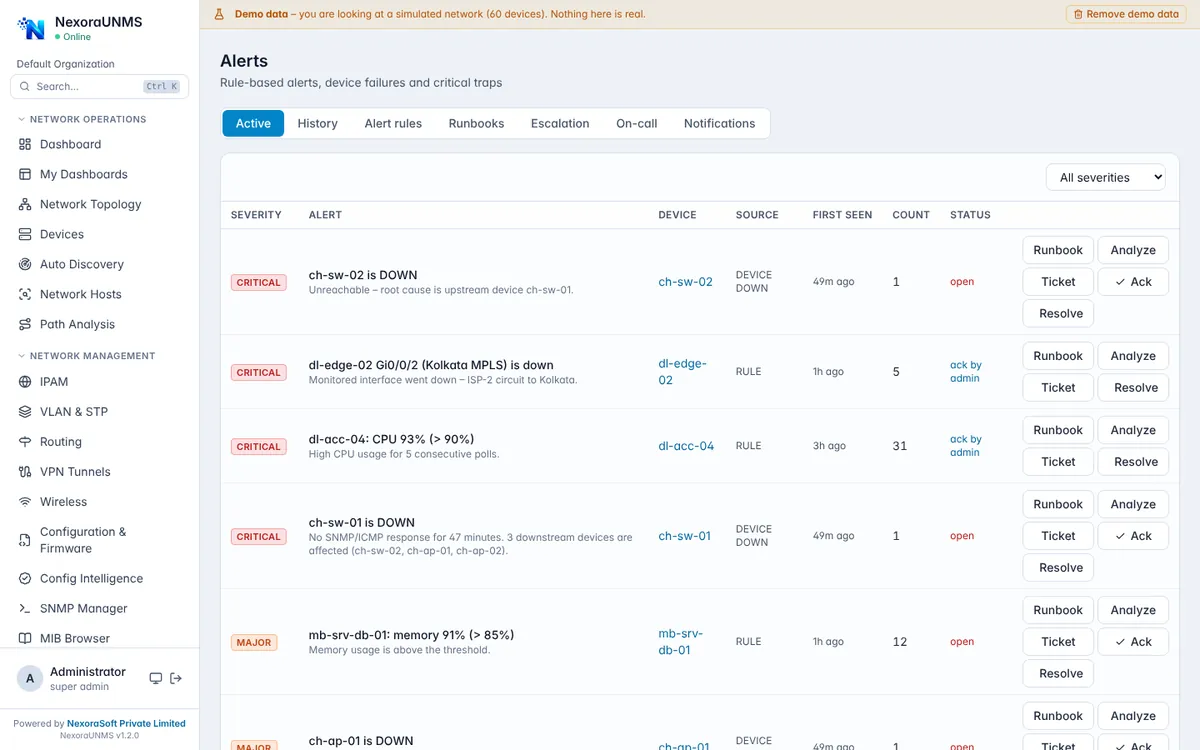
Real NexoraUNMS screens captured with built-in demo data (simulated network).
What Is Network Alert Management Software?
A monitoring tool that raises two hundred alerts a day trains people to ignore alerts. Good alert management does the opposite: fewer, clearer, routed to the right person, and escalated if nobody responds.
NexoraUNMS ranks alerts by severity, groups repeats, links each alert to its device and lets you acknowledge, resolve, open a ticket or run path analysis from the same row. Escalation policies, on-call schedules and notification channels decide who is told, when and how.
This capability is part of NexoraUNMS, so it shares one device inventory, one alert system and one login with monitoring, topology, configuration and reports.
What You Get
Severity and status
Critical, major, minor and info with open, acknowledged and resolved states.
De-duplication
Repeated events increase a counter instead of flooding the list.
Escalation policies
If nobody acknowledges, the alert moves to the next person or team.
On-call schedules
Route notifications to whoever is on duty.
Notifications
Email and push notifications to the channels you configure.
Runbooks
Attach fix steps to alert types so responders know what to do.
How It Works
Set rules
Choose thresholds and severities.
Define who is told
Create on-call and escalation.
Receive alerts
Email and push.
Resolve and learn
Close with notes and review history.
What to Know
Notification channels depend on your setup (SMTP for email, a push service for phones). We configure these with you.
Frequently Asked Questions
Yes. Escalation policies move an unacknowledged alert to the next level after the time you set.
Yes. On-call schedules decide who receives notifications at a given time.
Repeated events for the same condition are grouped and counted, and related alerts roll up into incidents.
Yes, directly from the alert row.
Talk to Us About NexoraUNMS
Tell us how many devices and sites you run and what you need to see or control, and get a free live demo of NexoraUNMS. No commitment; we typically respond within 24 hours.