Home › Products › NexoraUNMS › Syslog & SNMP Trap Management
NexoraUNMS · FeatureSyslog and SNMP Trap Management Software
Devices tell you what is wrong in two ways: they answer when polled, and they speak up on their own through syslog messages and SNMP traps. NexoraUNMS listens for both.
Built-in receiversSearch and filterDevice correlationDe-duplicated trapsAlert rules
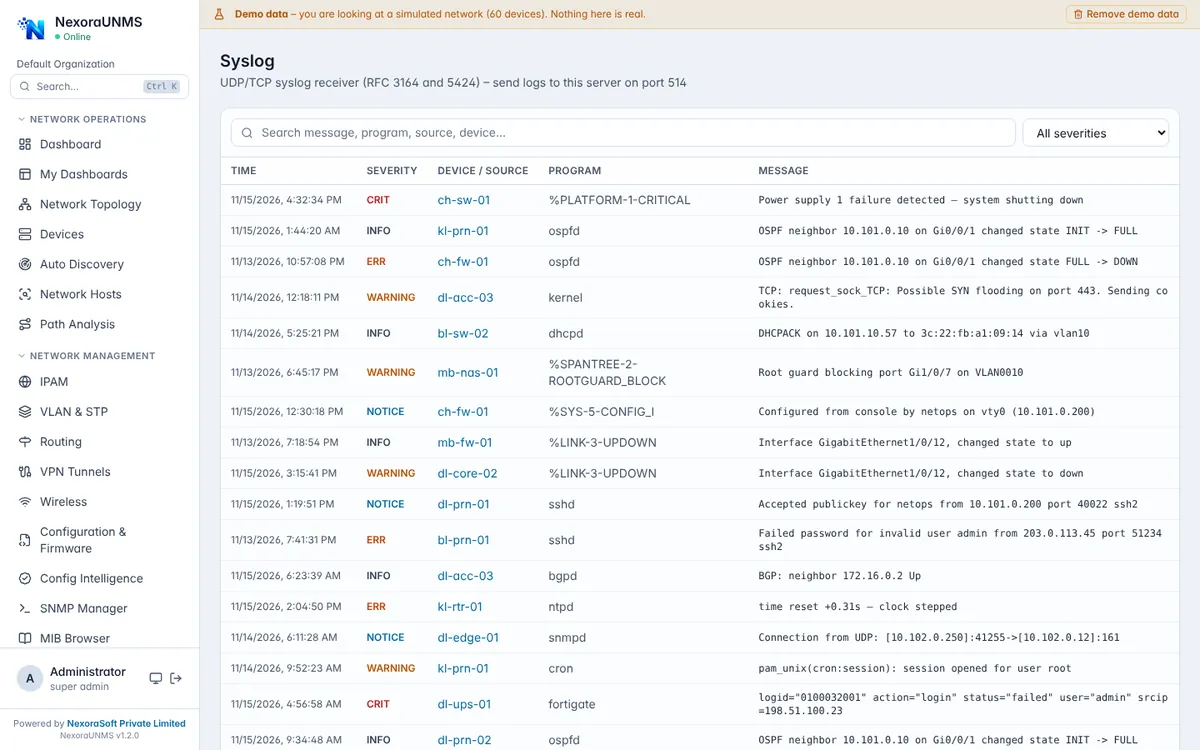
Real NexoraUNMS screens captured with built-in demo data (simulated network).
What Is Syslog & SNMP Trap Management?
Devices tell you what is wrong in two ways: they answer when polled, and they speak up on their own through syslog messages and SNMP traps. NexoraUNMS listens for both.
Syslog arrives over UDP and TCP, traps and informs over SNMP v1, v2c and v3. Every message is matched to its device, searchable by severity, program and text, and can feed alert rules so a critical log line becomes a ticket, not a footnote.
This capability is part of NexoraUNMS, so it shares one device inventory, one alert system and one login with monitoring, topology, configuration and reports.
What You Get
Built-in receivers
Syslog on UDP/TCP 514 and traps on UDP 162 (alternate ports on Linux and macOS for non-root users).
Search and filter
Find messages by severity, device, program or free text.
Device correlation
Each message is tied to the device and site it came from.
De-duplicated traps
Repeated traps are counted, not repeated.
Alert rules
Turn important log patterns and traps into alerts.
Retention
Keep history for troubleshooting and audits.
How It Works
Point devices
Send syslog and traps to the server.
Verify
Check messages arrive.
Filter
Save useful searches.
Alert
Create rules for critical events.
What to Know
Devices must be configured to send to the server. On Linux and macOS, non-root users use ports 1514 and 1162 by default; we can map standard ports with your administrator.
Frequently Asked Questions
Syslog on UDP and TCP 514 and SNMP traps on UDP 162 where permitted, or alternate ports 1514 and 1162 for non-root users on Linux and macOS.
Yes, traps and informs for SNMP v1, v2c and v3 are supported.
Yes. Rules can turn matching messages and traps into alerts.
Yes. Messages are stored in the database and are searchable by device, severity and text.
Talk to Us About NexoraUNMS
Tell us how many devices and sites you run and what you need to see or control, and get a free live demo of NexoraUNMS. No commitment; we typically respond within 24 hours.