Home › Products › NexoraUNMS › Network Topology Mapping Software
NexoraUNMS · FeatureNetwork Topology Mapping Software with Failure Impact
A network diagram drawn by hand is out of date the day after it is drawn. NexoraUNMS builds the map from the network itself, using the neighbour tables that switches and routers already keep through LLDP and CDP.
Auto-built from LLDP and CDPHierarchical layoutFailure impactLink utilisationVLAN overlay
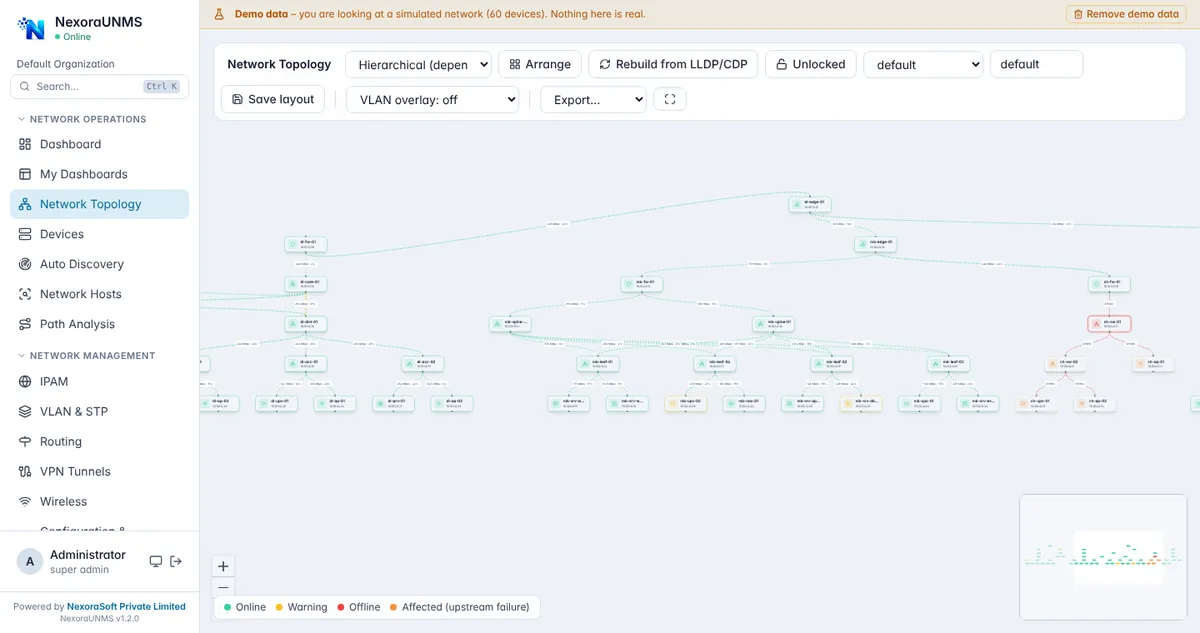
Real NexoraUNMS screens captured with built-in demo data (simulated network).
What Is Network Topology Mapping Software?
A network diagram drawn by hand is out of date the day after it is drawn. NexoraUNMS builds the map from the network itself, using the neighbour tables that switches and routers already keep through LLDP and CDP.
Each link shows live bandwidth and utilisation. When a device fails, the devices behind it are marked as affected, so you can see the blast radius instead of guessing. You can arrange the layout, lock it, save it, overlay VLANs and export the map.
This capability is part of NexoraUNMS, so it shares one device inventory, one alert system and one login with monitoring, topology, configuration and reports.
What You Get
Auto-built from LLDP and CDP
Neighbour data creates links without manual drawing; rebuild any time.
Hierarchical layout
Core, distribution and access layers arranged automatically.
Failure impact
Offline devices and the devices behind them are coloured differently.
Link utilisation
Live in/out bandwidth and percentage on each link.
VLAN overlay
Highlight devices and links carrying a chosen VLAN.
Save and export
Save custom layouts and export the map for documents.
How It Works
Enable LLDP/CDP
Switch it on for device neighbours.
Discover devices
Add devices with SNMP access.
Build topology
Rebuild from neighbour data.
Arrange and save
Tidy the layout and keep it.
What to Know
Topology is only as complete as the neighbour data your devices share. Devices without LLDP or CDP may need links added manually; we check this in the demo.
Frequently Asked Questions
From LLDP and CDP neighbour tables collected by SNMP. The map is rebuilt on demand, and you can lock a saved layout.
Yes. Offline devices are shown in red and devices that depend on them upstream are shown as affected.
Yes. A VLAN overlay highlights the devices and links that carry the VLAN you pick.
Yes, there is an export option, and you can save custom layouts.
Talk to Us About NexoraUNMS
Tell us how many devices and sites you run and what you need to see or control, and get a free live demo of NexoraUNMS. No commitment; we typically respond within 24 hours.