Home › Products › NexoraUNMS › Network Auto Discovery Software
NexoraUNMS · FeatureNetwork Auto Discovery Software with Zero Configuration
Most monitoring projects stall at the first step: typing in IP ranges and credentials. NexoraUNMS starts by itself. About 15 seconds after the server is up it detects the networks it is connected to, scans them and rescans every 60 minutes.
Zero-configuration first scanSNMP credentials to trySilent hosts are not lostDiscovery rulesScheduled rescans
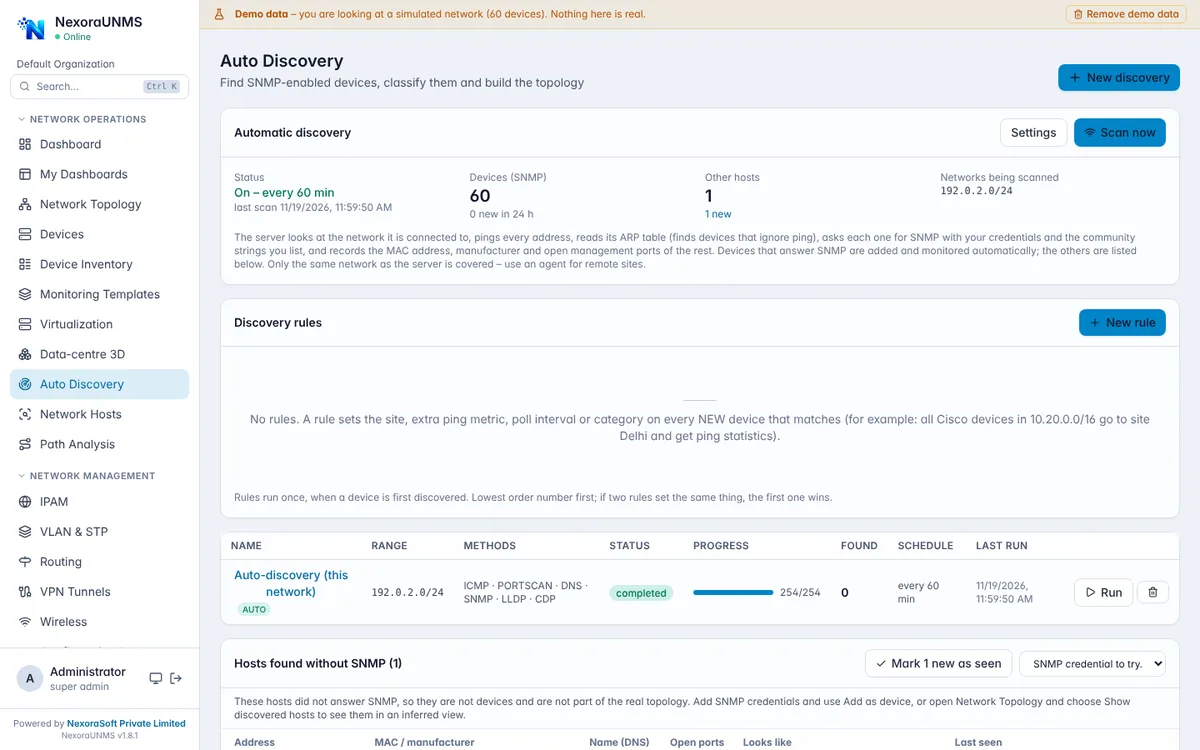
Real NexoraUNMS screens captured with built-in demo data (simulated network).
What Is Network Auto Discovery Software?
Most monitoring projects stall at the first step: typing in IP ranges and credentials. NexoraUNMS starts by itself. About 15 seconds after the server is up it detects the networks it is connected to, scans them and rescans every 60 minutes.
Devices that answer SNMP are added and monitored automatically. Hosts that stay silent are still found through the server's ARP table and kept with their MAC address, manufacturer, open management ports, DNS name and a best-guess type, so printers, cameras and unknown hosts show up too.
This capability is part of NexoraUNMS, so it shares one device inventory, one alert system and one login with monitoring, topology, configuration and reports.
What You Get
Zero-configuration first scan
Connected networks are detected and scanned without a range or credential; virtual adapters such as Docker, WSL, VMware and VPN are skipped unless enabled.
SNMP credentials to try
Community strings to try are configurable (default public); extra routed ranges can be added.
Silent hosts are not lost
ARP-based discovery keeps MAC, manufacturer, open ports, DNS name and a guessed type; new hosts are marked NEW until acknowledged.
Discovery rules
Match by vendor, category, subnet or name pattern and set site, ping statistics, poll interval, category or a monitoring template on newly found devices.
Scheduled rescans
Repeat every 60 minutes by default, or change the schedule; Scan now runs it on demand.
Topology without SNMP
When no SNMP device exists, an inferred view groups discovered hosts by subnet under the likely gateway, clearly marked as a guess.
How It Works
Start the server
Discovery begins on its own about 15 seconds after start-up.
Review what was found
SNMP devices are added; silent hosts are listed with MAC and vendor.
Add credentials where needed
Add a host as a device with the right SNMP credential.
Set rules
Let discovery rules set site, polling and templates for new devices.
What to Know
Automatic discovery covers the network the server itself is connected to and belongs to the default organisation. Remote sites and other organisations need an agent or a manual range. The inferred topology for hosts without SNMP is a guess grouped by subnet, not a set of real links, and the product marks it that way.
Frequently Asked Questions
No. The server detects the networks it is on and scans them by itself; you can add routed ranges later.
They are found through ARP and kept with MAC, manufacturer, open management ports, DNS name and a best-guess type, and can be added as devices later.
Every 60 minutes by default, and the schedule can be changed. Scan now runs a scan immediately.
Yes. A rule can set site, ping statistics, poll interval, category or a monitoring template on new devices that match.
Talk to Us About NexoraUNMS
Tell us how many devices and sites you run and what you need to see or control, and get a free live demo of NexoraUNMS. No commitment; we typically respond within 24 hours.