Home › Products › NexoraUNMS › Backup, Restore & High Availability
NexoraUNMS · FeatureBackup, Restore and High Availability
A monitoring system has to be there when the network is not. NexoraUNMS backs up its own configuration and data on a schedule, encrypts the backup, verifies it and can restore it with one click.
Encrypted backupsVerified automaticallyOne-click restoreActive/standby HAPlatform operations
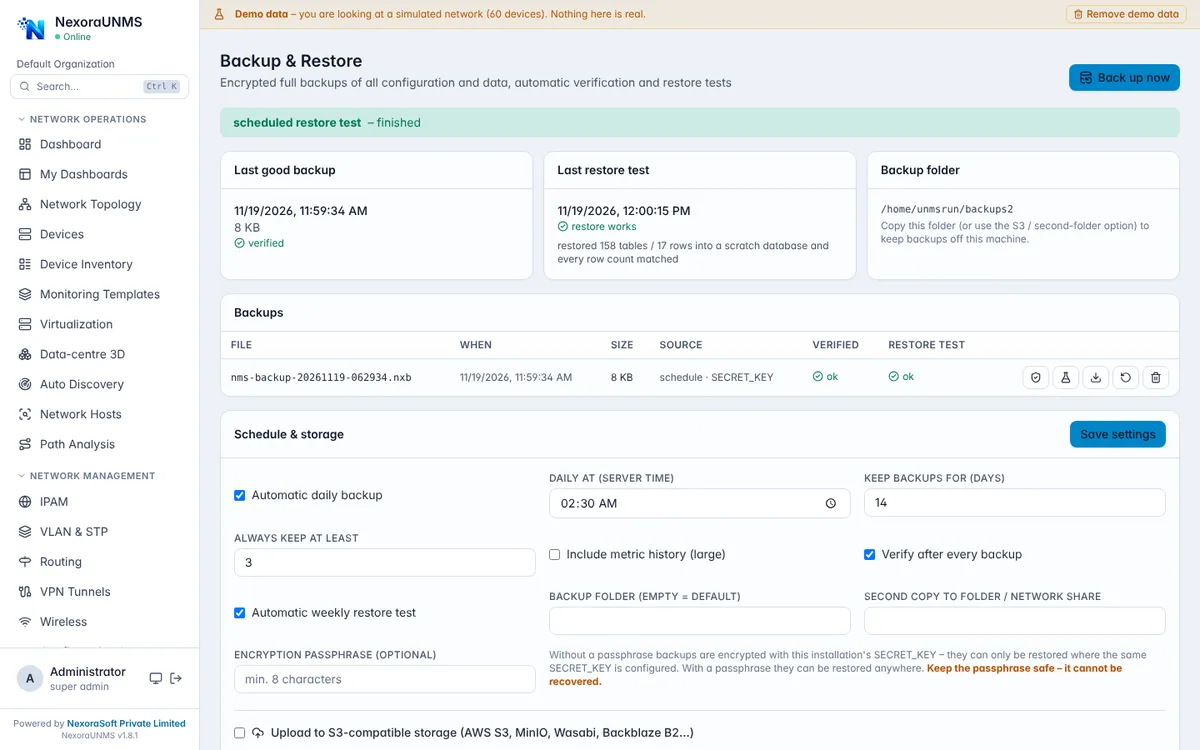
Real NexoraUNMS screens captured with built-in demo data (simulated network).
What Is Backup, Restore & High Availability?
A monitoring system has to be there when the network is not. NexoraUNMS backs up its own configuration and data on a schedule, encrypts the backup, verifies it and can restore it with one click.
It also watches itself: a platform operations dashboard shows polling success, notification delay, API response time, database growth and collector heartbeats, and an optional active/standby mode fails over the central server automatically.
This capability is part of NexoraUNMS, so it shares one device inventory, one alert system and one login with monitoring, topology, configuration and reports.
What You Get
Encrypted backups
AES-256-GCM with an optional passphrase, on a schedule you set, with retention.
Verified automatically
Each backup is verified, and a weekly restore test runs into a scratch database.
One-click restore
Restore with a safety backup taken first; copy to a second folder or upload to S3-compatible storage.
Active/standby HA
Leader lease with a fencing token, automatic failover and failback; the database must be made redundant separately.
Platform operations
Polling success, queue delay, API p95, database connections and growth, memory and CPU, and collector outages.
Retention and restore drills
Archive-before-delete retention, purge reports and restore drills that measure RTO and RPO.
How It Works
Set the schedule
Choose backup time, retention and storage targets.
Set a passphrase
Keep it outside the server with the secret key.
Check the restore test
Review the weekly scratch-database result.
Plan HA if needed
Enable active/standby on a second node and make the database redundant.
What to Know
Active/standby HA protects the application server only; PostgreSQL redundancy must be arranged separately. Take a backup before every upgrade. Failover and restore were validated with simulated outages and test databases, so run your own drill before relying on them.
Frequently Asked Questions
Yes, with AES-256-GCM and an optional passphrase. Keep the passphrase and secret key outside the server.
Yes. Backups are verified automatically and a weekly restore test runs into a scratch database.
No. Active/standby covers the application server; the database must be made redundant separately.
Yes. Backups can be copied to a second folder or uploaded to S3-compatible storage.
Talk to Us About NexoraUNMS
Tell us how many devices and sites you run and what you need to see or control, and get a free live demo of NexoraUNMS. No commitment; we typically respond within 24 hours.