Home › Products › NexoraUNMS › Network Maps & Digital Twin
NexoraUNMS · FeatureNetwork Maps and Digital Twin
One map cannot answer every question. NexoraUNMS draws the same network several ways: Layer 2, Layer 3, WAN, data centre, wireless and geographic maps, plus a 3D rack twin.
Layer 2 and Layer 3WAN and geographicData centre and 3D twinWireless mapBGP and OSPF links
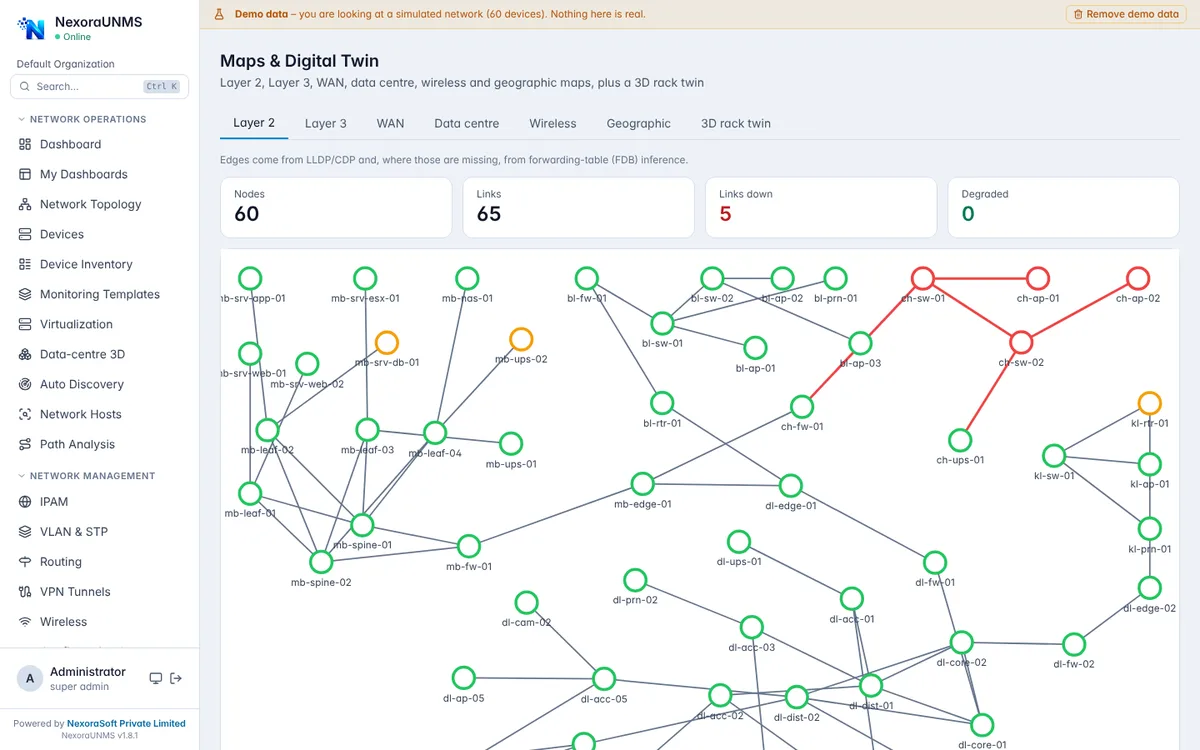
Real NexoraUNMS screens captured with built-in demo data (simulated network).
What Is Network Maps & Digital Twin?
One map cannot answer every question. NexoraUNMS draws the same network several ways: Layer 2, Layer 3, WAN, data centre, wireless and geographic maps, plus a 3D rack twin.
Links come from LLDP and CDP and, where those are missing, from forwarding-table (FDB) inference. BGP and OSPF adjacencies appear as dotted links between devices that have no physical link, without changing the dependency tree used for failure impact.
This capability is part of NexoraUNMS, so it shares one device inventory, one alert system and one login with monitoring, topology, configuration and reports.
What You Get
Layer 2 and Layer 3
Switch topology from LLDP, CDP and FDB, and routed topology for subnets and gateways.
WAN and geographic
Sites and links on a map with link state, built from the sites you define.
Data centre and 3D twin
Rack-based view and the rotatable 3D rack floor.
Wireless map
Access points and controllers with their client load.
BGP and OSPF links
Dotted links between routers that only have a routing relationship; they never change the failure-impact tree.
Topology history
Daily and manual snapshots with before and after comparison, new and removed devices and links, and a CSV change report.
How It Works
Let discovery run
Neighbour data builds the first map.
Pick a map type
Layer 2, Layer 3, WAN, data centre, wireless or geographic.
Fix gaps
Add missing links or racks, or rely on FDB inference.
Snapshot
Compare today with last week before and after a change.
What to Know
Maps are only as complete as the neighbour and forwarding-table data devices expose. FDB-inferred links are inferences, and routing links are not physical links. The 3D twin lays racks out automatically and is not a CAD floor plan.
Frequently Asked Questions
Layer 2, Layer 3, WAN, data centre, wireless and geographic maps, plus a 3D rack twin.
LLDP and CDP neighbours and, where those are missing, forwarding-table (FDB) inference. BGP and OSPF adjacencies are shown as dotted links.
Yes. Daily and manual snapshots can be compared to show new and removed devices and links, with a CSV change report.
No. BGP and OSPF links are only drawn between devices without a physical link and never change the dependency tree.
Talk to Us About NexoraUNMS
Tell us how many devices and sites you run and what you need to see or control, and get a free live demo of NexoraUNMS. No commitment; we typically respond within 24 hours.