Home › Inventory Management Software › POS & Inventory Software in India
Inventory SoftwarePOS & Inventory Software for Retail and Online Sales
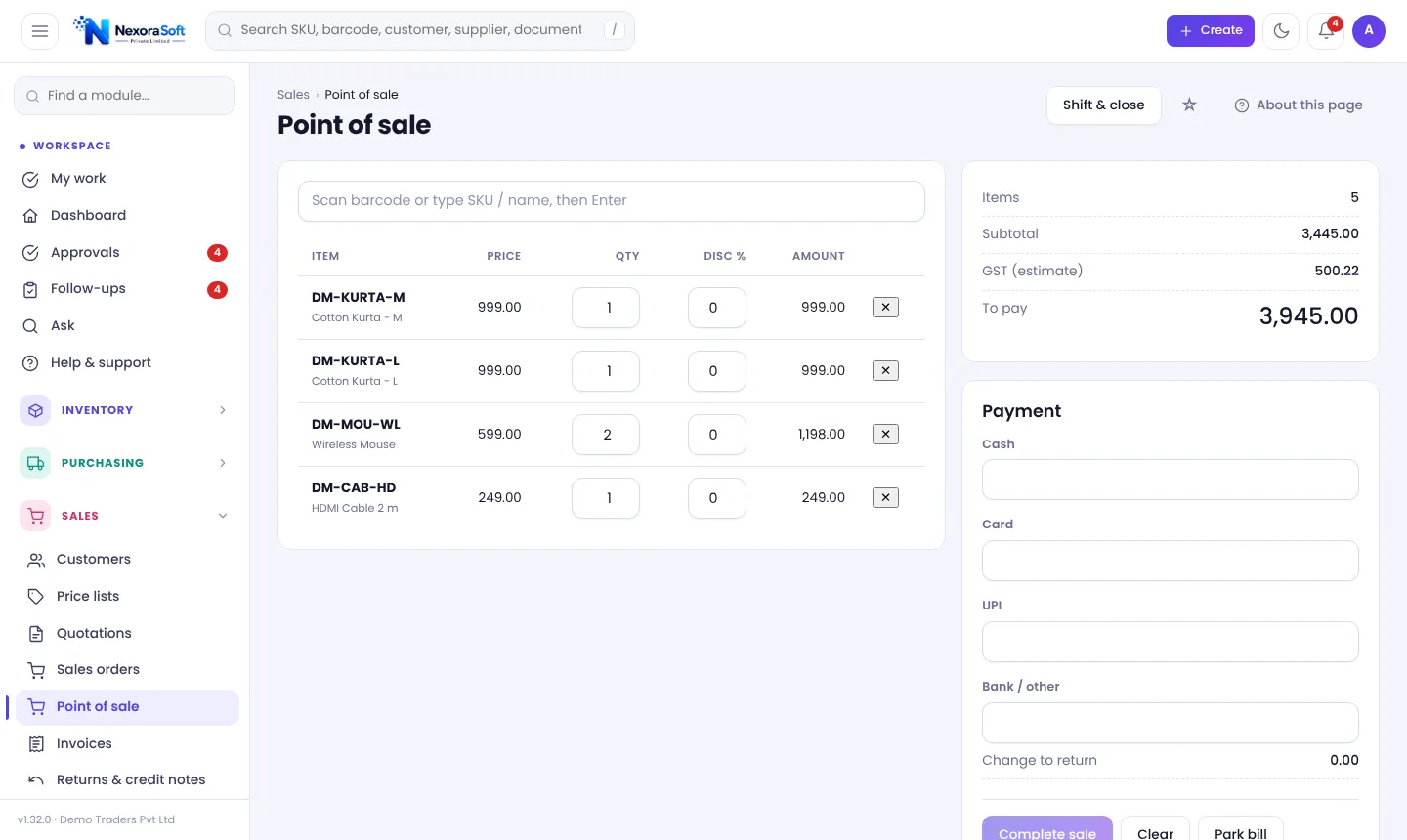
Bill at the counter and update stock in the same moment. NexoraIMS has a barcode POS with split payment, parked bills and cash shifts, size and colour variants, and order import from WooCommerce and Shopify.
Retail Needs One Stock
A shop that sells at the counter and online has one stock but usually two systems. Online orders arrive for items already sold in the shop, and returns get lost between the two.
NexoraIMS puts the counter, online channels and warehouse on the same ledger. A POS sale issues stock as a posted invoice; online orders arrive as draft invoices for review; and every return goes through a credit note.
POS and Retail Features
Barcode POS
Scan or type SKU or name, set quantity and line discount, see GST estimate and amount to pay.
Split payment
Take cash, card, UPI and bank or other in one bill and show change to return.
Shifts and cash close
Open a shift with opening cash, close it with counted cash; differences need a note.
Parked bills
Park a cart with an optional label and resume it at the same counter by the same person.
Size and colour variants
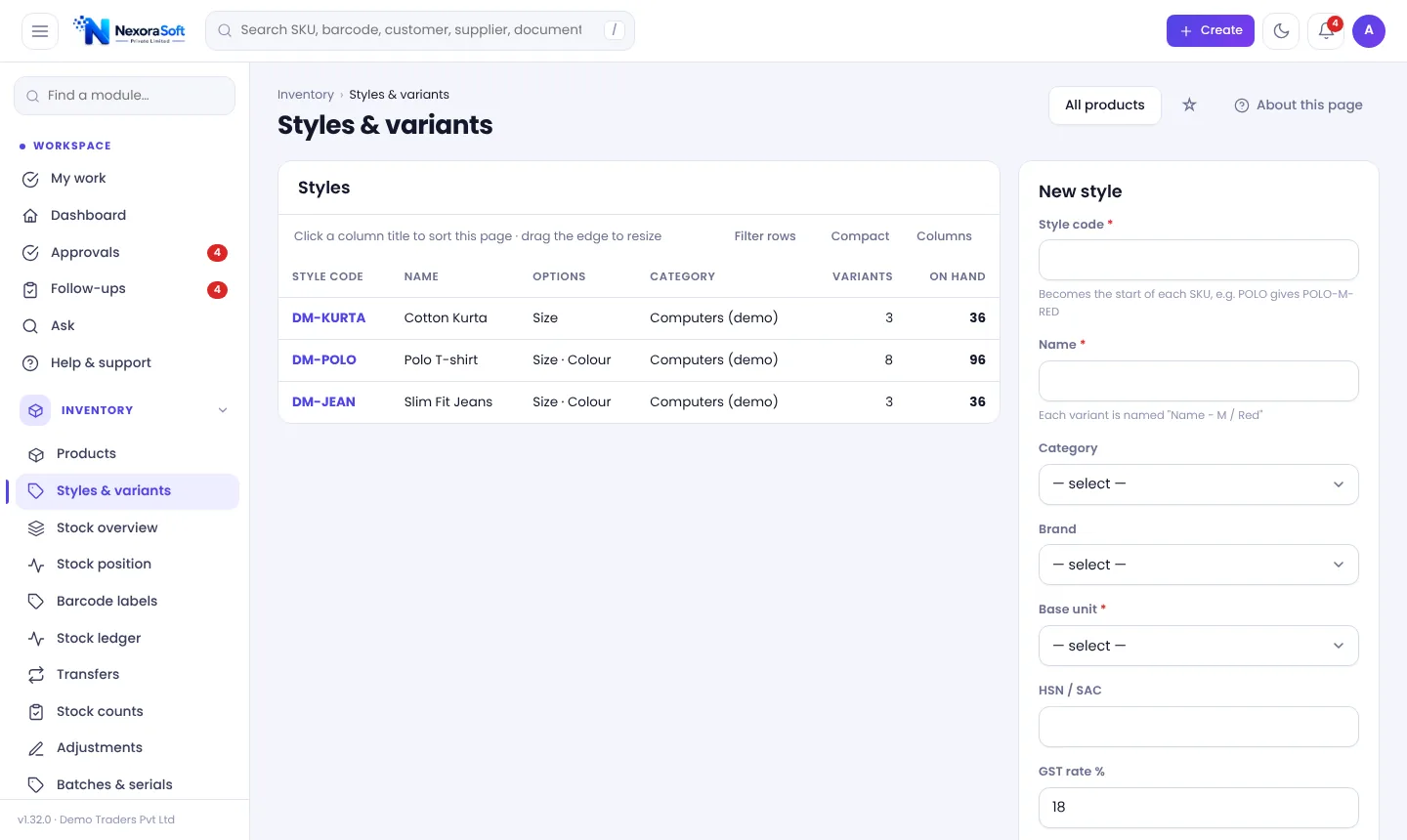
Each combination is its own product with its own stock, barcode and reorder, shown as a size × colour grid.
Store connectors
Pull WooCommerce and Shopify orders as draft invoices and push stock to WooCommerce.
Variants and Online Orders
Apparel and footwear need variants. In NexoraIMS you create a style, say Polo T-shirt with Size S, M, L and Colour Navy, White, and every combination becomes its own product, so you can receive, sell, transfer, count and reorder each size and colour separately.
For online sales connect a store under Sales channels. New orders appear as draft invoices; you review and post them, then create shipments. Shopify prices that include tax are converted using the product's GST rate; WooCommerce prices are taken as ex-tax.
- Style code starts every SKU
- Prices and GST for all variants in one go
- WooCommerce and Shopify order pull
- CSV order import for other marketplaces
A Day at the Counter
Open shift
Enter opening cash.
Scan & bill
Scan items, apply discount, take payment.
Return
Credit note from the invoice.
Sync
Online orders arrive as drafts.
Close shift
Count cash and close with a note if it differs.
Retail Features at a Glance
| Need | NexoraIMS answer |
|---|---|
| Fast billing | Barcode POS with parked bills |
| Mixed payment | Cash, card, UPI and bank in one sale |
| Cash control | Shifts with expected vs counted cash |
| Sizes and colours | Style and variant grid |
| Online store | WooCommerce, Shopify and CSV order import |
POS prints a receipt from the next screen. No offline mode in the current version.
POS & Inventory Software in India – FAQ
Yes, a barcode POS with discounts, split payment, parked bills and shifts.
Yes. Completing a sale posts an invoice that issues stock.
Yes. Orders pull in as draft invoices; WooCommerce stock can be pushed back by SKU.
No. The current version needs a browser connection to the server.
Yes. Styles and variants create a product per combination with its own stock.
Open the invoice and use Credit note.
See NexoraIMS on Your Own Stock
Share your products, warehouses and billing flow and get a free live demo of NexoraIMS. No commitment; we typically respond within 24 hours.