Home › Restaurant POS Software › POS Software for Dhabas & Small Eateries
Industry Restaurant POS SoftwarePOS Software for Dhabas & Small Eateries
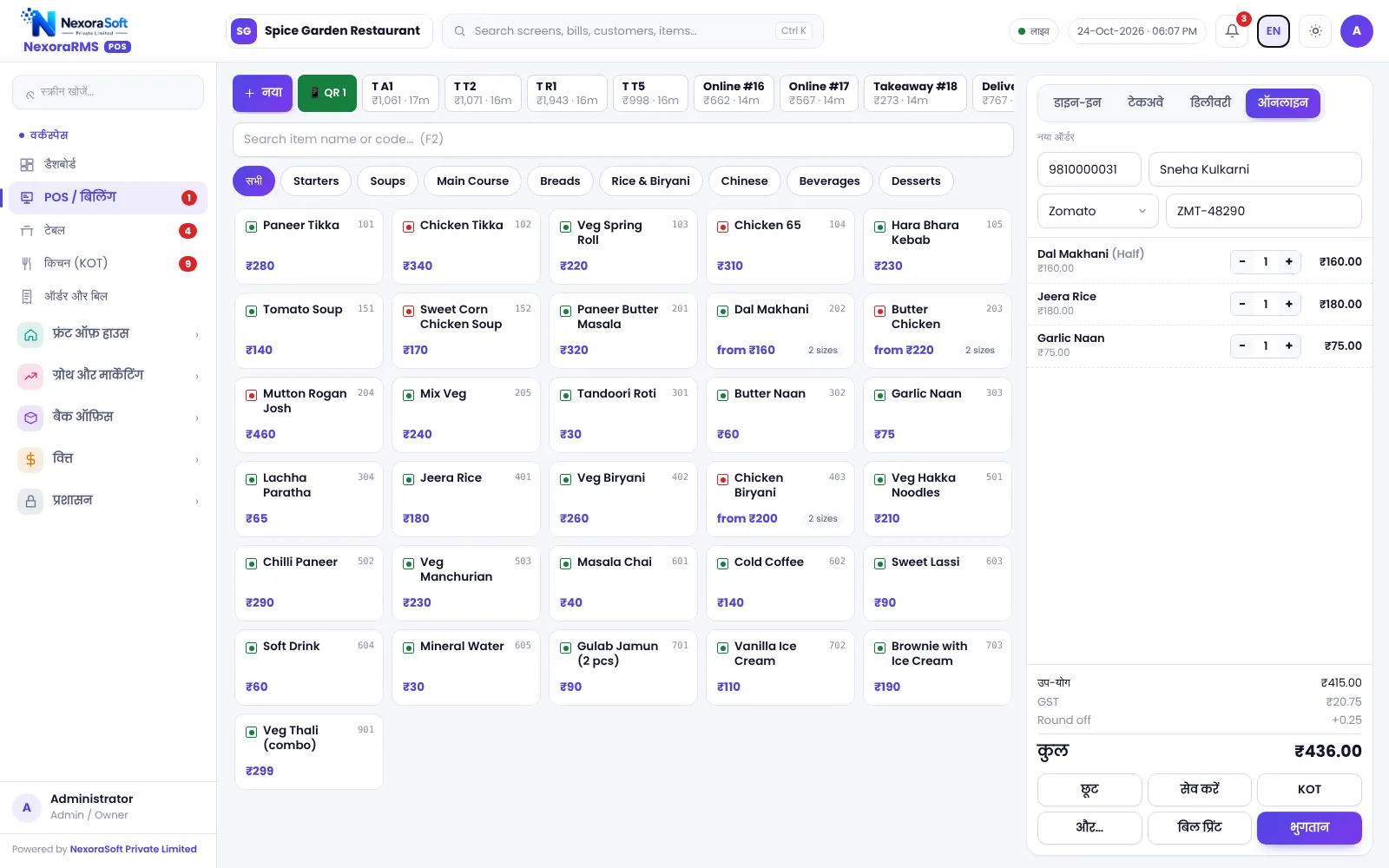
Small eateries need billing that is simple and in a language the staff understand. NexoraRMS-POS has a Hindi interface, quick billing and a daily report, and you can switch on more as you grow.
HindiSimpleDaily report
What Small Eateries Need
A dhaba or small eatery wants fast billing, a clean daily total and few buttons. Staff may be more comfortable in Hindi, and the owner may handle everything.
NexoraRMS-POS lets you start with the menu and billing, switch to Hindi and add tables, KOT or stock later.
Challenges and How NexoraRMS-POS Handles Them
Hindi interface
Switch between English and Hindi.
Simple billing
Tap items, print the bill.
Bill formats
GST bills with tax settings you control.
Daily report
Z report and sales totals.
Expenses
Record daily spends.
Works on tablet
Runs in a browser.
Start Simple, Grow Later
Begin with billing and the daily report. When you add a second counter, tables or a kitchen screen, switch them on.
Backups run on the server, so a lost device does not mean lost records.
- Hindi interface
- Quick billing
- Expenses
- Daily backup
Small Eatery POS at a Glance
| Need | NexoraRMS-POS answer |
|---|---|
| Language | Hindi and English |
| Simplicity | Few screens to start |
| Control | Z report and expenses |
It needs an internet connection.
Getting Started
Set up the restaurant
Switch to Hindi, add the menu and print a test bill.
Build the menu
Add categories, items, sizes, add-ons and tax rates, or import the menu from CSV.
Floor and staff
Draw sections and tables, then create logins for cashier, captain and chef with the right permissions.
Print and test
Set the bill width and header, print a test bill and KOT, and run a few dummy orders.
Go live
Train the team, start with one shift, and review the Z report at close.
POS Software for Dhabas & Small Eateries – FAQ
Yes. The interface can switch between English and Hindi from the top bar, which helps counter and kitchen staff. You can verify this in a free live demo of NexoraRMS-POS using your own menu and tables.
No. You can start with billing only and switch on KOT, tables, loyalty or inventory when you are ready. You can verify this in a free live demo of NexoraRMS-POS using your own menu and tables.
No. NexoraRMS-POS needs an internet connection to its server. Keep reliable broadband and a mobile hotspot as backup. Offline billing is not part of this version.
See NexoraRMS-POS in Your Own Restaurant
Share your menu, tables and billing flow and get a free live demo of NexoraRMS-POS. No commitment; we typically respond within 24 hours.