Home › Restaurant POS Software › Restaurant Cash Register & Shift Software
Restaurant POS SoftwareRestaurant Cash Register & Shift Software
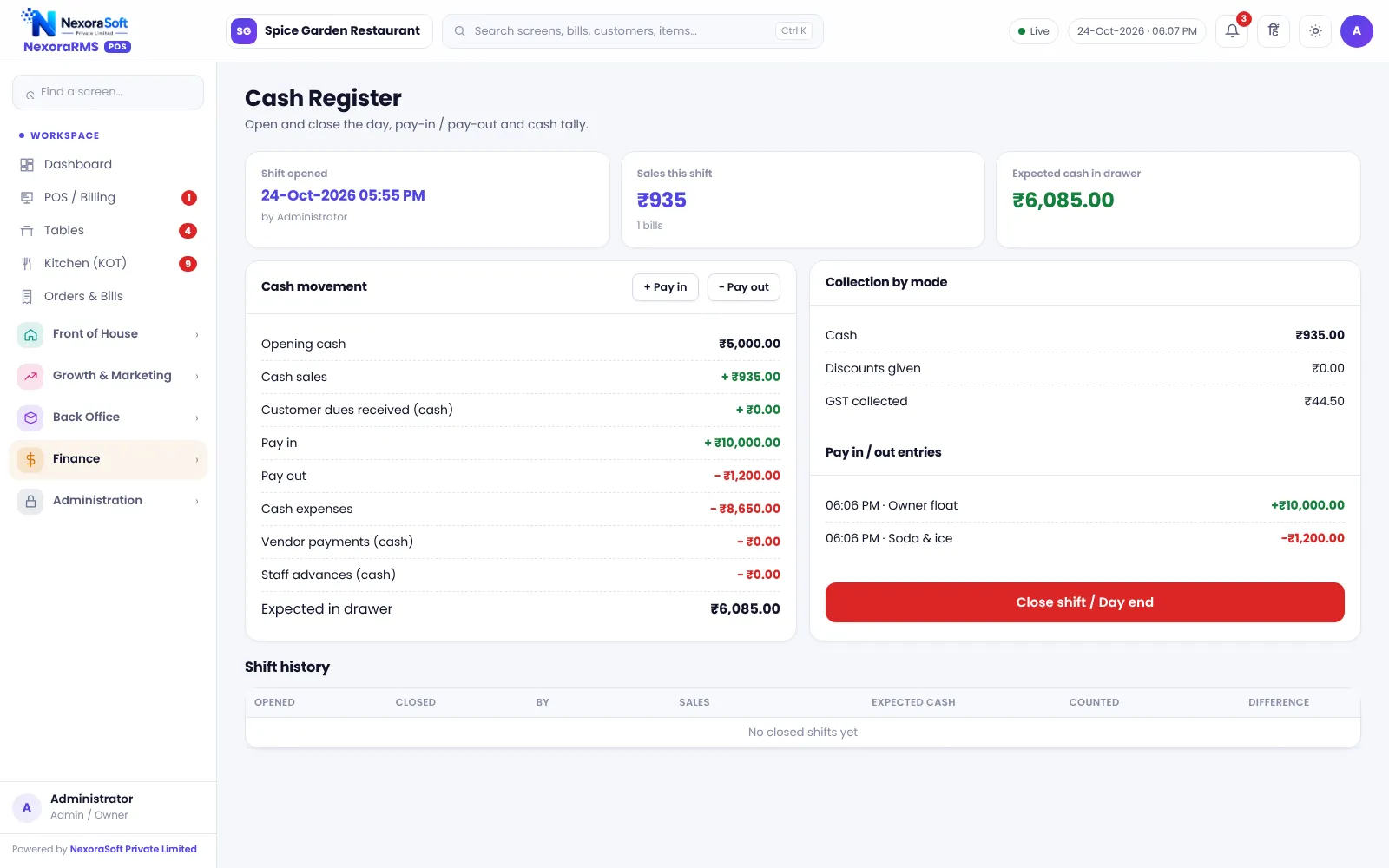
Start each shift with counted cash and end it with a tally. Pay-ins, pay-outs and cash sales are recorded, so the difference at closing is clear and not a guess.
Why Cash Control Matters
Even in a UPI-heavy restaurant, cash leaks: change given wrong, expenses paid from the drawer without a note, a bill settled as cash that was not. A shift with an opening and closing count turns leakage into a visible difference.
NexoraRMS-POS tracks expected cash as opening cash plus cash sales plus pay-ins minus pay-outs. At close staff count denominations and the difference is stored. Read cash handling and shift closing.
Cash Features
Shift open and close
Record opening cash, close with a count and see the difference.
Pay-in and pay-out
Add cash to or take cash from the drawer with a reason.
Denomination count
Count notes and coins to avoid addition mistakes.
Expenses
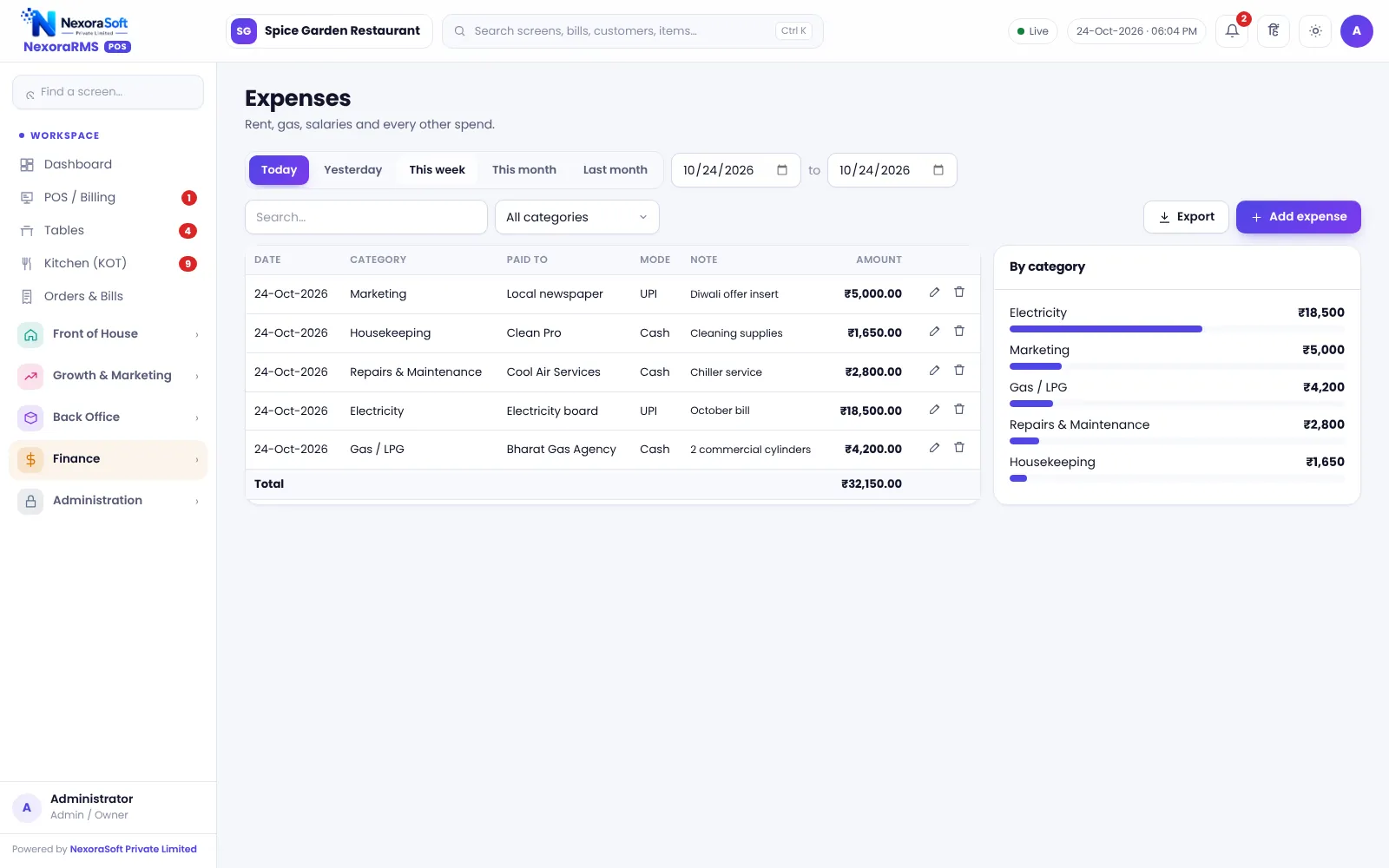
Record expenses with category and mode, and link them to the cash register.
Z report
Day-end printout of sales, payments and tax.
Approvals
Manager PIN for sensitive actions and an audit log.
Expenses and Day-End
Small expenses such as milk, gas or a repair are the usual source of unexplained shortage. Record them as expenses so they appear in profit and loss and in the cash register.
At day-end, the Z report and the shift close give the owner the cash number to match the drawer.
- Expected cash calculated
- Difference stored at close
- Expenses by category
- Day-end summary to the owner on WhatsApp
- Audit log
Closing a Shift
Open
Enter opening cash.
Run
Take pay-ins and pay-outs as they happen.
Count
Count denominations at close.
Compare
Check expected vs counted.
Report
Print the Z report.
Cash Control at a Glance
| Need | NexoraRMS-POS feature |
|---|---|
| Opening and closing | Shift open and close |
| Drawer movements | Pay-in and pay-out |
| Counting | Denominations |
| Small spends | Expenses |
| Evidence | Z report and audit log |
The software cannot confirm physical cash; it compares expected and counted figures you enter.
Restaurant Cash Register & Shift Software – FAQ
Shifts record who opened and closed the register, the opening cash, sales by payment mode, pay-outs and the counted cash, so every cashier is accountable for their own drawer.
Yes. At close the counted cash is compared with expected cash and the shortage or excess is shown with a reason field, so the owner can review it the same day.
Yes. Petty cash spent from the drawer, such as ice or gas, can be recorded as a pay-out or expense so the drawer balance still reconciles at close. Ask for a free live demo of NexoraRMS-POS with sample restaurant data to see this on screen.
Yes. The day-end Z report summarises sales, taxes, discounts, voids, payment modes and cash, and it can be shared as a WhatsApp summary. Confirm tax rates and treatment for your outlet with your CA; NexoraRMS-POS prints and exports the data.
Yes. A click-to-send WhatsApp summary opens WhatsApp with the day's numbers ready; someone taps send, so it is not fully automatic. You can verify this in a free live demo of NexoraRMS-POS using your own menu and tables.
See NexoraRMS-POS in Your Own Restaurant
Share your menu, tables and billing flow and get a free live demo of NexoraRMS-POS. No commitment; we typically respond within 24 hours.