Home › Inventory Management Software › Batch & Expiry Tracking Software in India
Inventory SoftwareBatch & Expiry Tracking Software with FEFO and Recall Trace
Track every batch from supplier to customer. Sell the earliest expiry first, get alerts before stock expires, and if a batch must be recalled see every customer and invoice that received it.
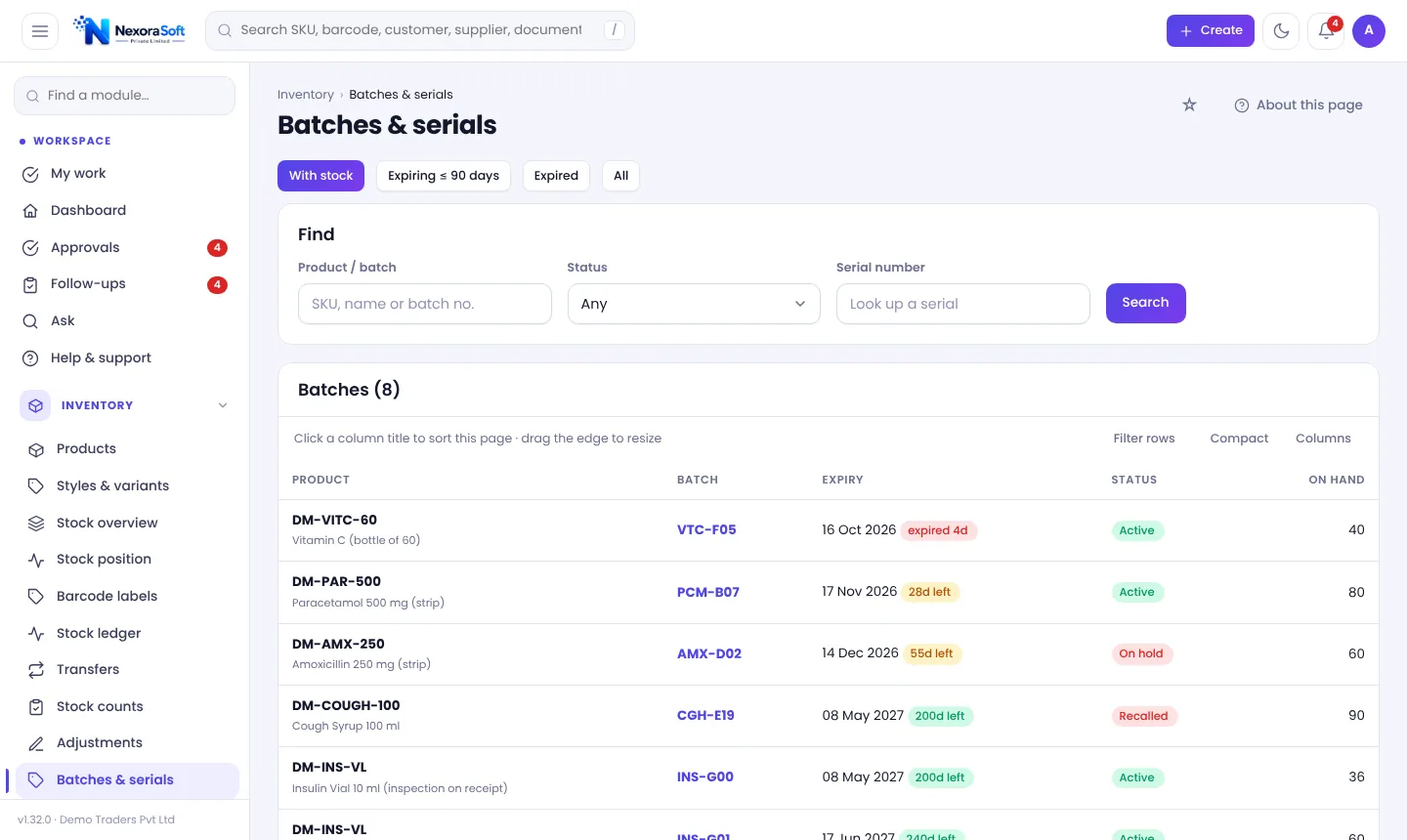
Why Batch and Expiry Control Matters
For medicines, food, cosmetics and chemicals, the batch is the unit of safety. A recall needs to find exactly who received batch B-402, and an expired item sold by mistake is a compliance and trust problem. Spreadsheets can hold an expiry date, but they cannot stop you selling the wrong batch.
In NexoraIMS a product can be tracked by batch or lot (with or without expiry and shelf life) or by serial number. Tracking cannot be switched off later, so decide before the first receipt.
Batch and Expiry Features
FEFO selling
Leave the batch blank on a sale and the batch that expires first is picked. Or type a batch or serial numbers to choose.
Expired goods refused
A goods receipt refuses expired stock, and a recalled or held batch is never picked.
Expiry alerts
A daily notification warns about batches expiring within the alert window you set.
Recall trace
Open the batch, mark it Recalled with a reason, and list every customer and invoice that received it, net of returns.
Quality inspection
Tick Inspect on receipt: stock waits in quarantine until passed and failed quantities are entered; failures count against the supplier.
Clearance suggestions
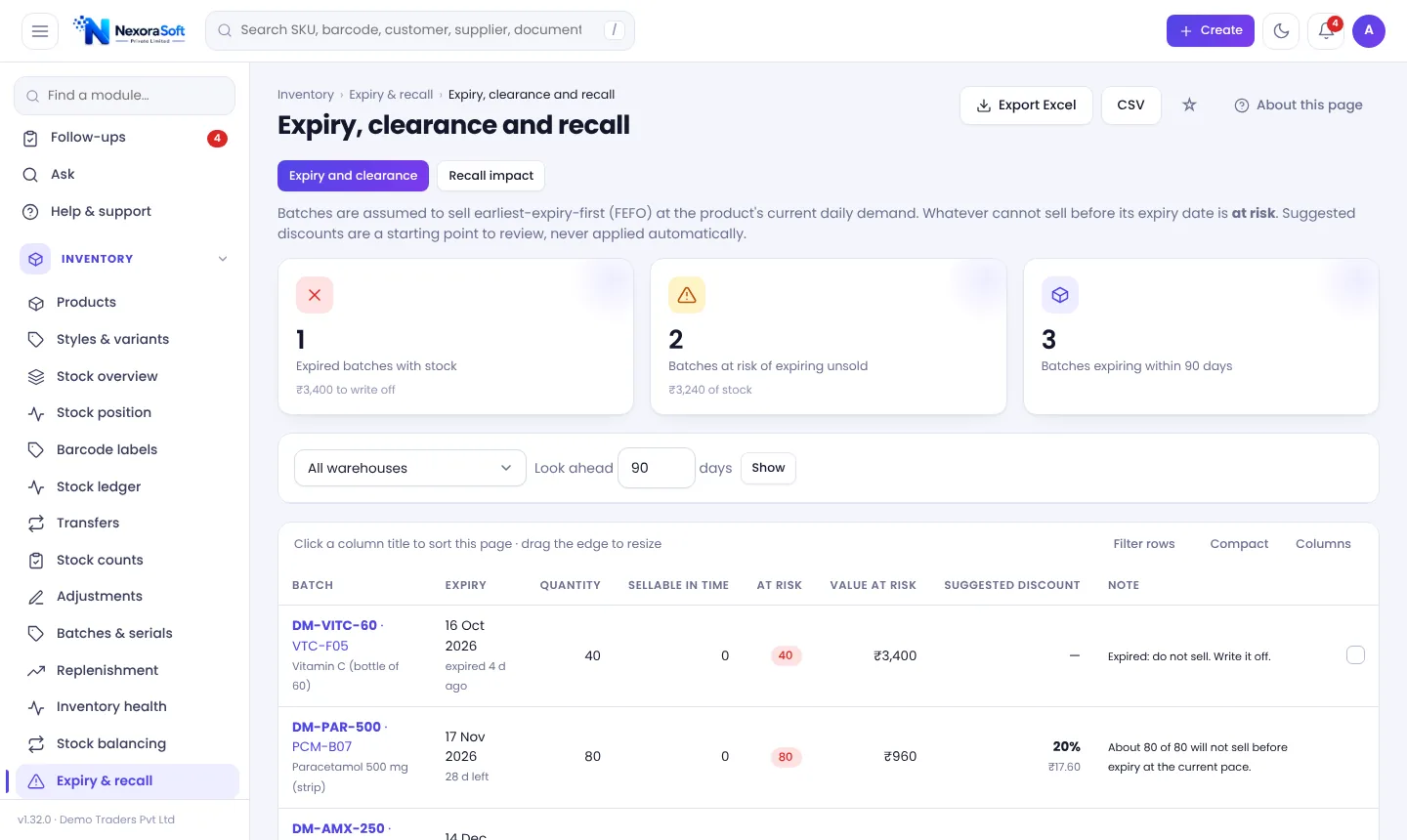
Stock at risk of expiring unsold is shown with a suggested discount, flagged when below cost.
Expiry, Clearance and Recall in One Place
The Expiry, clearance and recall page projects how much of each batch can sell before it expires at the current daily demand. What cannot sell is "at risk", with a suggested discount. Expired batches can be ticked and written off as a draft adjustment with the reason Expired, which still goes through the normal approval.
The Recall impact tab lists, for every batch on hold or recalled, the customers and invoices that received it, the quantity still in stock and a CSV for contacting buyers.
- Earliest-expiry-first projection
- Suggested clearance discount
- Draft write-off for expired batches
- Recall list with CSV
From Receipt to Recall
Receive
Enter batch, manufacturing date and expiry on the receipt.
Inspect
Optional quality inspection before stock is available.
Sell
Earliest expiry is picked automatically.
Watch
Alerts and the clearance page flag risk early.
Recall
Trace customers and invoices for any batch.
Batch Tracking at a Glance
| Need | NexoraIMS answer |
|---|---|
| Sell oldest first | FEFO pick by default |
| Stop expired stock | Refused on receipt, never picked when recalled |
| Find who got a batch | Recall impact list with CSV |
| Track serial products | Serial numbers on receipt and sale |
| Reduce write-offs | Clearance projection with discount hint |
Serial-number products do not yet support transfers, counts or adjustments. FEFO exceptions are not tracked.
Batch & Expiry Tracking Software in India – FAQ
First Expired, First Out: the batch with the earliest expiry is sold first. Read FIFO vs FEFO vs LIFO.
Yes, serial products record serial numbers on receipt and sale. Transfers, adjustments and counts are not yet available for serial products.
Expired goods are refused on receipt, and recalled or held batches are never picked for a sale.
Mark the batch Recalled with a reason; the page lists every customer and invoice that received it and the stock still held.
Yes, a daily notification covers batches expiring within the alert window set in Settings.
See NexoraIMS on Your Own Stock
Share your products, warehouses and billing flow and get a free live demo of NexoraIMS. No commitment; we typically respond within 24 hours.