An e-way bill is the electronic permit for moving goods worth more than Rs 50,000. A truck stopped without one can be detained and penalised, so it pays to know when you need it and how to make it quickly from your invoice.
When an e-way bill is required
- Movement of goods with consignment value above Rs 50,000, whether for sale, transfer, return, job work or any other reason.
- Consignment value means taxable value plus GST, excluding exempt goods on the same document.
- Inter-state job work and handicraft goods need an e-way bill even below the limit.
- For intra-state movement, some states use a different limit or exempt certain goods, so check your state's rules.
Some goods are exempt altogether, such as most unprocessed food items, LPG for households and goods moved by non-motorised conveyance.
Part A and Part B
| Part | Contains | Filled by |
|---|---|---|
| Part A | GSTIN of supplier and recipient, place of delivery, document number and date, value, HSN, reason for transport | Supplier, recipient or transporter |
| Part B | Vehicle number, or transport document (LR/RR/airway bill) number | Whoever arranges transport |
Part B can be skipped when goods move within the same state up to 50 km between the business and the transporter's place.
Validity
| Cargo | Validity |
|---|---|
| Normal cargo | 1 day for every 200 km or part of it |
| Over-dimensional cargo or multimodal ship cargo | 1 day for every 20 km or part of it |
A day ends at midnight following the time of generation. Validity can be extended within 8 hours before or after expiry, for reasons such as breakdown or accidents.
Rules added in 2025
- An e-way bill can be generated only for documents dated within the last 180 days.
- Total extension of an e-way bill is capped at 360 days from its original generation.
Generating it from your invoice
You can type every field on ewaybillgst.gov.in, but the faster way is to let billing software produce the bulk-upload JSON from the invoice you already made:
- Open the invoice and choose E-Way Bill JSON.
- Enter supply type, transport mode, approximate distance, vehicle number and transporter.
- Download the JSON and upload it under Generate Bulk on the e-way bill portal.
- Note the e-way bill number and save it on the invoice under order and dispatch details.
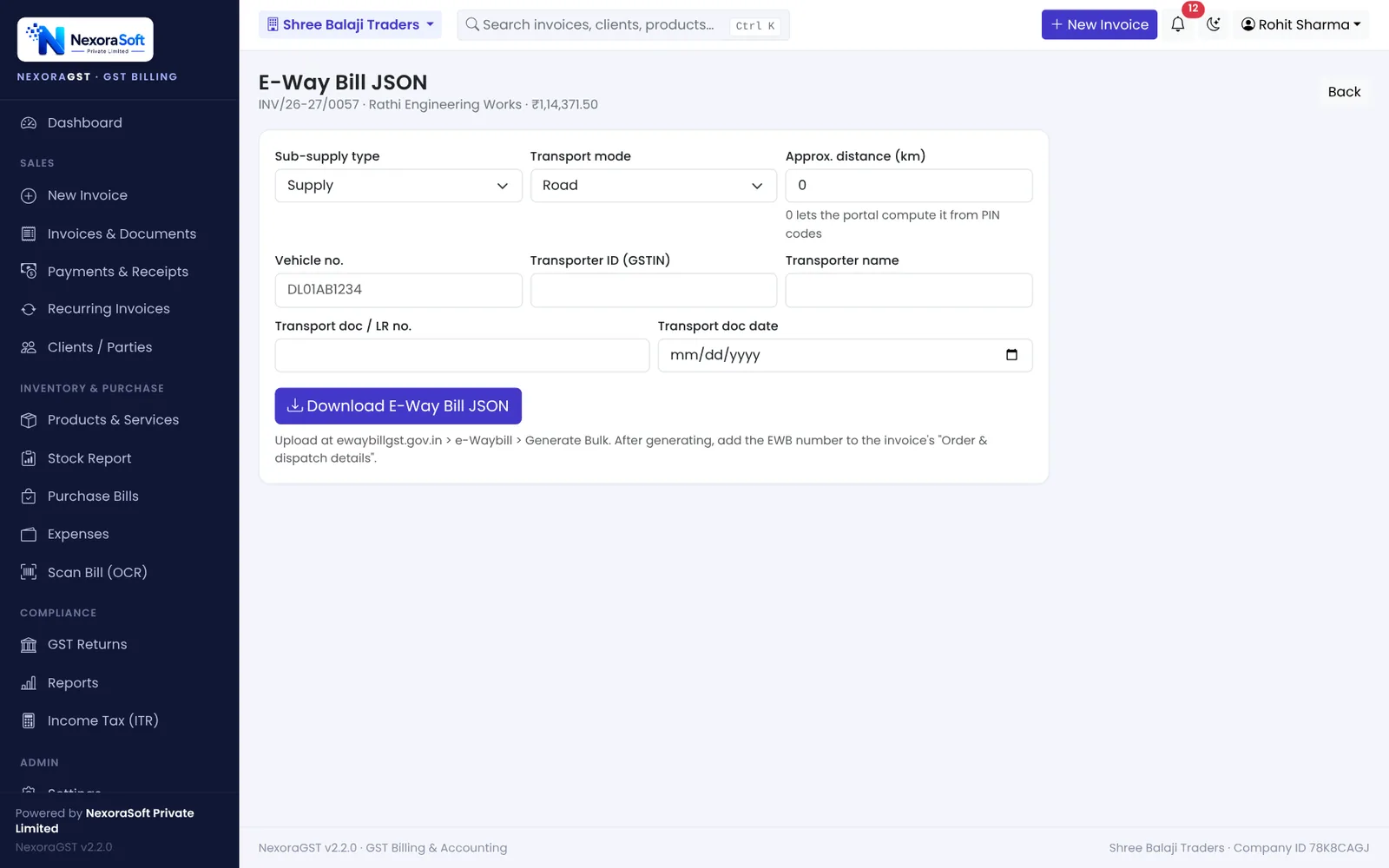
If you are above the e-invoice limit, an e-way bill can also be generated with the IRN, using Part B details given at the time of e-invoicing.
📌 GST law changes often. This guide reflects the rules as we understand them in October 2026. Confirm anything specific to your business with your CA or on gst.gov.in.
Software for this: NexoraGST GST Billing Software · for small business · in Delhi
CGST, SGST or IGST? Place of Supply Explained With ExamplesHow to Create a GST InvoiceGSTR-1 vs GSTR-3BGSTR-2B ReconciliationCredit Note and Debit Note Under GST
See NexoraGST in Action
Book a free live demo and watch invoices, payments, stock and GSTR-1 / GSTR-3B work on your own data.
Book a Free Demo +91 98115 51004