GST टैक्स इनवॉइस सिर्फ एक बिल नहीं है। इसी से आपका ग्राहक इनपुट टैक्स क्रेडिट (ITC) लेता है और इसी से आपका GSTR-1 बनता है। यहाँ आसान भाषा में जानिए कि GST बिल में क्या-क्या लिखना ज़रूरी है।
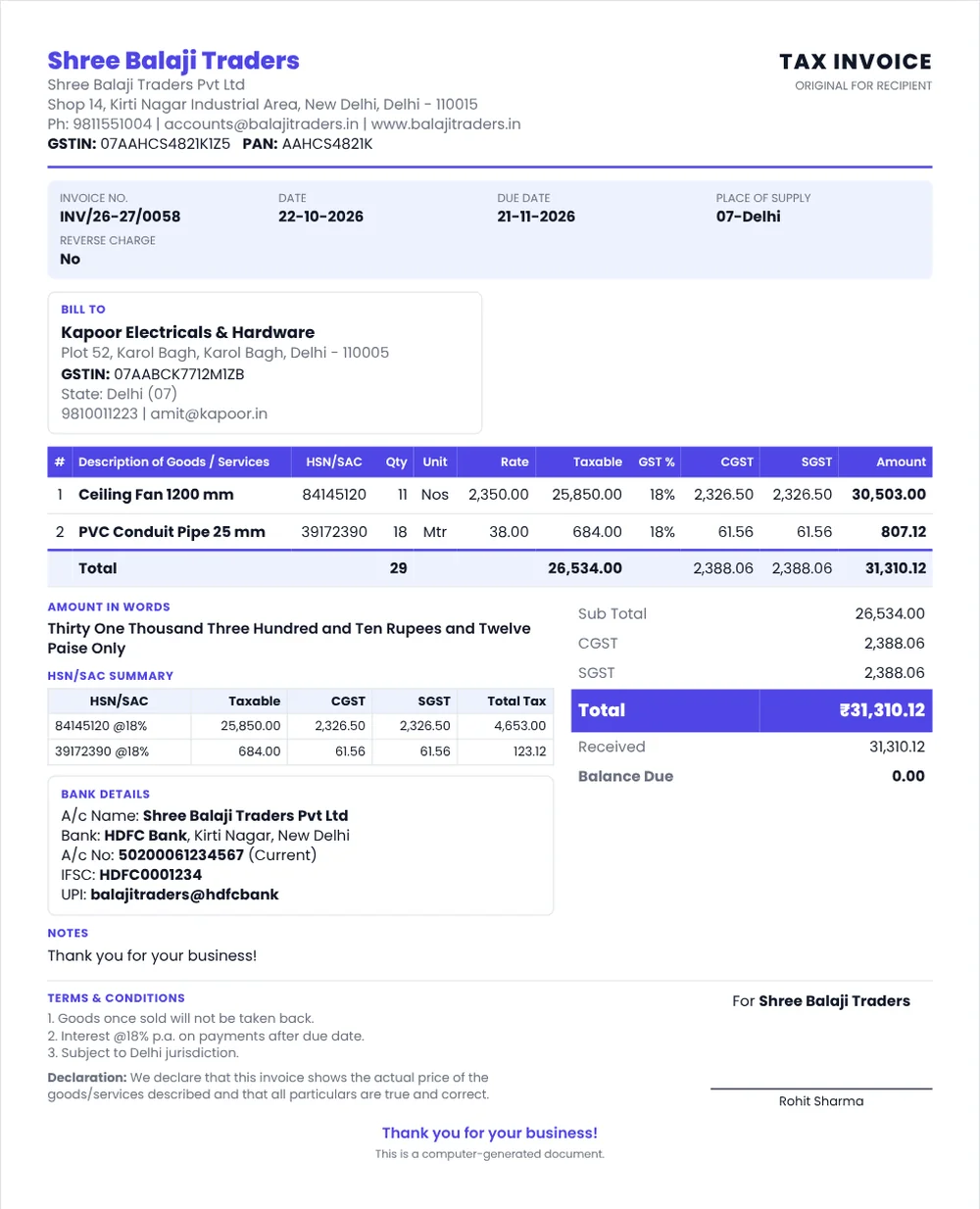
GST बिल में ज़रूरी जानकारी
- आपका नाम, पता और GSTIN
- बिल नंबर: लगातार क्रम में, एक वित्त वर्ष में यूनिक, अधिकतम 16 अक्षर
- बिल की तारीख
- ग्राहक का नाम, पता और GSTIN (अगर ग्राहक रजिस्टर्ड है)
- सामान के लिए HSN कोड और सेवाओं के लिए SAC कोड
- सामान का विवरण, मात्रा और यूनिट
- टैक्सेबल वैल्यू (डिस्काउंट के बाद)
- GST की दर और रकम: CGST + SGST या IGST
- दूसरे राज्य की सप्लाई में प्लेस ऑफ सप्लाई (राज्य का नाम)
- रिवर्स चार्ज लागू है या नहीं
- सप्लायर के हस्ताक्षर
CGST + SGST या IGST: कौन-सा लगेगा?
| स्थिति | टैक्स |
|---|---|
| ग्राहक उसी राज्य में (जैसे दिल्ली से दिल्ली) | CGST + SGST |
| ग्राहक दूसरे राज्य में (जैसे दिल्ली से नोएडा) | IGST |
| SEZ या एक्सपोर्ट | IGST या LUT के तहत बिना टैक्स |
कुल दर एक जैसी रहती है। जैसे 18% GST = CGST 9% + SGST 9%, या IGST 18%। ज़्यादा जानकारी के लिए पढ़ें: CGST, SGST or IGST? Place of Supply Explained।
बिल कब जारी करें?
- सामान: माल भेजने से पहले या उसी समय
- सेवा: सेवा देने के 30 दिन के अंदर
बिलिंग सॉफ्टवेयर से GST बिल बनाने का तरीका
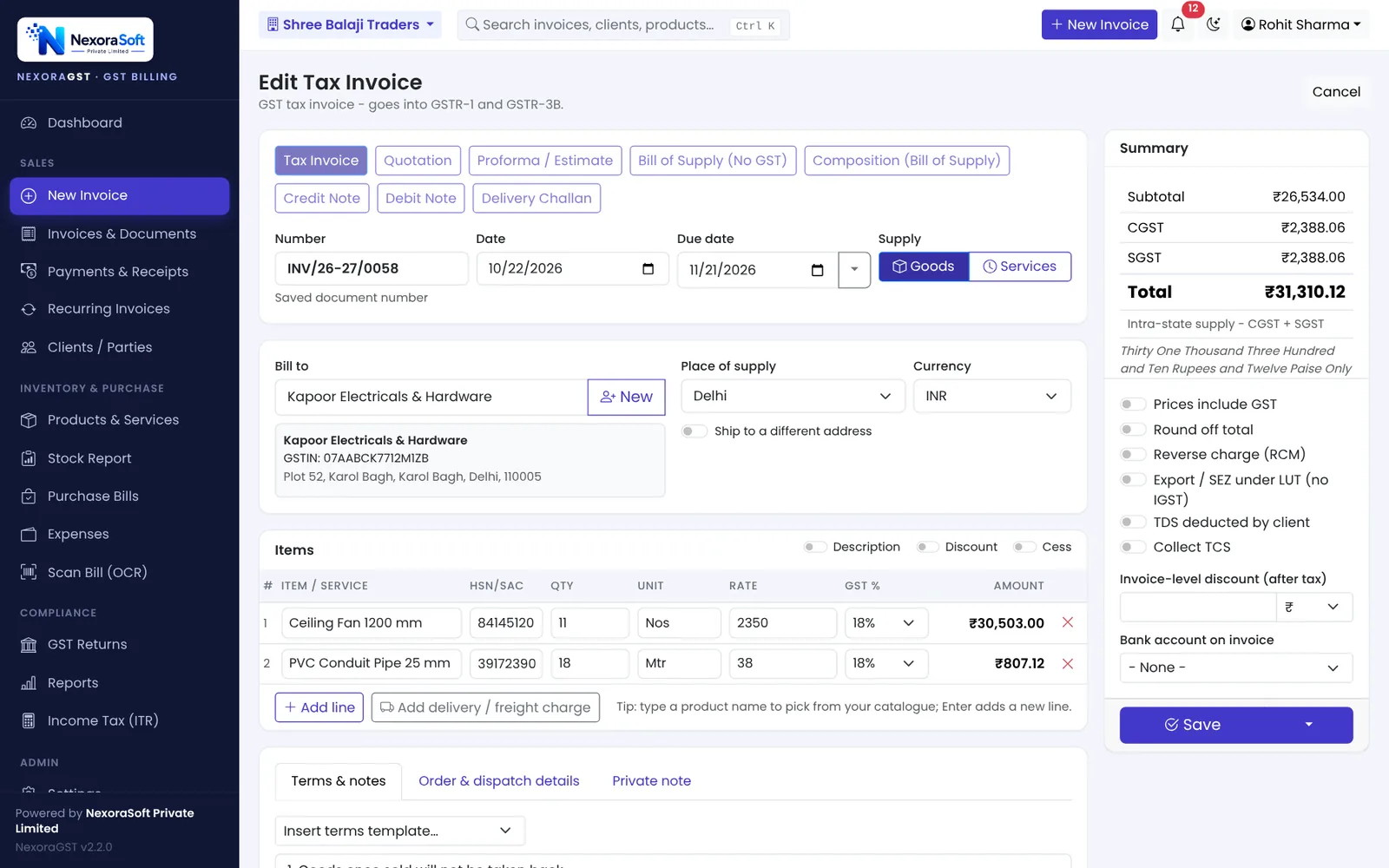
- डॉक्यूमेंट टाइप चुनें: टैक्स इनवॉइस, कोटेशन, बिल ऑफ सप्लाई आदि।
- ग्राहक चुनें या नया जोड़ें। सही GSTIN डालते ही राज्य अपने-आप भर जाता है।
- आइटम जोड़ें। HSN, यूनिट और GST दर प्रोडक्ट लिस्ट से आ जाती है।
- सेव करें। बिल नंबर, स्टॉक और लेजर अपने-आप अपडेट हो जाते हैं।
- प्रिंट करें, PDF डाउनलोड करें या WhatsApp पर भेजें।
आम गलतियाँ
- ग्राहक का गलत GSTIN: ग्राहक को ITC नहीं मिलेगा।
- दूसरे राज्य की बिक्री पर CGST + SGST लगाना: टैक्स दोबारा भरना पड़ सकता है।
- बिल नंबर छोड़ना या दोहराना।
- HSN कोड न लिखना।
- फाइल हो चुके बिल को बदलना। इसके बजाय क्रेडिट नोट या डेबिट नोट जारी करें।
English में विस्तार से पढ़ें: How to Create a GST Invoice।
📌 GST law changes often. This guide reflects the rules as we understand them in October 2026. Confirm anything specific to your business with your CA or on gst.gov.in.
Software for this: NexoraGST GST Billing Software · for small business · in Delhi
How to Create a GST InvoiceCGST, SGST or IGST? Place of Supply Explained With ExamplesCredit Note and Debit Note Under GSTGSTR-1 vs GSTR-3BGSTR-2B Reconciliation
See NexoraGST in Action
Book a free live demo and watch invoices, payments, stock and GSTR-1 / GSTR-3B work on your own data.
Book a Free Demo +91 98115 51004