Home › Restaurant POS Software › KOT & Kitchen Display Software for Restaurants
Restaurant POS SoftwareKOT & Kitchen Display Software for Restaurants
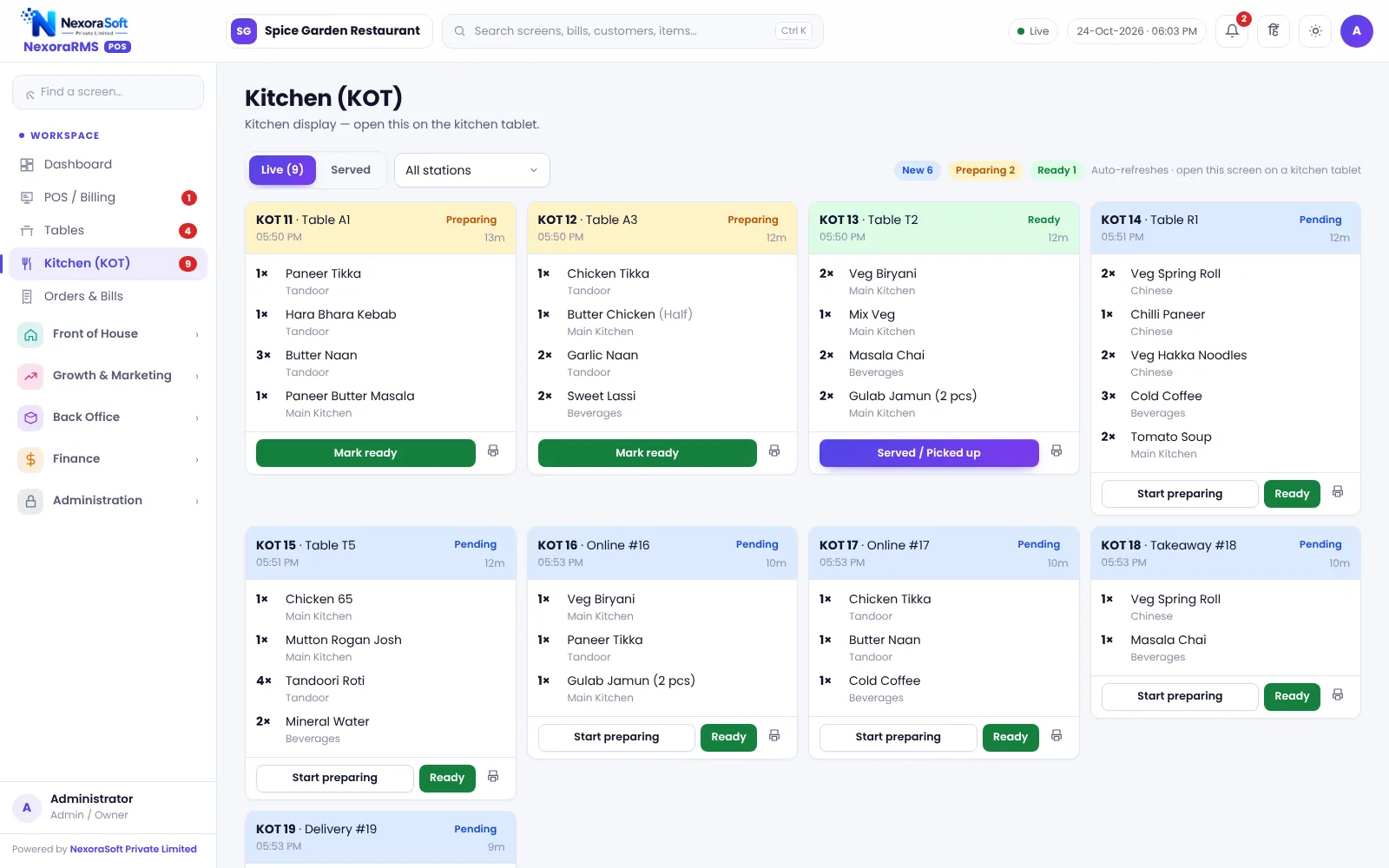
Orders reach the kitchen the moment the captain sends them, with a KOT number, table and notes. The kitchen display shows what is waiting, cooking and ready, so food leaves on time and nothing is lost on paper.
What a KOT System Does
A kitchen order ticket (KOT) is the instruction from the floor to the kitchen. On paper it gets lost, misread or delayed. A KOT system sends it in a fixed format with number, table, items, quantity and notes, and keeps a record of what was sent and when.
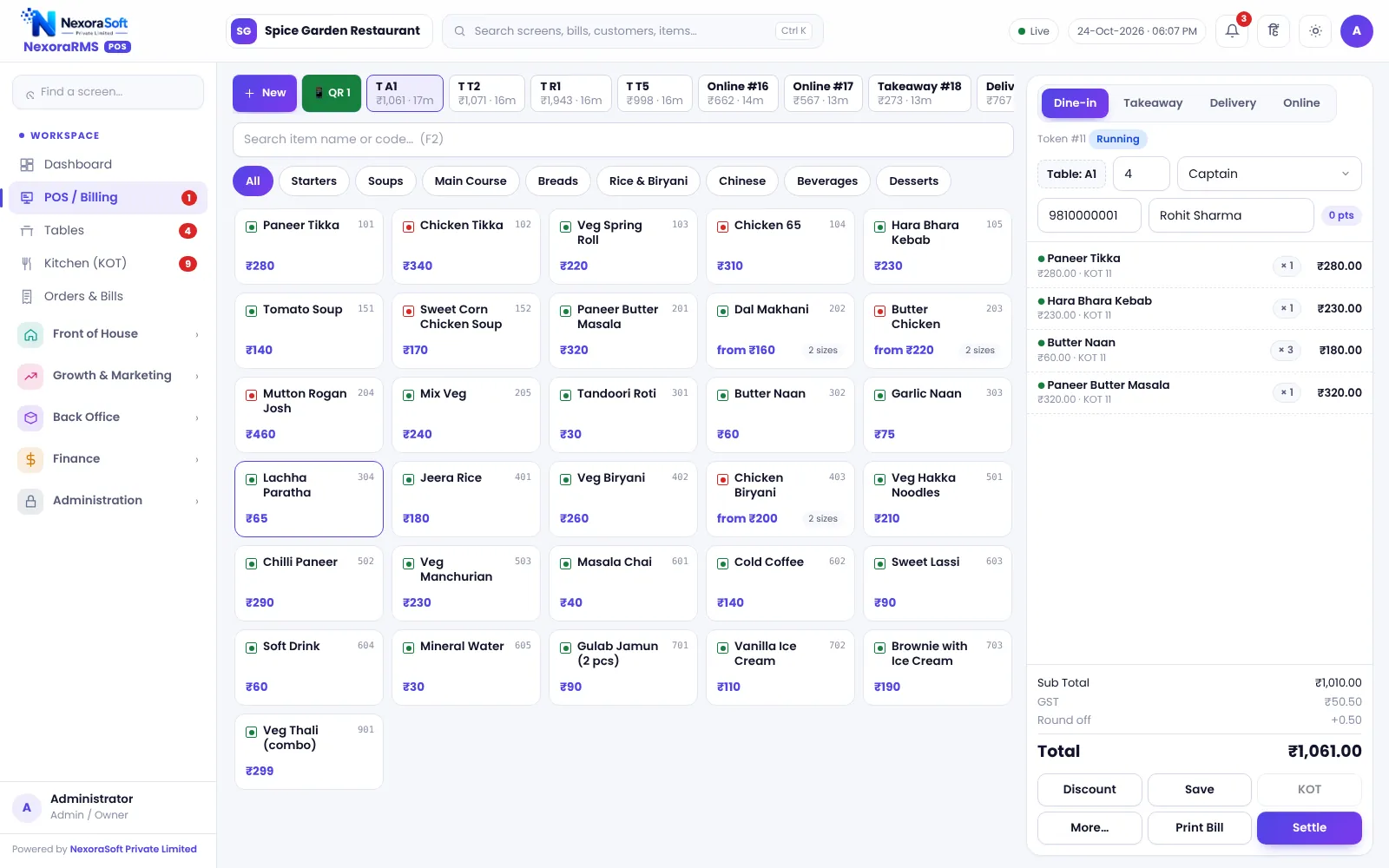
In NexoraRMS-POS sending an order saves the order and the KOT together. If guests add items later, a new KOT is created on the same bill, so the kitchen sees only the new items. Read KOT system explained for the basics.
Kitchen Features
Numbered KOT
Every ticket has a server-issued number, so duplicates and missing tickets are easy to spot.
Kitchen display
A screen for the pass or kitchen that lists tickets with table, order type, items and age.
Status flow
Tickets move from new to cooking to ready, so the captain knows when to pick up.
Reprint KOT
Reprint a KOT when the printer jams, marked as a reprint.
Cancel with control
Cancelling a sent item needs permission and is logged, so food cost leakage is visible.
Auto out-of-stock
Items can be marked unavailable so they cannot be ordered, and menu timings hide breakfast or dinner items.
From Captain to Kitchen to Table
The captain takes the order on a tablet, phone or counter screen and sends it. The ticket appears on the kitchen display and can also be printed. The kitchen marks it cooking and ready, and the ready status shows on the POS so the captain collects the dish.
Because the KOT, the bill and the stock use the same order, a cancelled dish does not remain on the bill and recipe stock is deducted only for what was served.
- One order, many KOTs as guests add items
- KOT print or on-screen display
- Kitchen status visible on the POS
- Order note for the kitchen
- Cancel item and cancel order with approval
KOT Process
Take order
Add items on the table order.
Send KOT
The ticket is numbered and sent.
Cook
Kitchen marks the ticket cooking.
Ready
Ready status appears at the POS.
Serve and bill
The same order becomes the bill.
KOT and Kitchen Display at a Glance
| Need | NexoraRMS-POS feature |
|---|---|
| Send orders fast | KOT on send, numbered by the server |
| Kitchen visibility | Kitchen display by status |
| Corrections | Reprint KOT, cancel item with approval |
| Special requests | Order note for kitchen and add-ons |
| Stock-outs | Out-of-stock and menu timings |
The kitchen display needs a screen on the same network as the server and a browser. Printer behaviour depends on your printer model.
KOT & Kitchen Display Software for Restaurants – FAQ
Yes. The kitchen display lists tickets by status, so cooks can mark them preparing and ready, and servers can see what is ready. It works on a tablet, TV or computer browser.
Yes. The KOT can be printed through the browser to a kitchen printer, with 58 mm and 80 mm thermal options. Test your printer during the demo. You can verify this in a free live demo of NexoraRMS-POS using your own menu and tables.
Yes. Items added later create a new KOT on the same bill, so the kitchen sees only the additions. The final bill includes all KOTs for the table. Ask for a free live demo of NexoraRMS-POS with sample restaurant data to see this on screen.
Yes. A KOT can be reprinted, and the reprint is clearly marked so the kitchen does not cook it twice. Reprints can also require a manager PIN and are logged.
Cancelling an item that has already been sent to the kitchen needs permission, such as a manager PIN, and a reason. The action is logged in the audit trail and the item is removed from the bill.
Yes. Stations such as Main Kitchen, Tandoor, Chinese and Beverages can be set up so each item routes to the right station. Confirm your station structure in the demo.
See NexoraRMS-POS in Your Own Restaurant
Share your menu, tables and billing flow and get a free live demo of NexoraRMS-POS. No commitment; we typically respond within 24 hours.