Home › Restaurant POS Software › QR Code Menu & Table Ordering Software
Restaurant POS SoftwareQR Code Menu & Table Ordering Software for Restaurants
Put a QR on every table. Guests open the menu on their phone, order, call the waiter or ask for the bill, with no app to install. Orders arrive as requests your staff accept.
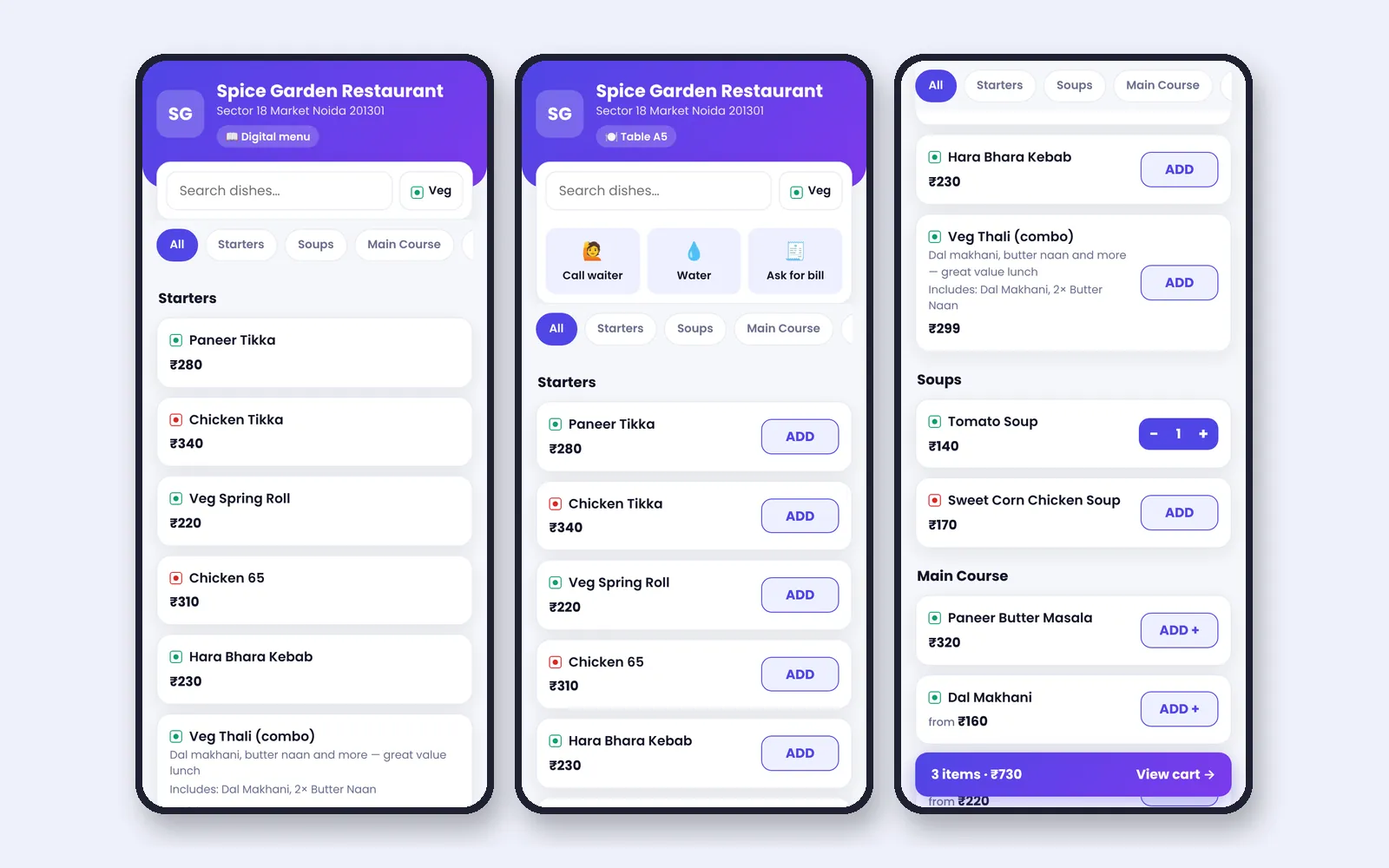
What QR Menu Ordering Software Does
A QR menu replaces the printed menu with a live one. Prices and availability are always current, and guests can order without waiting for a captain. For the restaurant it reduces order-taking effort at peak times and cuts mistakes in handwriting.
NexoraRMS-POS generates a signed QR link for each table, so a link cannot be altered to point at another table. Guests need no sign-in and no app. Read QR code menu for restaurants for setup tips.
Guest Features
Table QR
Each table has its own QR. A general QR opens a digital menu without ordering.
Menu on the phone
Categories, search, veg filter, sizes, add-ons and combos with server prices.
Call waiter, water, bill
Three quick buttons on the table menu notify the floor.
Order status
After ordering, guests see sent, confirmed, cooking, ready and served.
Rate your meal
A feedback page opens from the bill QR with ratings and NPS.
Safe by design
Per-phone rate limits, server-side prices and signed links.
How Staff Handle QR Orders
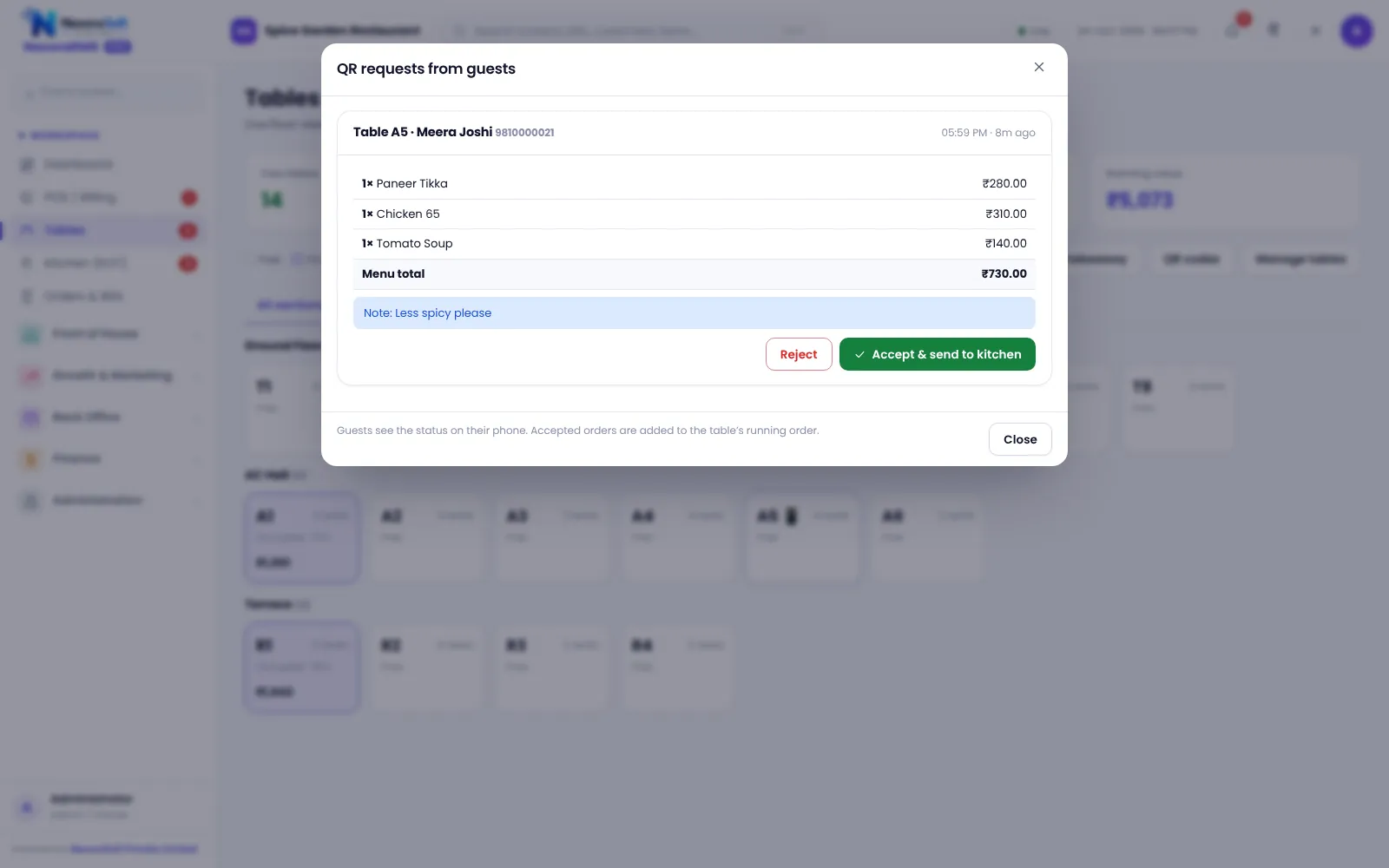
A guest order does not go straight to the kitchen. It arrives as a QR request on the Tables screen, where a captain or cashier reviews it and accepts it. Accepting turns it into a normal order and KOT on that table.
This keeps control with the restaurant: staff can reject a mistaken order or add a note before the kitchen starts.
- QR requests badge on the Tables screen
- Accept to create the order and KOT
- Table QR sheet to print
- Token board for takeaway on a TV
Setting Up QR Ordering
Print QR codes
Open QR codes on the Tables screen and print the sheet.
Stick on tables
Place one QR per table.
Test an order
Scan, order, accept and watch the KOT.
Train staff
Show the requests badge and the accept flow.
Go live
Start with a few tables, then extend.
QR Ordering at a Glance
| Need | NexoraRMS-POS feature |
|---|---|
| No app | Opens in the phone browser |
| Stay in control | Staff accept QR requests |
| Fewer calls to staff | Call waiter, water, bill |
| Takeaway queue | Token TV board |
| Feedback | Rate-your-meal page |
Guests pay at the counter or table through the normal bill; online payment inside the QR page is not part of this version.
QR Code Menu & Table Ordering Software – FAQ
No. The QR opens a web page in the phone browser, so guests do not need to install or sign in. You can verify this in a free live demo of NexoraRMS-POS using your own menu and tables.
No. Guests order and track status, and payment is settled with the normal bill at the counter or table. You can verify this in a free live demo of NexoraRMS-POS using your own menu and tables.
QR orders arrive as requests that staff accept first, which prevents prank or wrong orders reaching the kitchen. Ask for a free live demo of NexoraRMS-POS with sample restaurant data to see this on screen.
Yes. QR links are signed, prices come from the server, and per-phone rate limits reduce misuse. NexoraSoft gives a written quote after a free demo, based on outlets, users and modules.
Yes. A TV board shows preparing and ready tokens for takeaway. See POS for fast food and QSR. You can verify this in a free live demo of NexoraRMS-POS using your own menu and tables.
The staff interface has a Hindi mode. Check the guest page language in the demo. Ask for a free live demo of NexoraRMS-POS with sample restaurant data to see this on screen.
See NexoraRMS-POS in Your Own Restaurant
Share your menu, tables and billing flow and get a free live demo of NexoraRMS-POS. No commitment; we typically respond within 24 hours.