Home › Restaurant POS Software › Restaurant Feedback & NPS Software
Restaurant POS SoftwareRestaurant Feedback & NPS Software
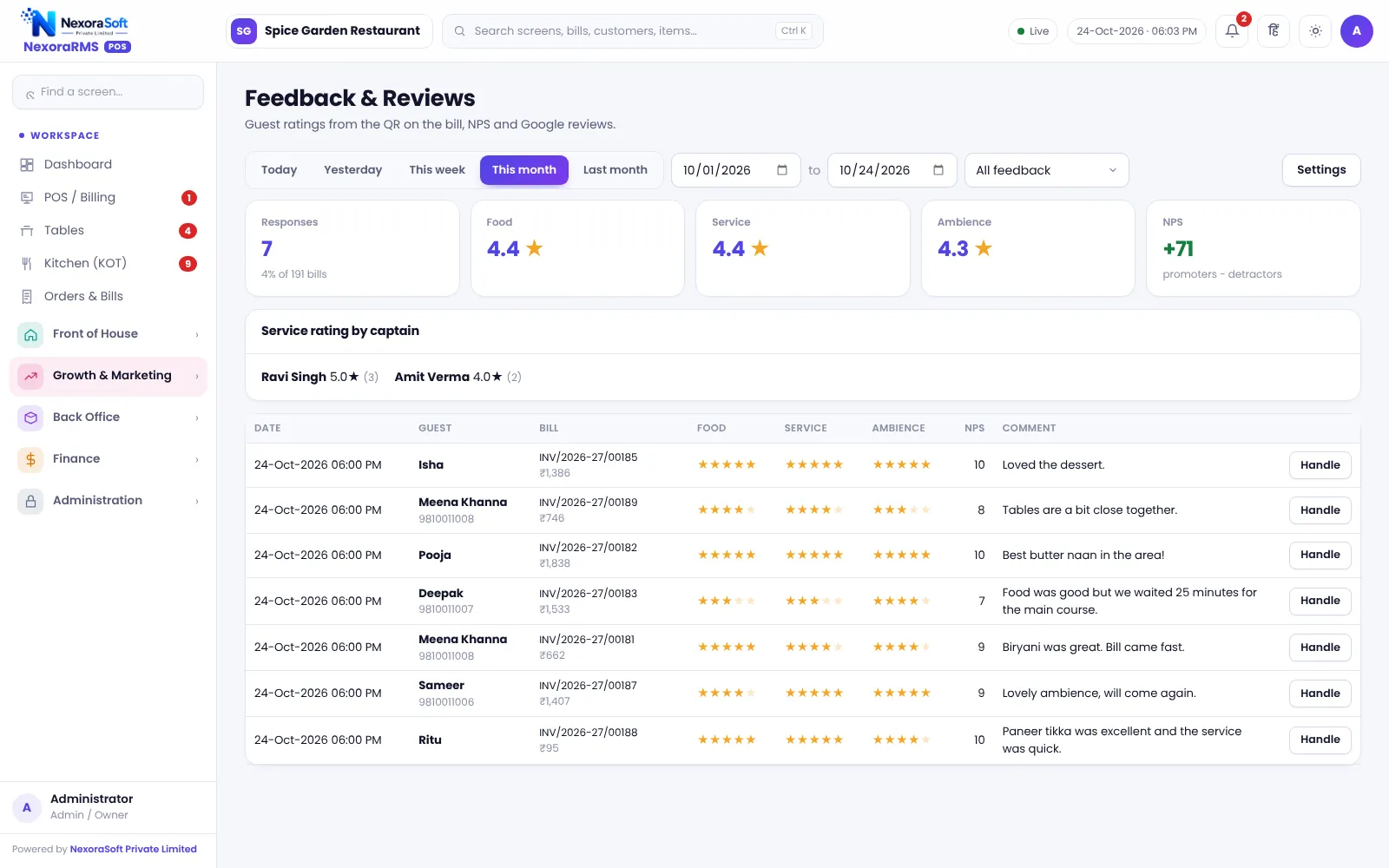
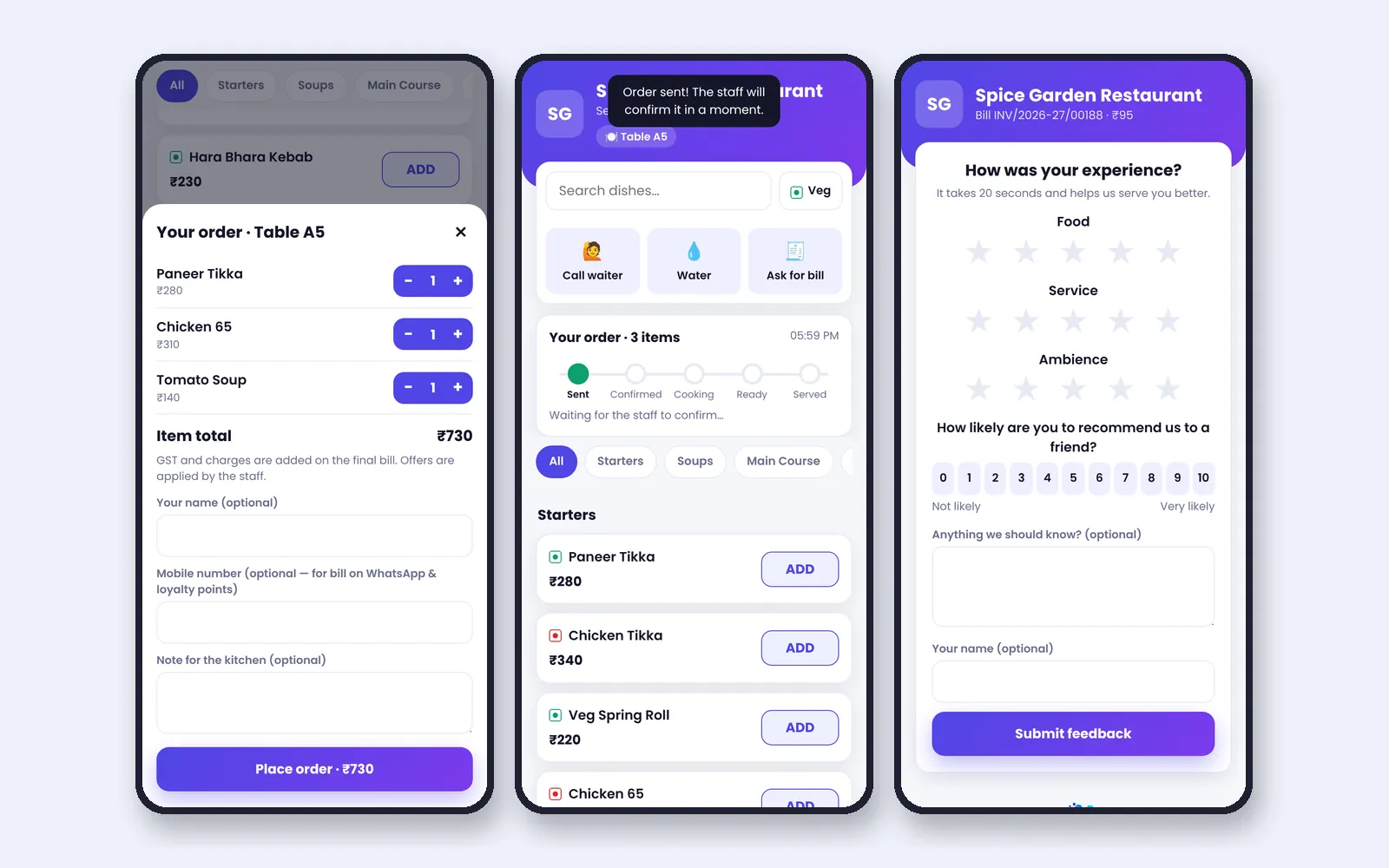
Every bill carries a QR to rate the meal. Guests score food, service and ambience, answer the NPS question and leave a comment, and you read it all in one place.
Why Collect Feedback at the Table
Unhappy guests rarely complain; they just do not return, or they post a review. Feedback at the time of the bill catches problems while you can still fix them.
In NexoraRMS-POS, the printed bill has a QR to a rate-your-meal page linked to that bill. A feedback bonus can reward guests with points.
Feedback Features
QR on every bill
Opens the feedback page for that bill.
Ratings
Food, service and ambience stars.
NPS
Likelihood to recommend, from 0 to 10, with the score on the dashboard.
Comments
Free-text feedback with the bill reference.
Feedback bonus
Reward guests with loyalty points.
Low-rating follow up
Filter low ratings to call guests back.
Using Feedback to Improve
Review comments weekly, tag themes such as speed, taste and hygiene, and fix one thing at a time. The NPS trend is a quick health check.
Public reviews on Google are a separate matter. The feedback page keeps private feedback with you; encourage happy guests to post a public review in your own words.
- Feedback linked to the bill
- NPS score
- Ratings by category
- Low-rating filter
- Points for feedback
Feedback Loop
Bill
QR prints on the bill.
Rate
Guest rates on the phone.
Read
Owner reads feedback and NPS.
Respond
Call back low ratings.
Improve
Fix the top issue.
Feedback at a Glance
| Need | NexoraRMS-POS feature |
|---|---|
| Collect easily | QR on bill |
| Measure | NPS and ratings |
| Act | Low rating filter |
| Reward | Feedback bonus |
Feedback is private to the restaurant; it does not post to Google by itself.
Restaurant Feedback & NPS Software – FAQ
No app is required. Feedback is collected on a web page opened through the bill or table QR, so guests only tap and answer. You can verify this in a free live demo of NexoraRMS-POS using your own menu and tables.
Yes. NPS-style feedback is included, so you can track a score over time along with comments tied to the bill. Ask for a free live demo of NexoraRMS-POS with sample restaurant data to see this on screen.
No. It collects private feedback so you can act on it first. It does not post to Google reviews or ask for public ratings on your behalf. Confirm tax rates and treatment for your outlet with your CA; NexoraRMS-POS prints and exports the data.
Yes. Guests can earn loyalty points for giving feedback, which raises response rates without paying for reviews. You can verify this in a free live demo of NexoraRMS-POS using your own menu and tables.
Yes. Each response is linked to the bill number, so you can trace a complaint to the table, order and staff on duty. Ask for a free live demo of NexoraRMS-POS with sample restaurant data to see this on screen.
See NexoraRMS-POS in Your Own Restaurant
Share your menu, tables and billing flow and get a free live demo of NexoraRMS-POS. No commitment; we typically respond within 24 hours.