Home › Restaurant POS Software › Zomato & Swiggy Order Management Software
Restaurant POS SoftwareZomato & Swiggy Order Management in One Restaurant POS
Keep aggregator, phone and own-store orders in the same bills, kitchen and reports instead of a separate tablet. In NexoraRMS-POS staff enter the order with the platform order ID, and it flows like any other order.
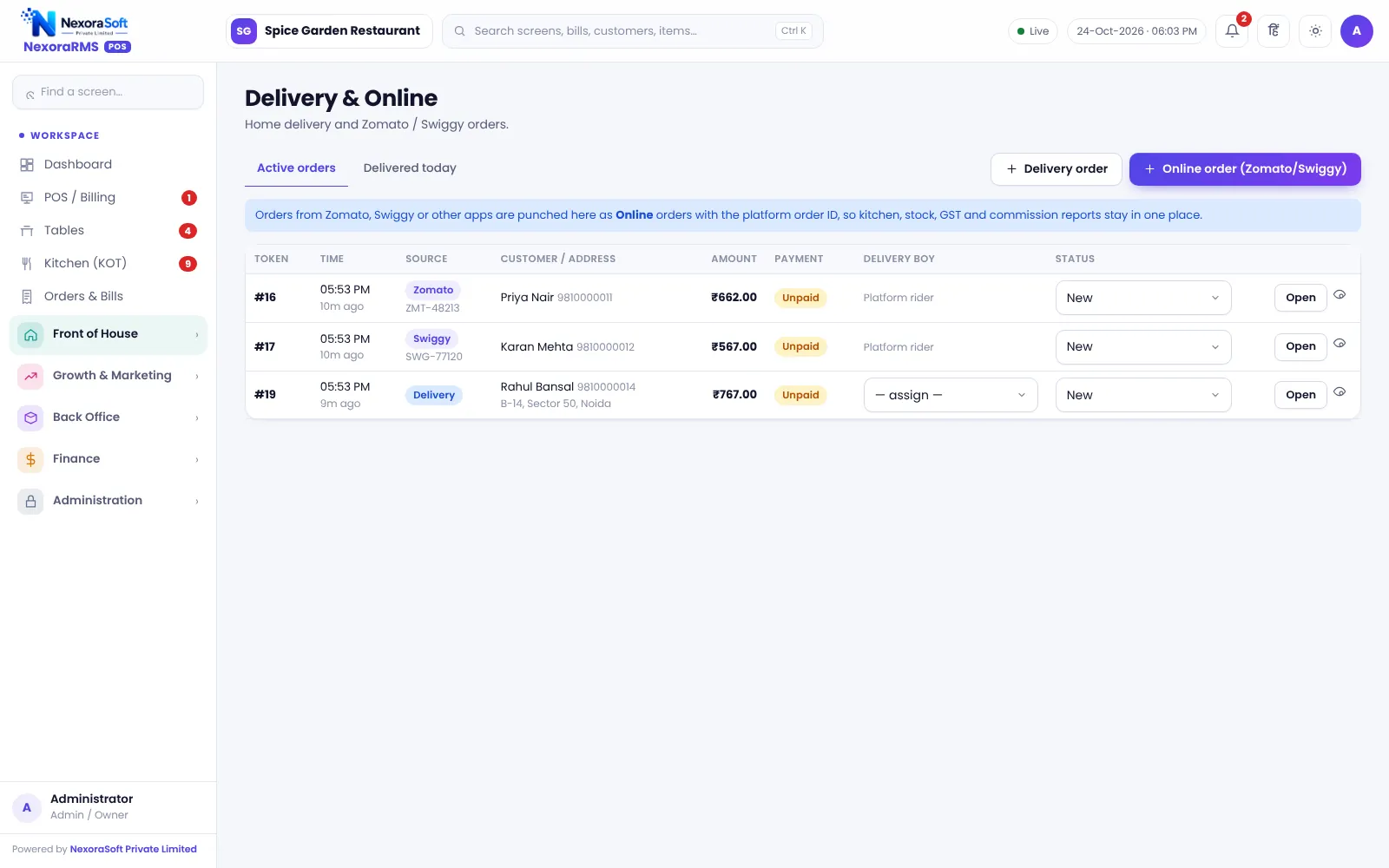
How NexoraRMS-POS Handles Online Orders
Restaurants usually receive orders on a Zomato or Swiggy tablet and then re-key them or cook from the tablet alone. Sales from those channels then go missing from the POS, stock is not deducted and the day-end does not match the payout.
In NexoraRMS-POS a staff member creates the order in Online mode, picks the platform, enters the platform order ID and adds the items. The order is billed on the channel price list, goes to the kitchen as a KOT and appears in reports by channel. Important: this version does not import aggregator orders automatically. Entry is manual, which keeps the data accurate but needs a person at the counter.
Online and Delivery Features
Online order mode
Pick Zomato, Swiggy or another platform and record the platform order ID.
Channel price lists
Different prices for AC hall, takeaway, Zomato and Swiggy menus.
Delivery orders
Customer address, delivery charge and packing charge on the bill.
Own online store
Takeaway and home-delivery ordering page with zero commission.
Pre-orders
Accept an order for a later time and see it on the kitchen queue.
Channel reports
See sales by order mode and platform in reports.
Price Lists for Every Channel
Aggregator menus often have higher prices to cover commission. NexoraRMS-POS supports price lists per channel, so the same dish bills at the right price for dine-in, takeaway, Zomato or Swiggy without editing the menu each time.
Packing and delivery charges are added where you enable them, and taxes follow the item’s tax settings. Confirm how GST applies to aggregator orders with your CA, because e-commerce operators may collect GST on some restaurant services.
- Price list per channel
- Packing and delivery charge
- Platform order ID on each bill
- Phone orders on the same screen
- Channel-wise sales in reports
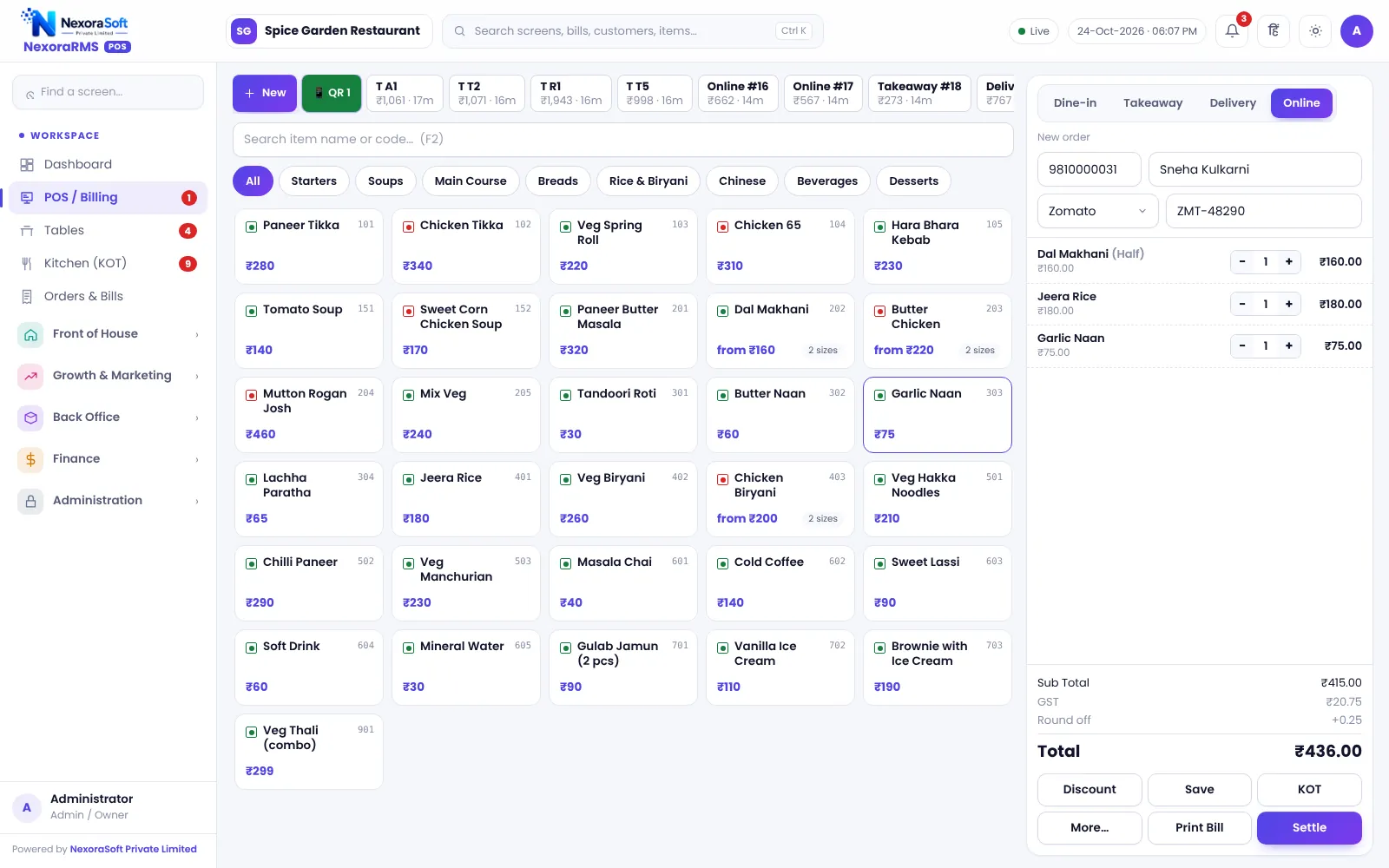
Handling an Aggregator Order
Receive
Order arrives on the platform tablet or app.
Enter
Create an Online order, pick the platform and add the order ID.
Kitchen
Send KOT. It shows on the kitchen display.
Hand over
Mark ready and pack; add packing charge if used.
Reconcile
Match platform payout with channel sales in reports.
Online Orders at a Glance
| Need | NexoraRMS-POS feature |
|---|---|
| One system | Same bills, KOT and reports |
| Right price | Price lists per channel |
| Trace an order | Platform order ID on the bill |
| No commission channel | Own online store |
| Auto import | Not available; manual entry |
Automatic Zomato or Swiggy integration is not part of this version.
Zomato & Swiggy Order Management Software – FAQ
Not automatically. Staff enter the order with the platform order ID. This keeps all channels in one set of bills and reports. You can verify this in a free live demo of NexoraRMS-POS using your own menu and tables.
Yes. Price lists per channel let you set higher prices for delivery apps than for dine-in. NexoraSoft gives a written quote after a free demo, based on outlets, users and modules.
Yes. An own online store for takeaway and home delivery with zero commission is included. Ask for a free live demo of NexoraRMS-POS with sample restaurant data to see this on screen.
Yes. Recipe stock is deducted when the order is settled, like any other order. Ask for a free live demo of NexoraRMS-POS with sample restaurant data to see this on screen.
Use channel-wise sales reports and compare with the platform statement. Payout reconciliation is manual. You can verify this in a free live demo of NexoraRMS-POS using your own menu and tables.
Yes. A cloud kitchen can use this with channel-wise orders and reports. See POS software for cloud kitchens. Ask for a free live demo of NexoraRMS-POS with sample restaurant data to see this on screen.
See NexoraRMS-POS in Your Own Restaurant
Share your menu, tables and billing flow and get a free live demo of NexoraRMS-POS. No commitment; we typically respond within 24 hours.