Home › School Management Software › School Staff Attendance & Payroll Software
School Management SoftwareSchool Staff Attendance & Payroll Software
Keep staff records, mark staff attendance, process the monthly salary and print payslips, with advances recovered through payroll. NexoraEDU covers a school’s own teaching and non-teaching staff.
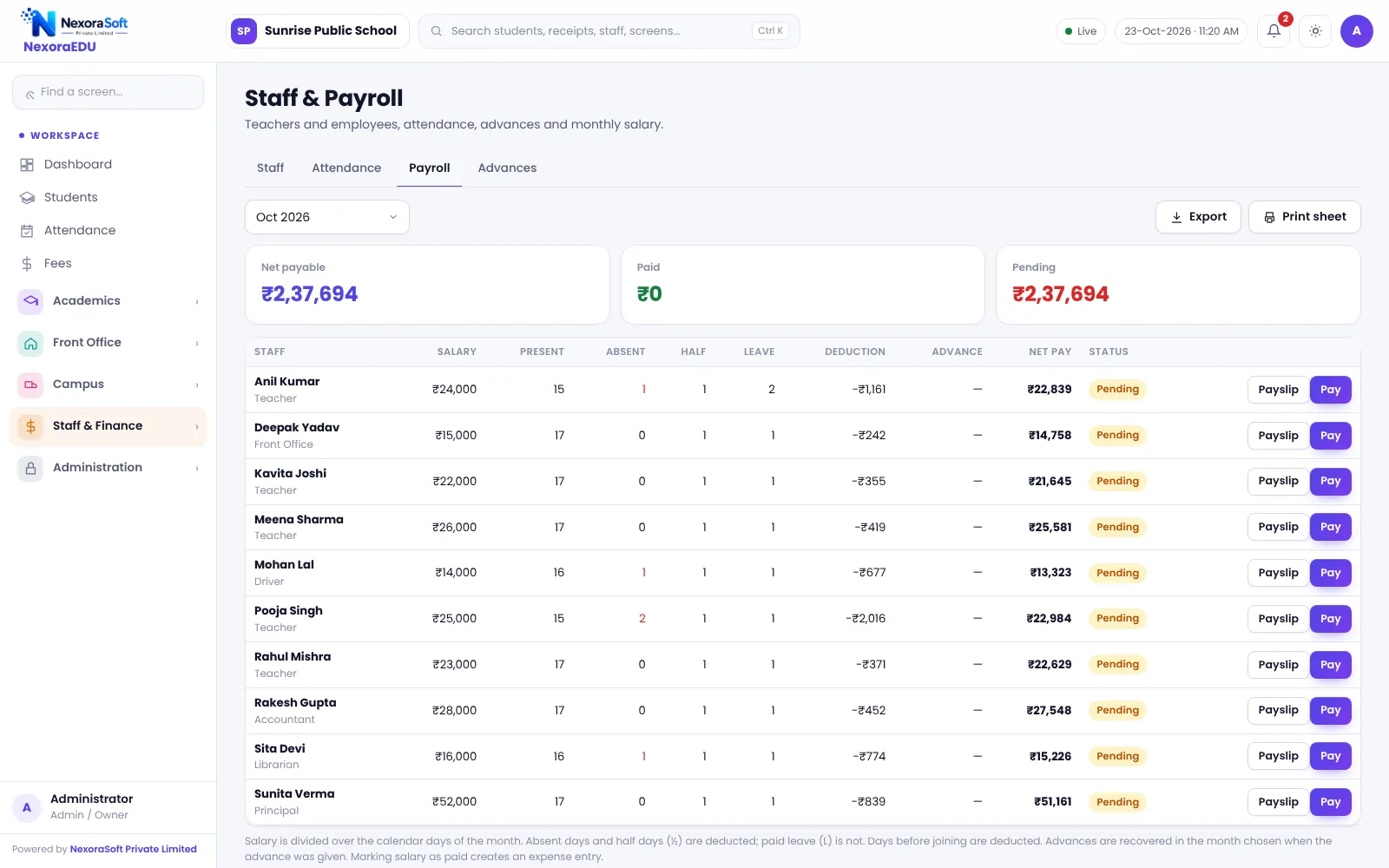
Staff Salary in a School
A school pays teachers, non-teaching staff, drivers and support staff on different terms. Attendance, leave, advances and deductions must all reach the salary slip, and any mistake becomes a staff complaint on the first of the month.
NexoraEDU keeps a staff directory, marks daily staff attendance and runs a monthly payroll that produces a payslip for each person. Advances are recorded and recovered through payroll.
Staff Features in NexoraEDU
Staff directory
Teaching and non-teaching staff with role and contact details.
Staff attendance
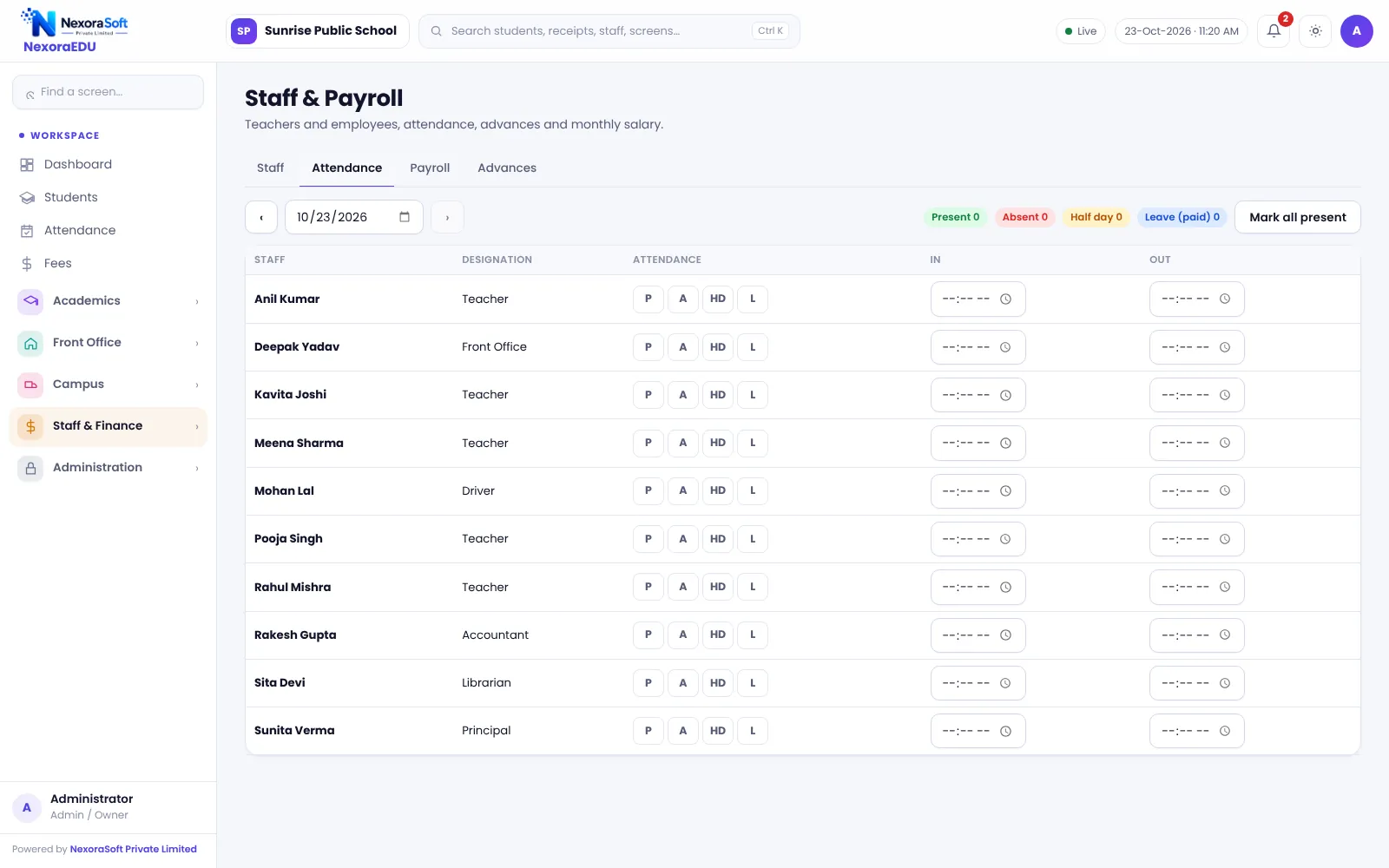
Daily attendance with leave and half-day.
Monthly payroll
Process salaries for the month with earnings and deductions.
Salary slip
Printable payslip for every staff member.
Advances
Record salary advances and recover them in payroll.
Expenses
Record school expenses by head with date and amount.
Payroll for School Needs
The built-in payroll fits a school’s own staff and keeps everything in the same software as the rest of the school. It is designed for straightforward monthly salary processing with deductions and advances.
For deeper statutory payroll, such as PF, ESI, TDS, professional tax, Form 16 and multi-branch rules, NexoraSoft offers dedicated payroll software for schools and the full NexoraHRMS payroll software.
- Staff attendance feeds payroll
- Printable payslips
- Advances recovered through payroll
- Expense records by head
- Link to dedicated payroll for statutory needs
Running Monthly Payroll
Staff
Keep the directory and salary details current.
Attendance
Mark staff attendance every day.
Advances
Record advances as they are given.
Process
Run the month’s payroll and review.
Payslips
Print payslips and pay by bank or cash.
Staff Module at a Glance
| Need | NexoraEDU answer |
|---|---|
| Staff records | Staff directory |
| Attendance | Daily staff attendance |
| Salary | Monthly payroll with payslips |
| Advances | Recorded and recovered |
| Statutory depth | Use dedicated payroll software |
Related School Management Software Guides
School Management Software India (full guide)Student Admission & Management SoftwareSchool Timetable Management SoftwareSchool Reports & Analytics SoftwareSchool Management Software Pricing in IndiaSchool Data Security, Backup and User RolesHow to Implement School Software for a New Session
School Staff Attendance & Payroll Software – FAQ
The school module is designed for straightforward monthly salary, deductions and advances. For detailed statutory compliance such as PF, ESI, TDS, professional tax and Form 16, we recommend NexoraSoft’s dedicated payroll product, which is built for it. Your accountant should confirm which compliance applies to your school.
Yes. Staff attendance is marked daily in the software and is used in the monthly payroll run, so absences are reflected in the salary. Agree your leave and half-day rules in writing and share the monthly attendance summary with staff before payment to avoid disputes.
Yes. A payslip can be printed for each staff member from the payroll run, with the school name and details from your branding settings. Check the layout for your longest names and number of deduction lines in the demo, and keep a copy of each month’s run for audit.
Advances are recorded against the staff member and can be recovered through payroll, so the deduction appears on the payslip. Keep a clear approval process for advances, and review the advances screen each month so recoveries match the agreed schedule.
Yes, for academic data. Teachers log in with a teacher role and see only the classes assigned to them, and this is enforced on the server. Staff attendance and payroll screens are available only to roles you give permission, such as the principal or accounts head.
See NexoraEDU Working for Your School
Share your classes, fee structure and workflow and get a free live demo of NexoraEDU. No commitment; we typically respond within 24 hours.