Home › School Management Software › Student Admission & Management Software
School Management SoftwareStudent Admission & Management Software
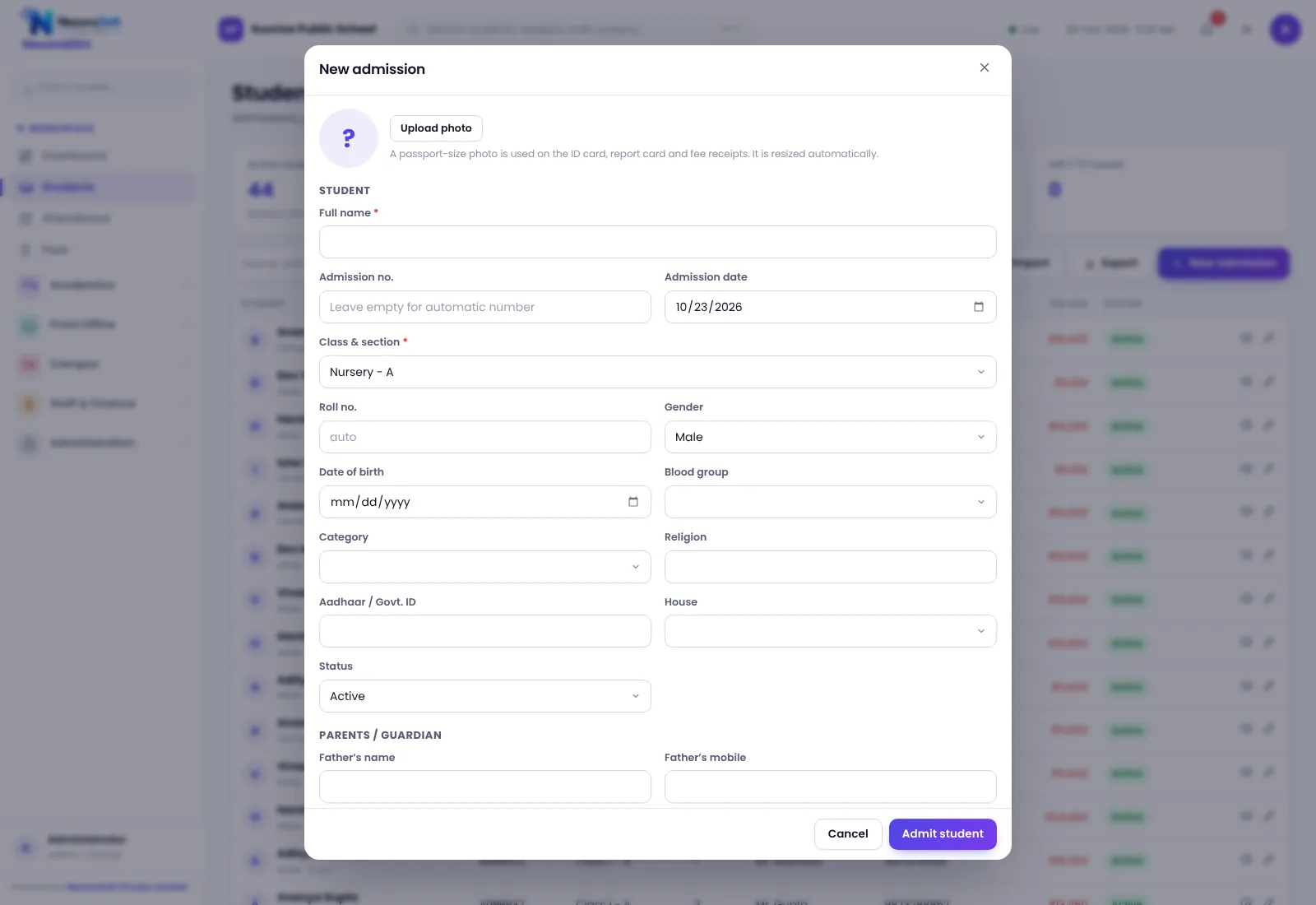
Enter a student once and use the record everywhere: fees, attendance, report cards and certificates. NexoraEDU handles the admission form, profile, documents, siblings, promotion and printable bonafide and TC.
What Student Management Software Should Do
A school’s student register is its most important record. It feeds the fee ledger, the attendance sheet, the report card and every certificate. When it lives in paper files and several Excel sheets, a single wrong class or section ripples through the year.
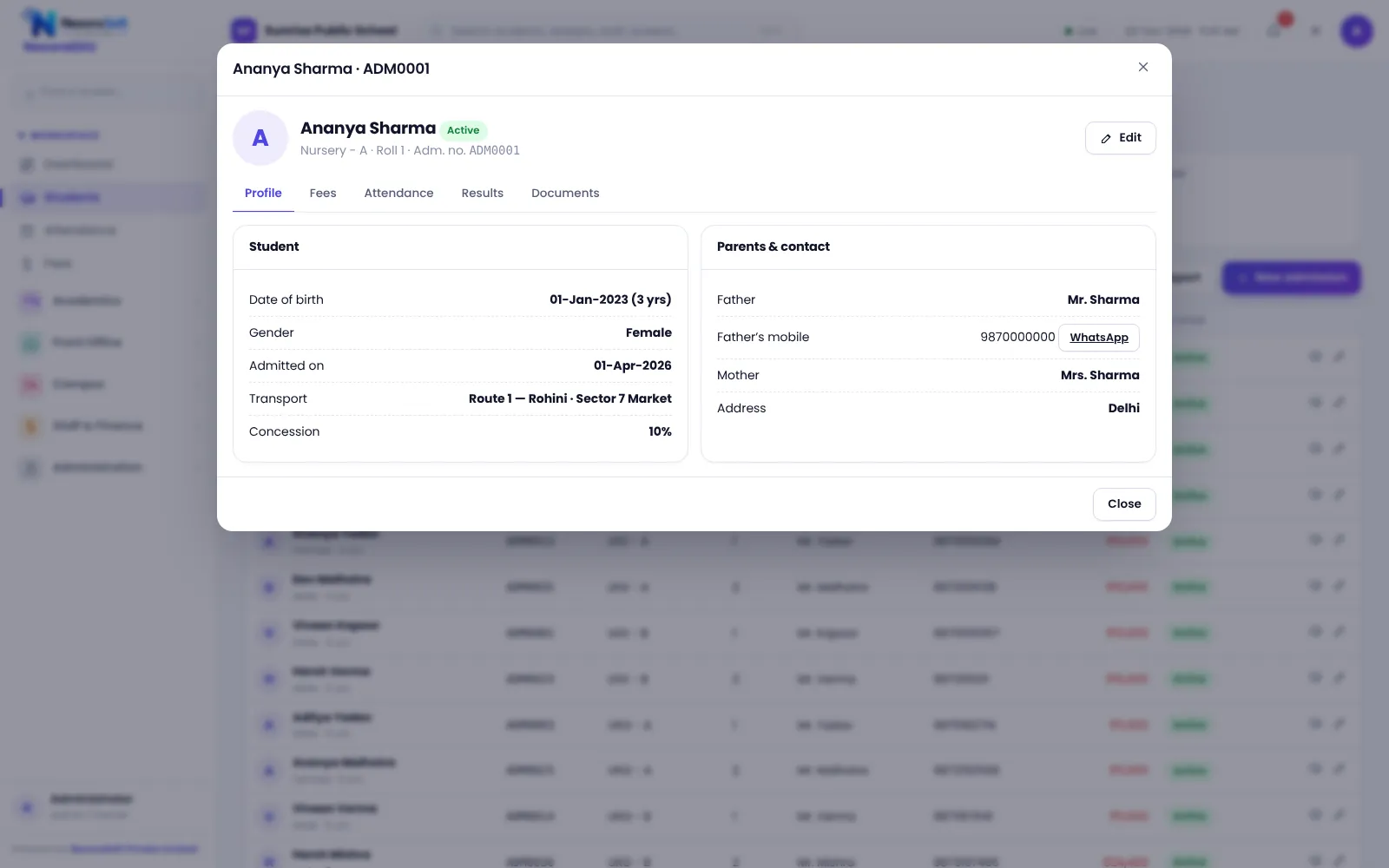
NexoraEDU keeps one student record with personal details, guardians, class and section, transport, documents and siblings. Everything else in the software reads from it, so a correction made once is correct everywhere.
Student Features in NexoraEDU
Admission form
Student and parent details, previous school, class, section, transport and notes in one form.
Documents
Record and track documents received, such as birth certificate, transfer certificate and photographs.
Siblings
Link brothers and sisters so parents see them together and fee handling is simpler.
Bonafide and TC
Print a bonafide certificate and transfer certificate from stored data.
ID card
Generate student ID cards from the profile data.
Import and export
Bring in existing students from Excel and export lists for reports or audits.
One Record, Used Everywhere
The student profile gathers fees, attendance, documents and siblings in one screen, so the front office can answer a parent without opening four files.
At the end of the year, promotion moves a class to the next one in a single step, with the option to leave back selected students.
- Admission number and class-section allotment
- Guardian details and contact numbers
- Promotion to the next class
- Search by name, admission number or class
- Status for active, left and transferred students
From Enquiry to Enrolled Student
Enquiry
Log the enquiry and follow-ups in the pipeline.
Admission form
Fill student and parent details and allot class and section.
Documents
Mark the documents received and pending.
Fee set-up
The class fee structure applies and the fee counter can take admission fees.
Start
The student appears in attendance, timetable and the parent portal.
Student Management at a Glance
| Need | NexoraEDU answer |
|---|---|
| Single student record | Profile with guardians, class and documents |
| Bulk start-up | Import from Excel |
| Certificates | Bonafide, TC and ID card |
| Year-end | Promotion to the next class |
| Family view | Siblings linked |
Related School Management Software Guides
School Management Software India (full guide)School Attendance Management SoftwareSchool Fee Management & Collection SoftwareOnline School Fee Payment SoftwareParent & Student Portal SoftwareSchool Front Office, Enquiry & Visitor SoftwareSchool Management Software in DelhiWhat Is School Management Software?Best School Management Software in India: Features to CheckSchool Admission Process: Enquiry to EnrolmentHow to Implement School Software for a New Session
Student Admission & Management Software – FAQ
Yes. NexoraEDU supports student import, so you can bring in a class list instead of typing every record again. We help you format the sheet, check class and section names and test with one class before importing the whole school. Clean data before import saves hours later, so check duplicates and phone numbers first.
Yes. A bonafide certificate and a transfer certificate can be printed from the stored student data, using the school name and details from your profile settings. The exact wording and format should be checked against your board or state rules in the demo, and we can adjust the layout where needed.
Yes. The software has a promotion step that moves students to the next class, and a start-new-session wizard to prepare the next year. You can leave back specific students. Take a backup before promotion, review the class lists, and promote one class first if you want to test the flow.
Yes. Siblings can be linked to a family so that parents see their children together in the portal and the front office can handle fees for the family more easily. Discount rules for siblings should be set as a concession policy by the school, which the fee counter then applies with the right approval.
No. This version does not include a public online admission form that feeds the software. Enquiries and admissions are entered by staff on the front desk. If you need a website form, NexoraSoft can build one as custom development and connect it to the enquiry list.
See NexoraEDU Working for Your School
Share your classes, fee structure and workflow and get a free live demo of NexoraEDU. No commitment; we typically respond within 24 hours.