A school holds sensitive data about children, families and fees. A few habits, and software that enforces them, go a long way toward protecting it.
Give people only what they need
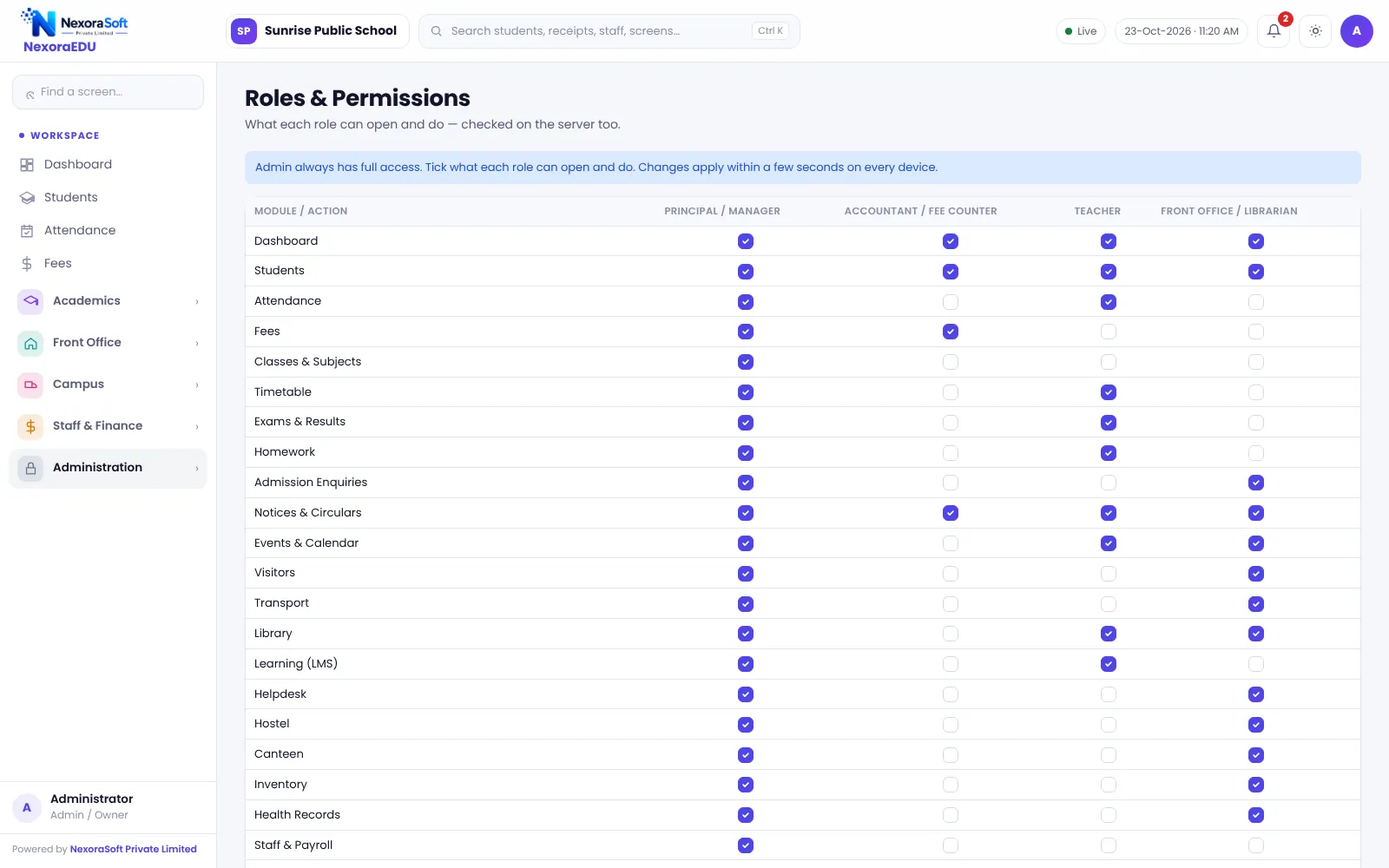
| Role | Typical access |
|---|---|
| Principal | Everything, including reports |
| Accountant / fee counter | Fees and receipts |
| Teacher | Own classes only |
| Front office / librarian | Enquiries, visitors, library, notices |
In NexoraEDU permissions are enforced on the server, so a hidden menu is not the only protection. Teachers can open only the classes assigned to them.
Password habits
- Change the default administrator login at first use
- Use a different login for each person
- Never share the principal PIN
- Remove access on the day a staff member leaves
Audit log
The audit log records who did what and when for important actions such as concessions, receipt cancellation and changes to marks. Review it monthly.
Backups
- The server takes a daily backup and keeps the last 14 copies.
- Download a backup file before promotion, new session set-up and major imports.
- Keep a copy off the server, for example on a secure drive.
- Test a restore once a year on a spare set-up.
Portal safety
Parents and students have separate logins and are asked to change the first password. Share the portal address only with families.
Know the limits
Security is also about hosting, https and office habits. Ask your vendor who is responsible for the server and updates. Online payments need https and the school’s own gateway account.
A termly security checklist
- Review the list of users and remove people who have left.
- Check that each role has only the permissions it needs.
- Read the audit log for unusual changes.
- Download a backup and store a copy off the server.
- Remind staff not to share passwords.
Student data and privacy
Student and family data should be used only for school purposes. Do not share class lists or fee dues outside authorised staff, and do not put them on public notice boards. Follow the data protection obligations that apply to your school and consult your legal adviser where unsure.
Related guides: School Management Software in India (complete guide)
Parent & Student Portal SoftwareSchool LMS, Assignment & Online Quiz SoftwareSchool Transport Management SoftwareSchool Staff Attendance & Payroll SoftwareSchool Reports & Analytics SoftwareSchool Management Software in DelhiSchool ERP vs Excel and Paper RegistersHow to Implement School Software for a New SessionOnline Quizzes and Assignments in a School LMSSchool Canteen and Hostel Management Tips
See NexoraEDU in Action
Book a free live demo and see admissions, attendance, fees, exams and the parent portal run on your own school data.
Book a Free Demo +91 98115 51004