Home › School Management Software › School Timetable Management Software
School Management SoftwareSchool Timetable Management Software
Build the class timetable, see each teacher’s week, get a warning when a teacher is double-booked and find free teachers for a period. NexoraEDU makes timetables easy to print and share.
Why Timetables Go Wrong
A school timetable has many constraints: teachers who take several classes, subjects with a set number of periods, labs and shared rooms. On paper, a clash is found only when two teachers or two classes turn up for the same slot.
NexoraEDU lets you assign subject and teacher to each period and warns about a clash while you do it. It does not auto-generate the whole timetable, so a coordinator still decides who teaches what.
Timetable Features in NexoraEDU
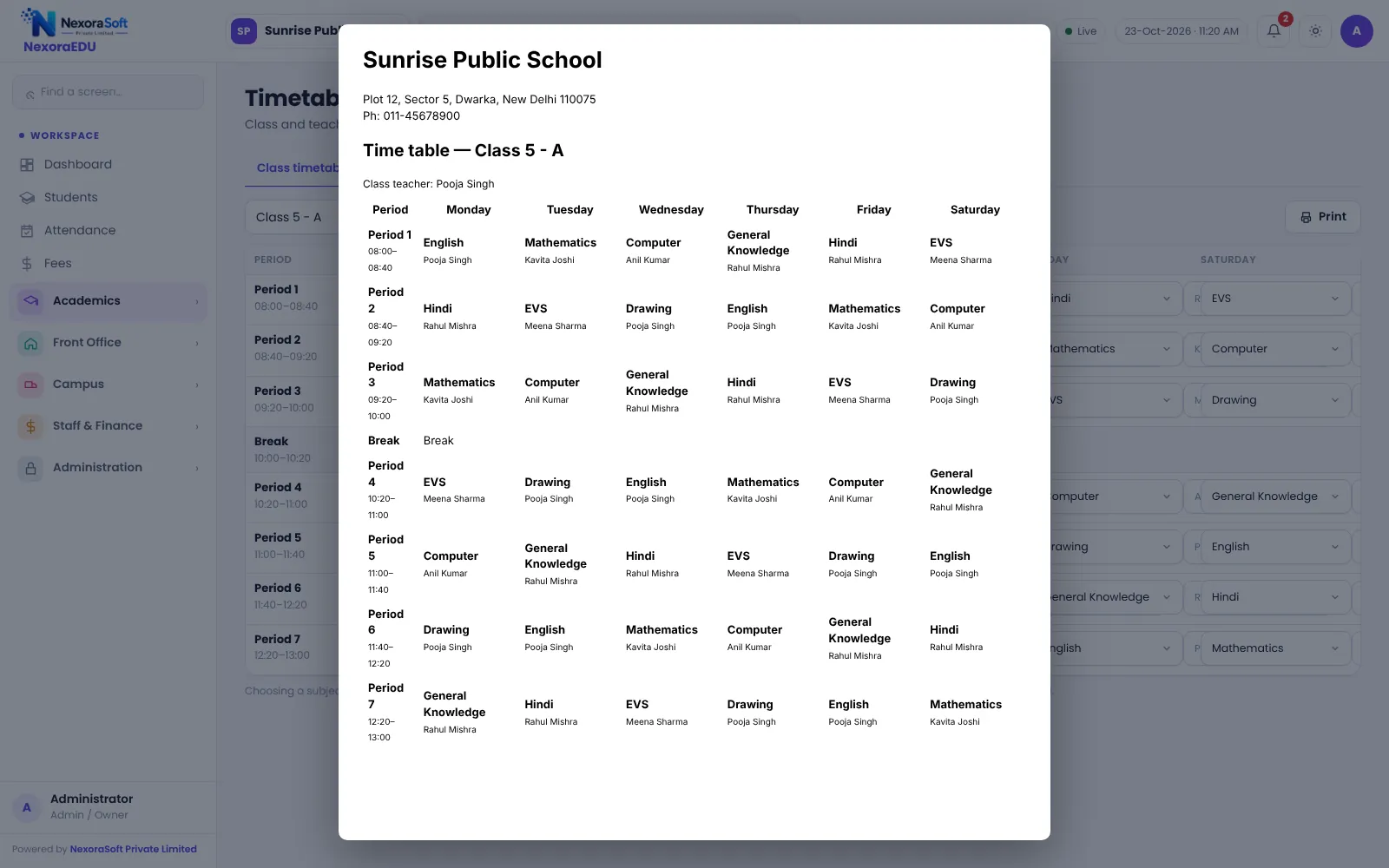
Class timetable
A weekly view for every class and section, printable.
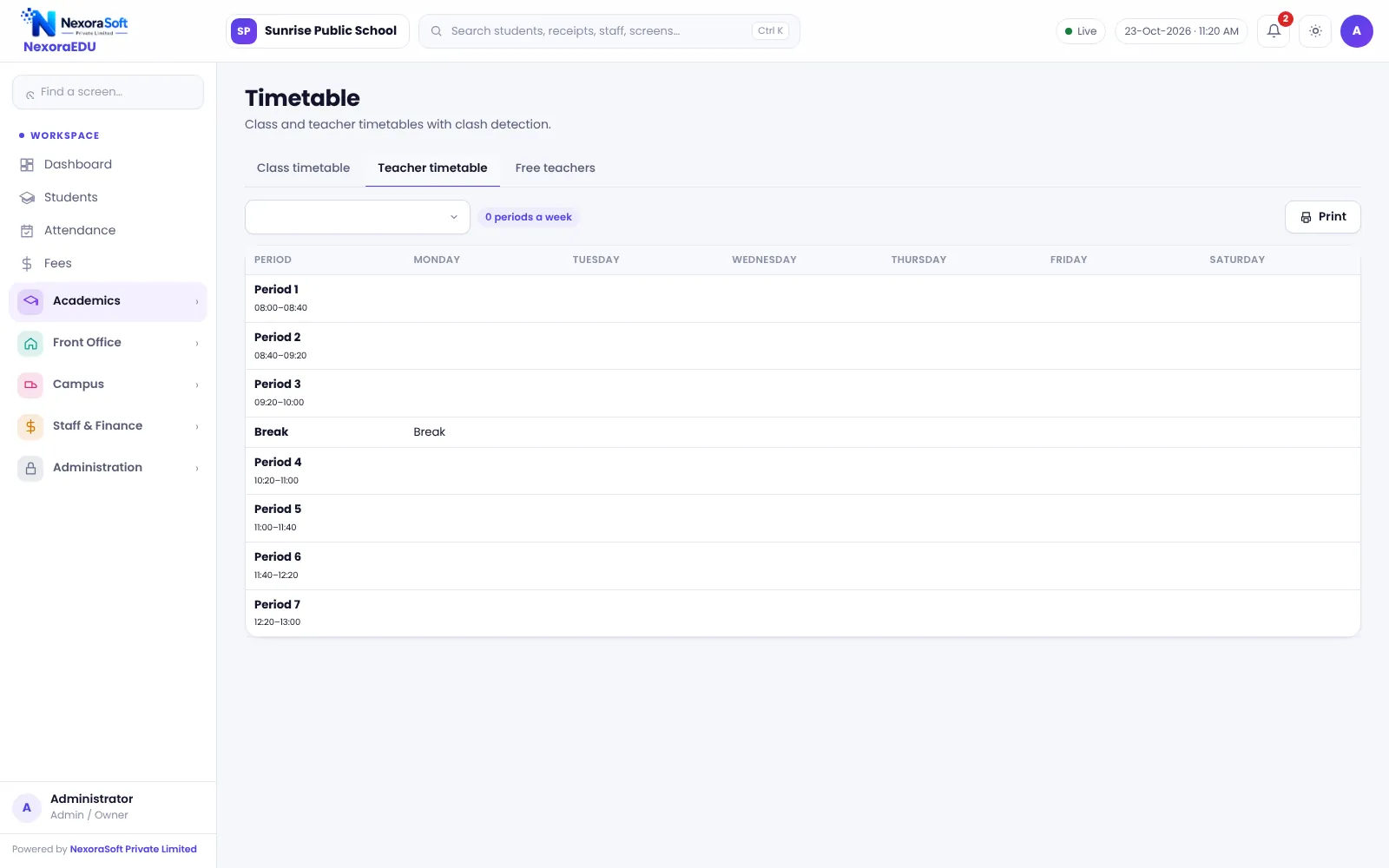
Teacher timetable
Each teacher’s periods in a week, with free periods visible.
Clash warning
A warning when a teacher or class is booked twice for the same period.
Period timings
Define period lengths and breaks once for the school.
Free teachers
See which teachers are free in a period when you need cover.
Print and share
Print class and teacher timetables for the notice board.
Planning and Cover
Set periods and subjects first, then assign teachers. The clash warning protects the plan, and the teacher view shows overload at a glance.
When a teacher is absent, the free-teachers view helps the coordinator choose cover. Substitution is arranged manually; the software does not automatically assign it in this version.
- Subject-to-teacher mapping
- Weekly view by class and section
- Teacher workload visibility
- Parents see the class timetable in the portal
- Printable A4 layout
Building the Timetable
Periods
Set period timings and breaks.
Subjects and teachers
Map subjects to classes and teachers.
Fill the grid
Assign periods; clashes are flagged.
Review
Check teacher workload and free periods.
Publish
Print it and make it visible in the portal.
Timetable at a Glance
| Need | NexoraEDU answer |
|---|---|
| Avoid double booking | Clash warning |
| Teacher view | Teacher timetable |
| Cover planning | Free teachers by period |
| Sharing | Print and portal view |
| Auto-generation | Not included |
Related School Management Software Guides
School Management Software India (full guide)Exam, Result & Report Card SoftwareParent & Student Portal SoftwareSchool LMS, Assignment & Online Quiz SoftwareSchool Staff Attendance & Payroll SoftwareSchool Software for CBSE SchoolsClash-Free School Timetable GuideSchool Admission Process: Enquiry to EnrolmentSchool Transport Route and Fee Management
School Timetable Management Software – FAQ
No. You assign subjects and teachers to periods, and the software warns about clashes while you do it. It does not auto-generate a complete timetable from constraints in this version. For many schools, a coordinator planning the grid with clash warnings is faster than learning a generator and still avoids double bookings.
Yes. The teacher timetable shows each teacher’s periods in the week, and a free-teachers view shows who has no class in a chosen period. It helps the coordinator find cover when a teacher is absent. The cover itself is arranged manually by the coordinator.
No. Teacher leave and automatic substitution are not part of this version. The coordinator uses the free-teachers view to pick a substitute and informs the teacher. We note this honestly so you can plan the process around it, and it is on our list for a later release.
Yes. In the portal, students and parents can view the class timetable. This reduces repeated questions to class teachers. Keep the timetable updated whenever a change is made, and print a copy for the notice board so everyone sees the same version.
Yes. Class and teacher timetables are printable from the software. The layout is designed for A4 paper, and the school name comes from the branding settings. Check the print preview for your longest class name and period count during the demo.
See NexoraEDU Working for Your School
Share your classes, fee structure and workflow and get a free live demo of NexoraEDU. No commitment; we typically respond within 24 hours.