Home › School Management Software › School Transport Management Software
School Management SoftwareSchool Transport Management Software
Set up routes and vehicles, allot students to a route and add the monthly route fee to the student’s fee ledger. NexoraEDU gives the transport in-charge a clean list for every bus.
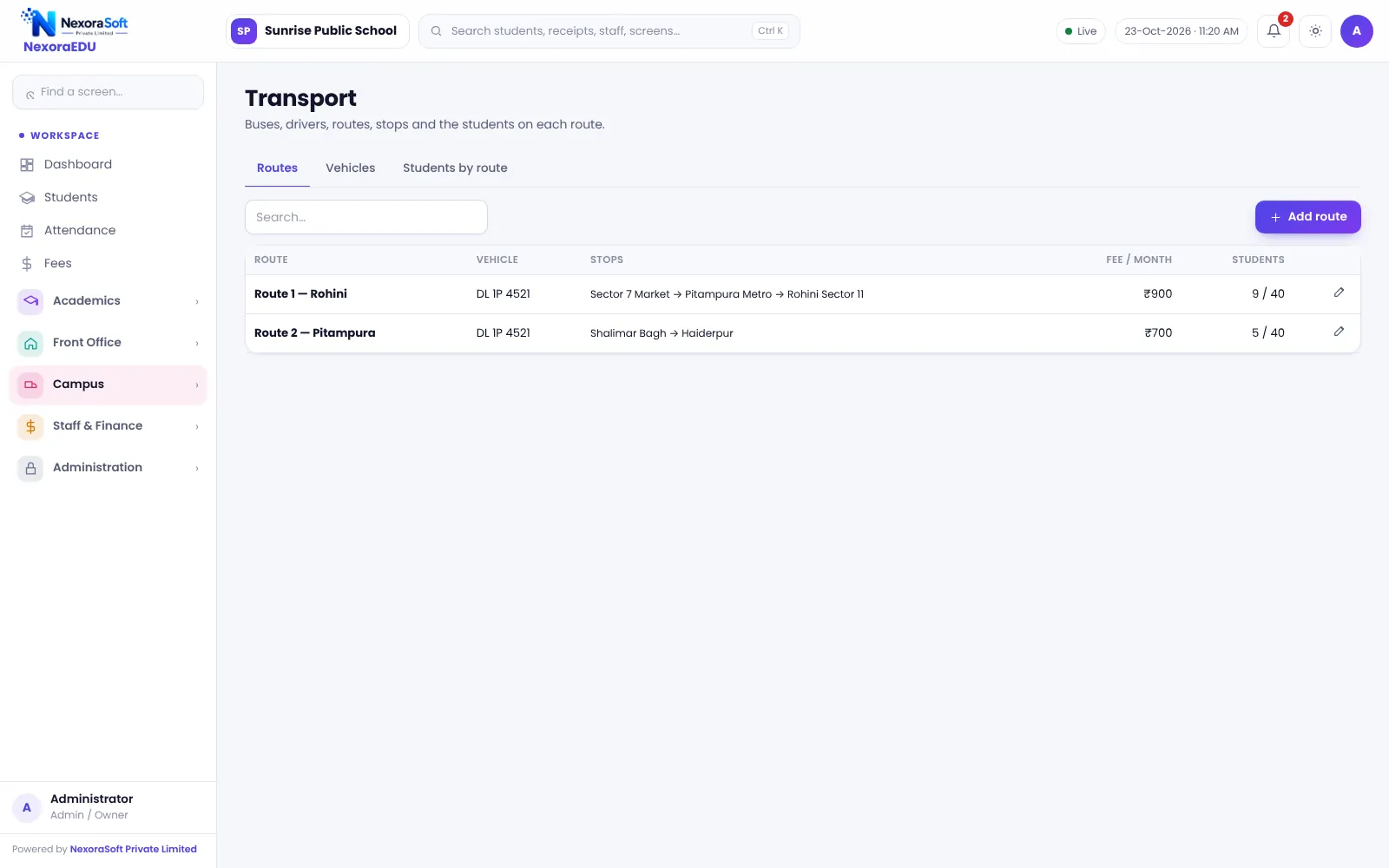
What School Transport Needs From Software
A school bus system has three problems: knowing which child rides which route, charging the right route fee every month and giving the transport in-charge a list they can trust. On paper, route changes mid-year are the usual source of errors.
NexoraEDU stores routes, stops, vehicles and drivers, then links each student to a route. The monthly route fee goes into the student’s fee ledger, so the fee counter collects it together with tuition.
Transport Features in NexoraEDU
Routes and stops
Define routes with stops and the monthly fee for each.
Vehicles
Keep a list of buses, registration numbers and capacity.
Drivers and attendants
Driver, driver mobile, attendant and insurance or fitness due date on each vehicle.
Students by route
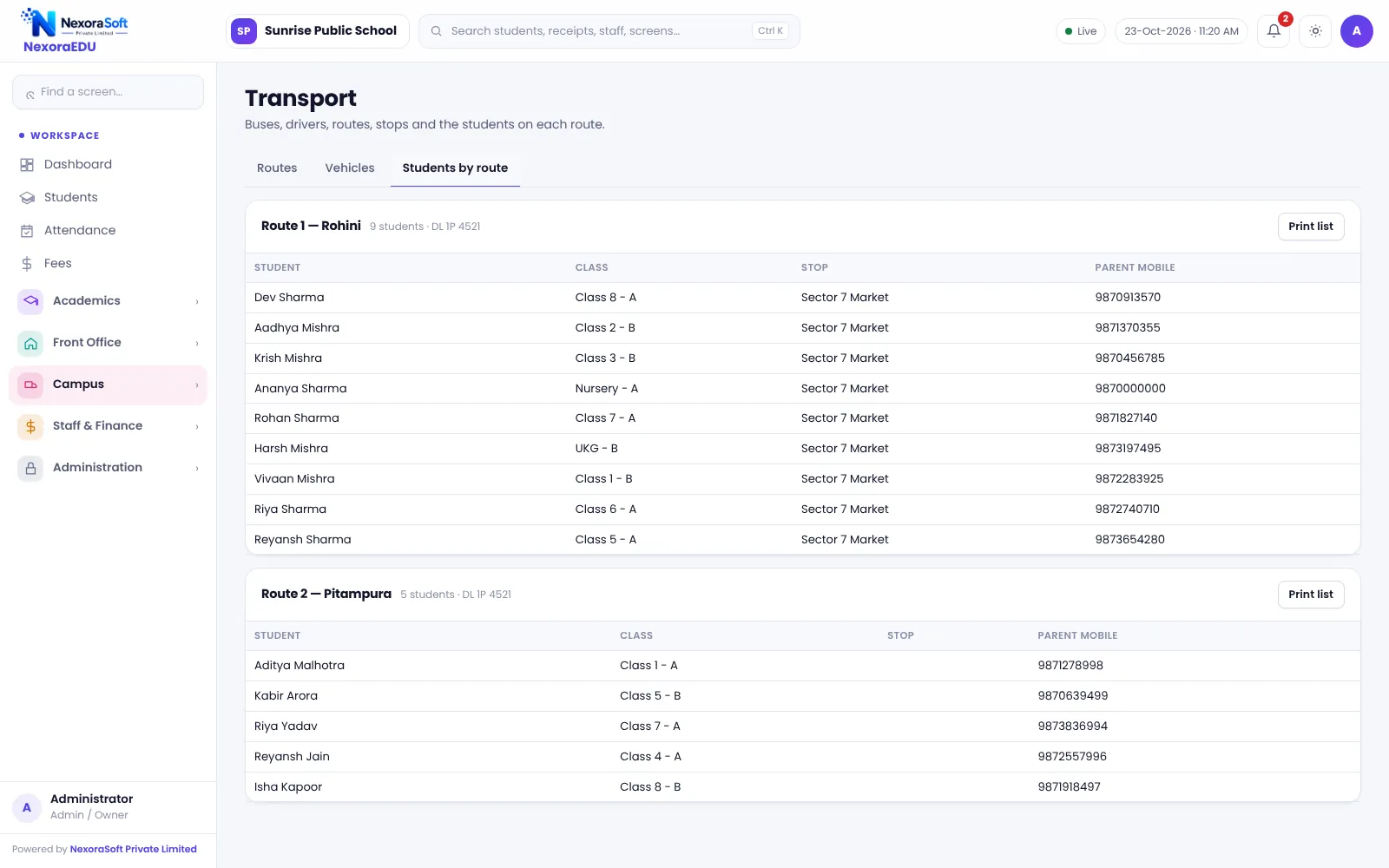
A list of students for each route for the transport in-charge.
Fee into the ledger
The route fee is added to the student ledger every month.
Printable lists
Print route-wise lists for drivers and attendants.
Route Fee Without Extra Registers
When a child is allotted to a route, the route fee is charged on the same fee ledger as tuition. If a child leaves the bus service, the allotment is changed and the fee stops from that point.
GPS tracking of buses is not part of this version, and neither is live location for parents.
- Route-wise fee
- Student allotment to route and stop
- Vehicle and driver details
- Printed route lists
- Fee collected at the same counter
Setting Up Transport
Routes
Create routes and stops with monthly fee.
Vehicles
Add buses and drivers.
Allot
Assign students to routes during admission or later.
Charge
Route fee appears in the ledger.
Review
Check route-wise lists each month.
Transport at a Glance
| Need | NexoraEDU answer |
|---|---|
| Who rides which bus | Students by route |
| Fee collection | Route fee in student ledger |
| Vehicle details | Vehicle and driver records |
| Live tracking | GPS tracking not included |
| Parent alerts | Not automatic |
Related School Management Software Guides
School Management Software India (full guide)School Fee Management & Collection SoftwareSchool Library Management SoftwareSchool Hostel Management SoftwareSchool Canteen & Prepaid Wallet SoftwareSchool Software for Small & Budget Private SchoolsSchool Management Software in GhaziabadWhat Is School Management Software?Best School Management Software in India: Features to CheckSchool Transport Route and Fee Management
School Transport Management Software – FAQ
No. GPS tracking and live bus location for parents are not part of this version. The transport module manages routes, stops, vehicles, drivers, student allotment and the monthly route fee. If GPS tracking is a priority, we can discuss integration with a tracking vendor as a separate project.
The route fee is defined on the route and posted to the student’s fee ledger every month. The cashier then collects it together with tuition at the fee counter, and one receipt can cover both. This avoids a separate transport register and reduces mismatches between the transport desk and accounts.
Yes. The students-by-route screen shows who rides each route and can be printed for the driver, attendant or transport in-charge. Keep allotments updated when families change stops, since the list is only as correct as the allotment data behind it.
Yes. The allotment can be changed, and the route fee follows the new route from the change. Decide a school policy for mid-month changes, such as charging from the next month, so that the fee counter and transport desk apply the same rule every time.
Yes. Each vehicle record stores registration number, type, seating capacity, driver (from the staff list or typed in), driver mobile, attendant or conductor, and an insurance or fitness due date that is highlighted when it is within 30 days. There are no automatic SMS reminders for it, so check the transport screen regularly.
See NexoraEDU Working for Your School
Share your classes, fee structure and workflow and get a free live demo of NexoraEDU. No commitment; we typically respond within 24 hours.