Home › School Management Software › School Hostel Management Software
School Management SoftwareSchool Hostel Management Software
Manage hostel rooms, allot students, collect hostel charges as a fee head at the same fee counter and look after health records and the canteen wallet, all from one student record. NexoraEDU supports boarding schools.
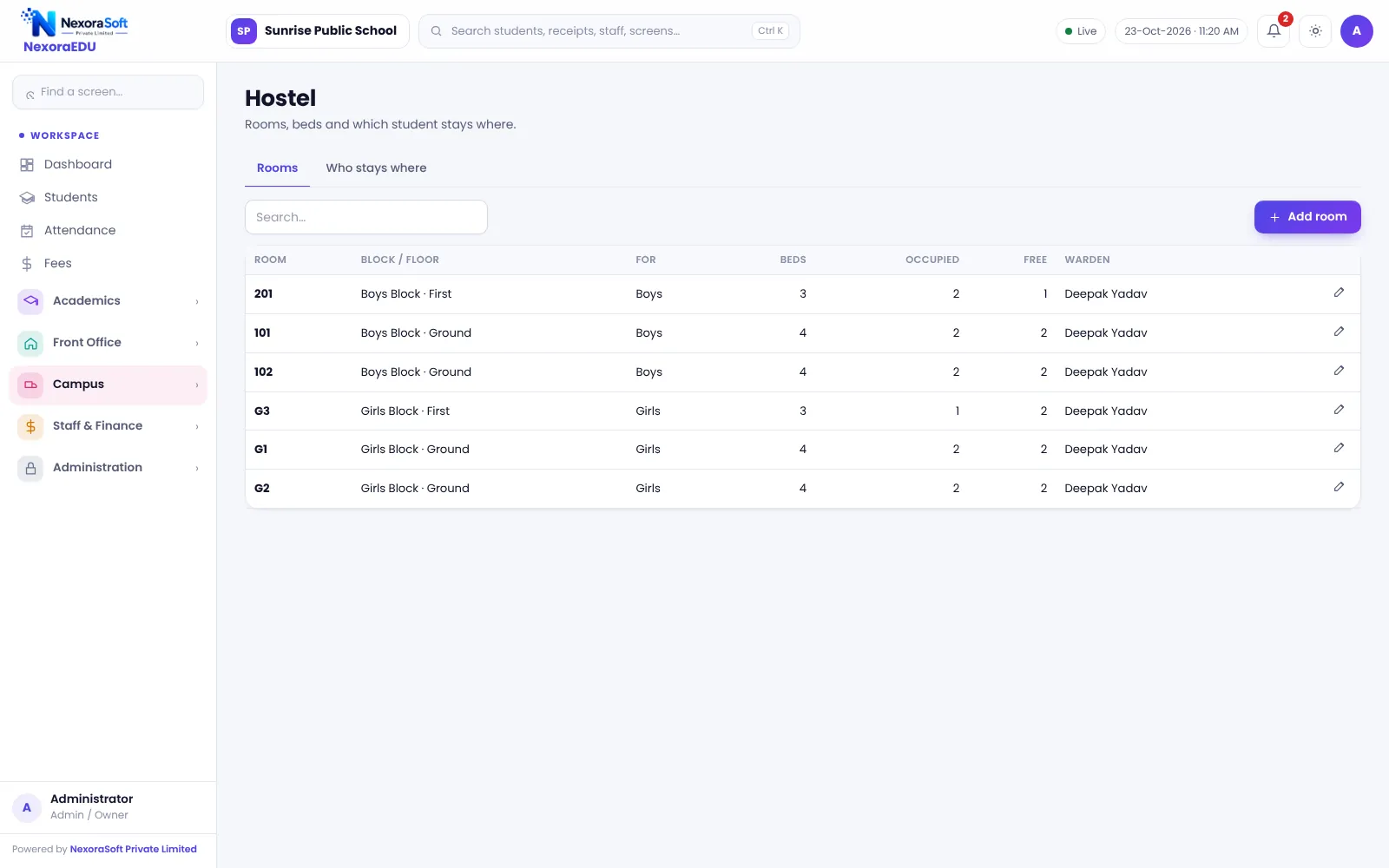
A Boarding School Needs One Student Record
A hostel adds a second layer of records: rooms, beds, mess, health and local guardians. When the hostel register is separate from the school register, the fee counter cannot see hostel dues and the warden cannot see academic status.
NexoraEDU’s hostel module links each boarder to a room and bed in the same student record. Hostel charges can be set up as a fee head, and the canteen wallet and health records are part of the same student data.
Hostel Features in NexoraEDU
Rooms and beds
Hostel blocks, rooms and bed counts with occupancy.
Allotment
Allot a student to a room, with a warning when the room is already full.
Hostel fee as a fee head
Set up hostel charges as a fee head so they are collected at the same fee counter.
Canteen wallet
Prepaid wallet for the mess or canteen.
Health records
Record health notes the warden should know.
Helpdesk
Parents raise requests and see replies in the portal.
Rooms, Fees and Care
Allotments show which rooms are full and which have a free bed, and the software warns before you allot a student to a room that is already full.
Mess menus, biometric entry and gate-pass or pick-up authorisation are not part of this version, so those remain on your existing process.
- Room-wise occupancy
- Warning for full rooms
- Hostel charges as a fee head
- Health notes in the profile
- Parents see hostel details in the portal
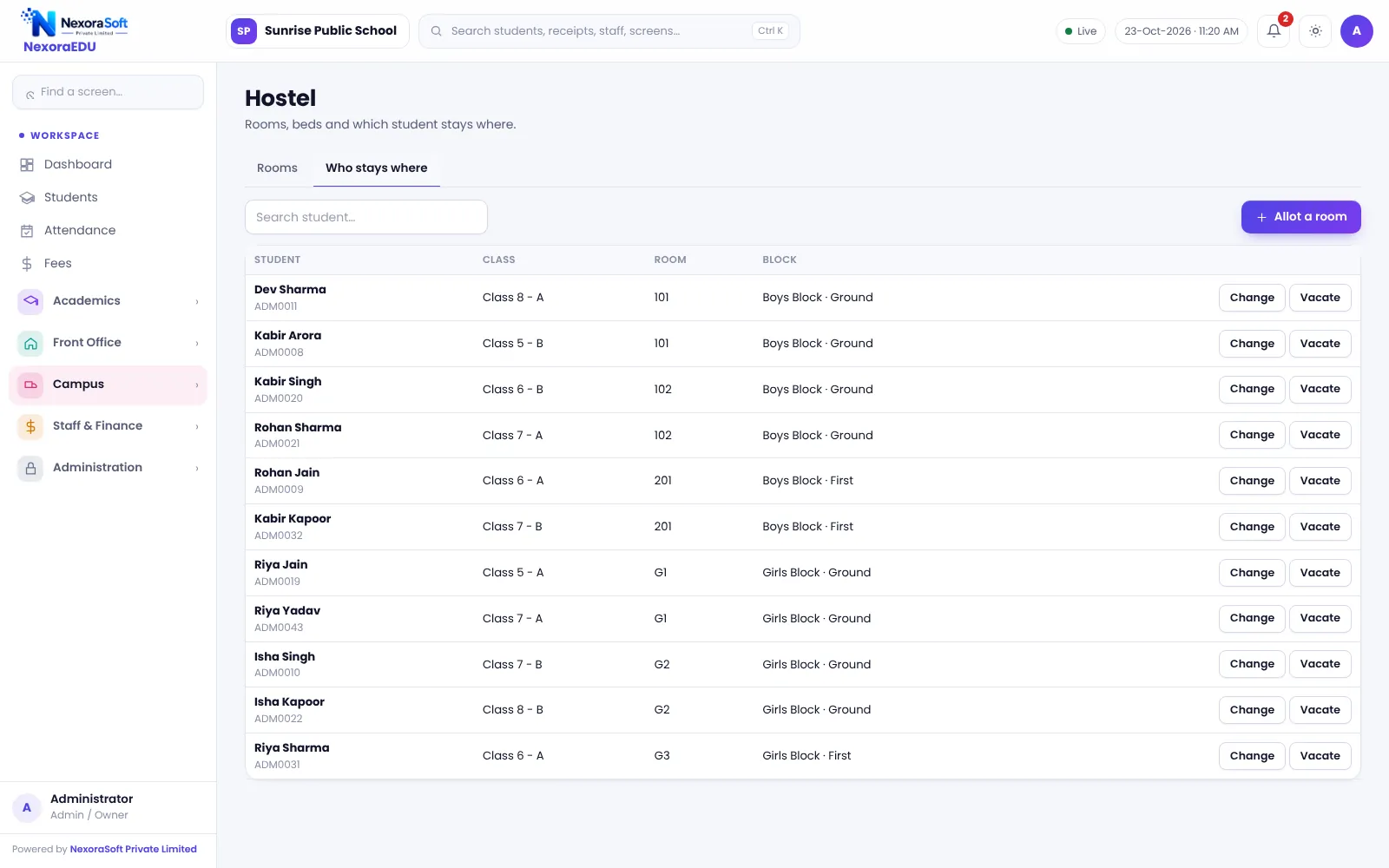
Running a Hostel
Set up rooms
Add blocks, rooms and bed counts.
Allot
Assign boarders to rooms.
Charge
Apply the hostel fee head to boarders.
Care
Keep health and guardian notes updated.
Vacate
Update the allotment when a student leaves.
Hostel at a Glance
| Need | NexoraEDU answer |
|---|---|
| Room occupancy | Rooms and beds view |
| Fee | Hostel charges as a fee head |
| Health notes | Health records |
| Gate pass | Not included |
| Mess menu | Not included |
Related School Management Software Guides
School Management Software India (full guide)School Transport Management SoftwareSchool Canteen & Prepaid Wallet SoftwareSchool Inventory & Stock Management SoftwareSchool Front Office, Enquiry & Visitor SoftwareSchool Software for Boarding & Residential SchoolsSchool Management Software in GurgaonSchool Attendance Management GuideClash-Free School Timetable GuideSchool Canteen and Hostel Management Tips
School Hostel Management Software – FAQ
No. Gate pass, pick-up authorisation and leave-out approvals are not part of this version. The hostel module covers rooms, beds, allotments and the hostel fee. These features are on our list for a later release, so tell us if they are essential and we can plan a custom solution.
Hostel charges are set up as a fee head in the fee structure, so the cashier collects them with tuition at the fee counter. Unlike the transport route fee, the hostel fee is not generated automatically from the room allotment, so apply the fee head to boarders when you set up fees. This keeps one ledger and one receipt per student.
Yes. The hostel rooms view shows rooms and beds with occupancy, so the warden can see where a new boarder can be placed. Update the allotment whenever a student vacates, because occupancy is computed from the allotment list rather than a separate count.
Yes. The health records module stores health notes such as height, weight and conditions the school should know. Access is limited by roles, so only authorised staff such as the warden or nurse should be given permission. Treat this as sensitive data and use strong passwords.
Yes. In the portal, parents can see hostel room details and canteen wallet balance for their child, along with fees and attendance. What is shown depends on what the school has enabled. Parents can also use the helpdesk to raise a request.
See NexoraEDU Working for Your School
Share your classes, fee structure and workflow and get a free live demo of NexoraEDU. No commitment; we typically respond within 24 hours.