Home › School Management Software › School Front Office, Enquiry & Visitor Software
School Management SoftwareSchool Front Office, Enquiry & Visitor Software
Track every admission enquiry to a decision, log visitors at the gate with a pass, print notices and keep an events calendar. NexoraEDU gives the front desk one place to work.
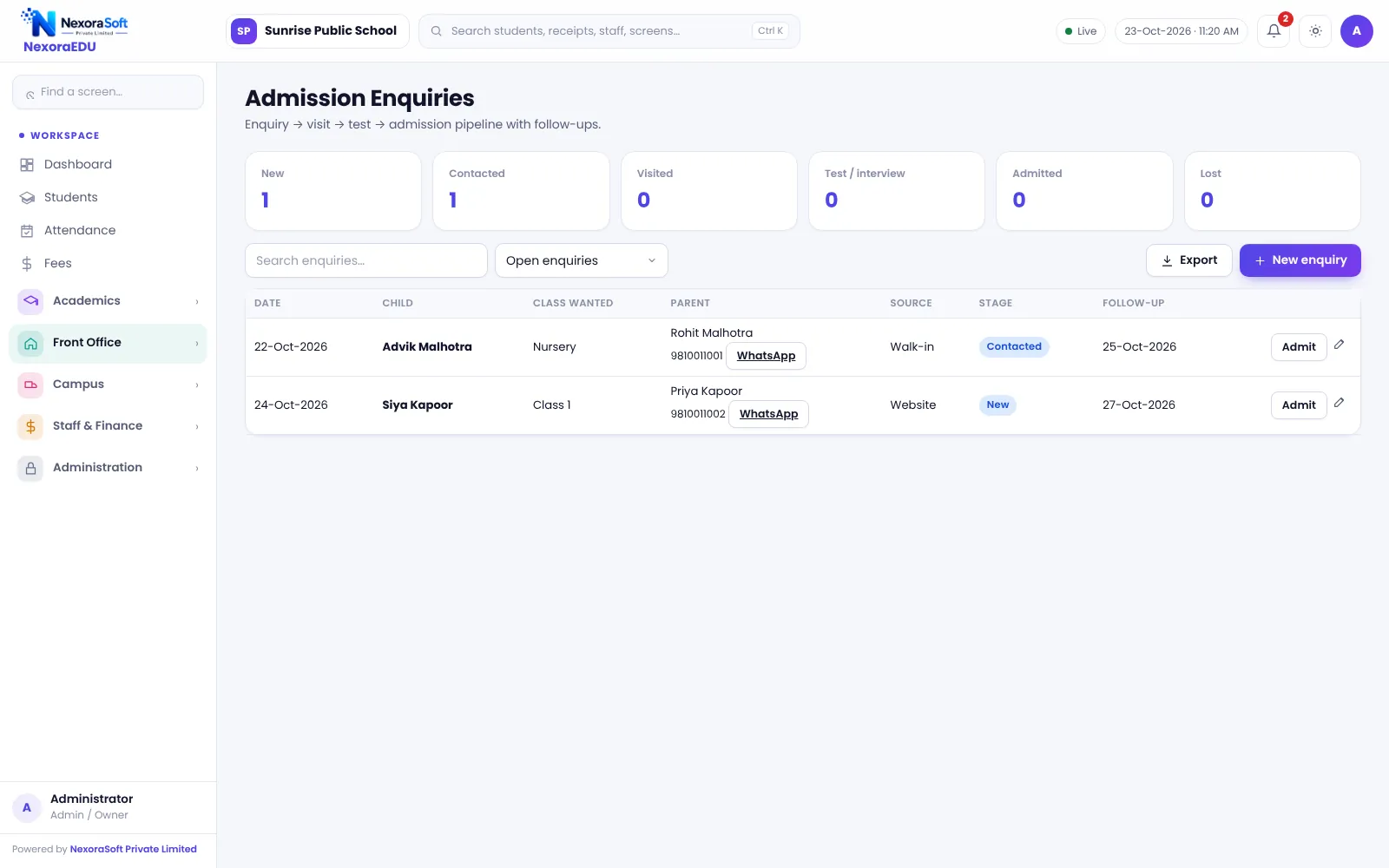
The Front Desk Is Where Trust Begins
A school’s front office sees parents, visitors, vendors and enquiries all day. Enquiries written on paper are forgotten, visitors enter without a record, and notices are written by hand and photocopied.
NexoraEDU gives the front desk an enquiry pipeline, a visitor register with a pass, a notice maker and an events calendar. Because it shares the student database, a closed enquiry becomes an admission in one step.
Front Office Features in NexoraEDU
Enquiry pipeline
Log enquiries and track them from new to follow-up to admitted or closed.
Visitor register
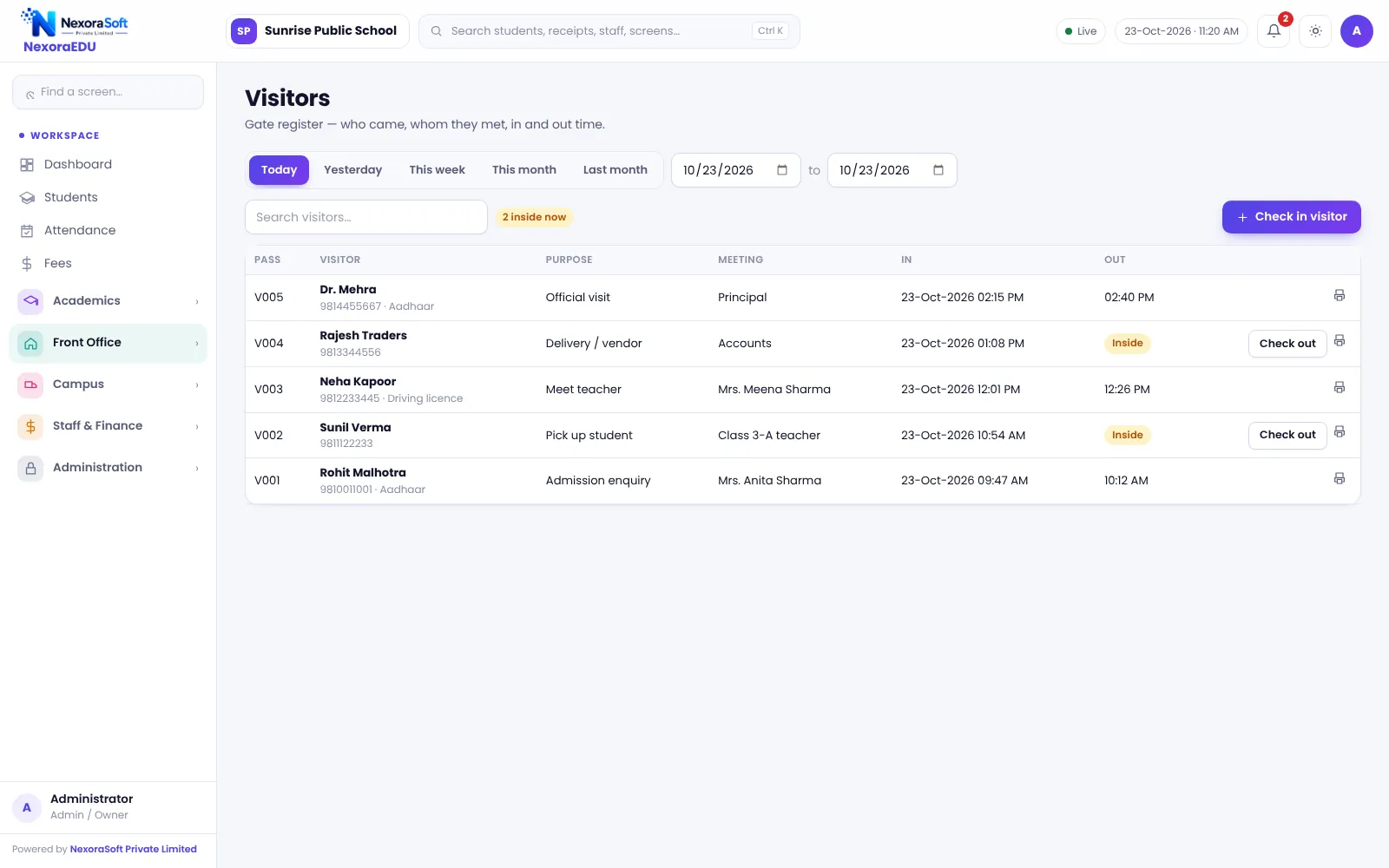
Log visitors with purpose, whom they meet, time in and out.
Visitor pass
Print a pass for each visitor.
Notices and circulars
Write a notice, print it or send it by WhatsApp click.
Events calendar
Holidays, exams and events on one calendar.
Helpdesk
Parent and student requests with status and reply.
From Enquiry to Admission
Each enquiry has a status and follow-up date, so nothing is forgotten after the first call. When the family decides, the admission form can be filled and the enquiry is marked admitted.
There is no public online admission form on your website in this version, and the visitor pass is not tied to biometric or gate hardware.
- Follow-up dates and status
- Admission form can be filled from an enquiry
- Visitor log with time in and out
- Notice print and WhatsApp click
- Events and holidays calendar
A Front Office Day
Enquiry
Log the call or walk-in enquiry.
Visitor
Log the visitor and print a pass.
Notice
Publish a circular for parents.
Follow up
Check the follow-up list each morning.
Admit
Convert a confirmed enquiry to an admission.
Front Office at a Glance
| Need | NexoraEDU answer |
|---|---|
| Admission leads | Enquiry pipeline |
| Gate security | Visitor register and pass |
| Parent communication | Notices with WhatsApp click |
| Planning | Events calendar |
| Website enquiry form | Not included |
Related School Management Software Guides
School Management Software India (full guide)Student Admission & Management SoftwareParent & Student Portal SoftwareSchool Staff Attendance & Payroll SoftwareSchool Reports & Analytics SoftwareSchool Management Software Pricing in IndiaSchool Management Software in DelhiParent-Teacher Communication with a School PortalSchool Admission Process: Enquiry to EnrolmentSchool Library Management GuideSchool ERP vs Excel and Paper Registers
School Front Office, Enquiry & Visitor Software – FAQ
Yes. Enquiries are logged with contact details and a follow-up date, and move through stages until they are admitted or closed. This gives the principal a view of how many enquiries became admissions and where leads are lost, before the new session begins.
Yes. The front desk logs visitors with name, purpose, whom they are meeting and time in and out, and can print a visitor pass. It is a register, not a hardware gate system; there is no face recognition, QR gate scanner or automatic parent notification.
You can write a notice or circular, print it, and use the click-to-send WhatsApp option to share it. Parents also see notices and events in the portal. There is no automatic bulk SMS or WhatsApp broadcast in this version, so plan for staff to send messages in batches.
Yes. School events, exams and holidays can be placed on a calendar that staff see, and parents see events in the portal. Keep the calendar updated at the start of each term so that attendance, timetable and notices all follow the same dates.
Yes. The helpdesk lets parents and students raise a request from the portal, and staff reply and update the status. Use it for queries like fee clarification or certificate requests, so that the history is kept and nothing is lost in phone calls.
See NexoraEDU Working for Your School
Share your classes, fee structure and workflow and get a free live demo of NexoraEDU. No commitment; we typically respond within 24 hours.