Home › School Management Software › School Inventory & Stock Management Software
School Management SoftwareSchool Inventory & Stock Management Software
Keep uniforms, books, stationery and store items under control with a clear stock register, movements and a trail of who issued what. NexoraEDU removes the guesswork from the school store.
Why School Stores Leak
A school store holds uniforms, books, stationery, lab material and consumables. Items go out without a record, counts are guessed at year end, and reordering depends on someone remembering to check the shelf.
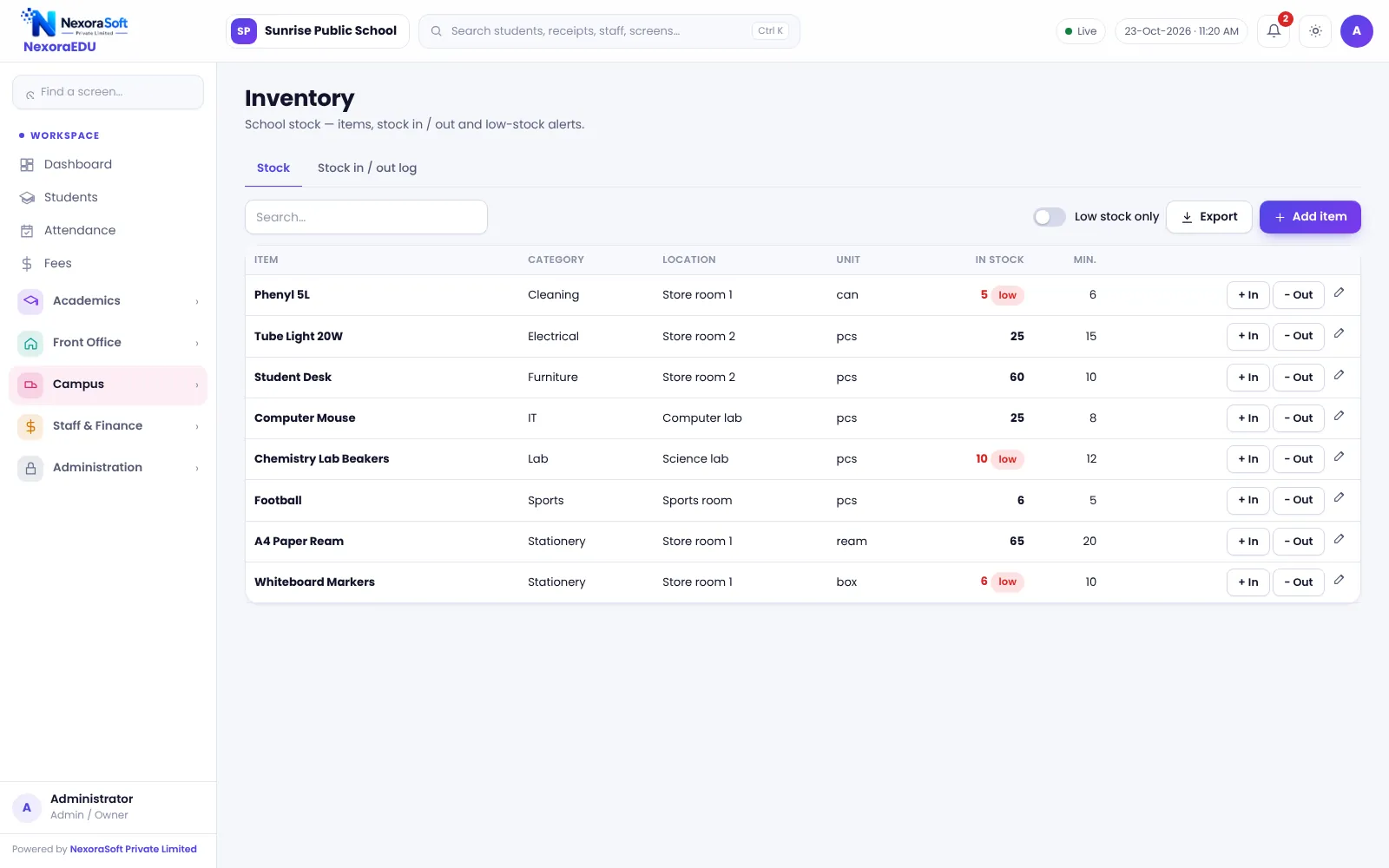
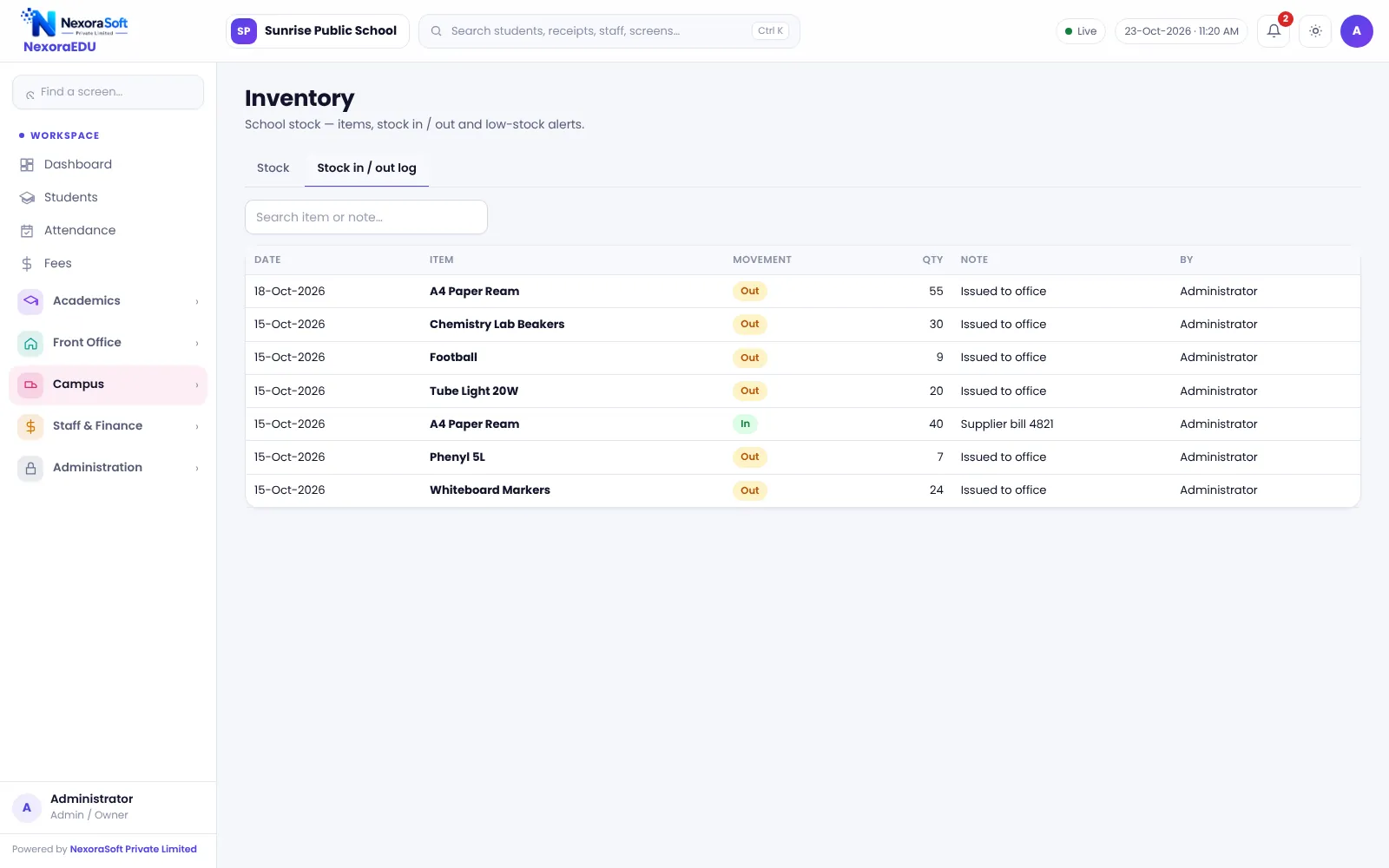
NexoraEDU’s inventory module keeps an item list with current stock, and every stock-in and stock-out is a movement with a date and a user. You can see what is low before the new session starts.
Inventory Features in NexoraEDU
Item master
Items with category, unit and opening stock.
Stock in
Record purchases and receipts into the store.
Stock out
Record issues to staff, classes or students.
Movement trail
Every in and out with date and user.
Low stock view
Spot items running low before they run out.
Expenses link
Record related purchases under school expenses.
A Simple Store Register
Create the items once, then enter stock-in when goods arrive and stock-out when they are issued. The stock page shows the current quantity and the movement page explains how it got there.
This is a school store register, not a full purchase-order or warehouse system. For deeper stock needs, see NexoraSoft’s inventory management software.
- Opening stock and units
- Stock in and stock out entries
- Trail of who and when
- Current stock by item
- Reports for audits
Running the Store
Items
Create items and opening stock.
Receive
Enter stock-in on purchase.
Issue
Enter stock-out on every issue.
Check
Review current stock monthly.
Count
Compare physical count each term.
Inventory at a Glance
| Need | NexoraEDU answer |
|---|---|
| Know current stock | Stock page |
| Explain differences | Movement trail |
| Track issues | Stock-out entries |
| Purchase orders | Not included |
| Multi-warehouse | See NexoraIMS |
Related School Management Software Guides
School Management Software India (full guide)School Library Management SoftwareSchool Canteen & Prepaid Wallet SoftwareSchool Front Office, Enquiry & Visitor SoftwareSchool Staff Attendance & Payroll SoftwareSchool Reports & Analytics SoftwareSchool Management Software Pricing in IndiaSchool Admission Process: Enquiry to EnrolmentSchool Transport Route and Fee Management
School Inventory & Stock Management Software – FAQ
No. It is a simple school store register with items, stock in, stock out and a movement trail. It does not include purchase orders, multi-warehouse or batch tracking. For a larger store or a school group with central purchasing, NexoraSoft’s NexoraIMS inventory software is a better fit and is listed on this site.
Yes. You can create items for uniforms by size, textbooks, notebooks and stationery, then record stock in when goods arrive and stock out when they are sold or issued. Keep item names consistent, for example including size, so the stock page stays easy to read.
Yes. Each movement is recorded with a date and the user who entered it, so you can trace a difference back to a transaction. Use separate logins for store staff, and limit who can adjust stock, which the roles and permissions screen lets you do.
The stock view lets you see quantities so you can spot items running low. There is no automatic purchase order or email alert in this version. Check the stock page at the start of each month and before the new session so that uniforms and books are ready.
Purchases can be recorded in the school expenses module, and the expense reports show spending by head. It is not a full accounting system and does not post to Tally. For accounting, your accountant continues to use the school’s existing books with data exported from reports.
See NexoraEDU Working for Your School
Share your classes, fee structure and workflow and get a free live demo of NexoraEDU. No commitment; we typically respond within 24 hours.