Home › School Management Software › School Library Management Software
School Management SoftwareSchool Library Management Software
Keep a catalogue of books, issue and return them in seconds, see what is overdue and charge a late fine. NexoraEDU’s library module is built into the school software, so students are already there.
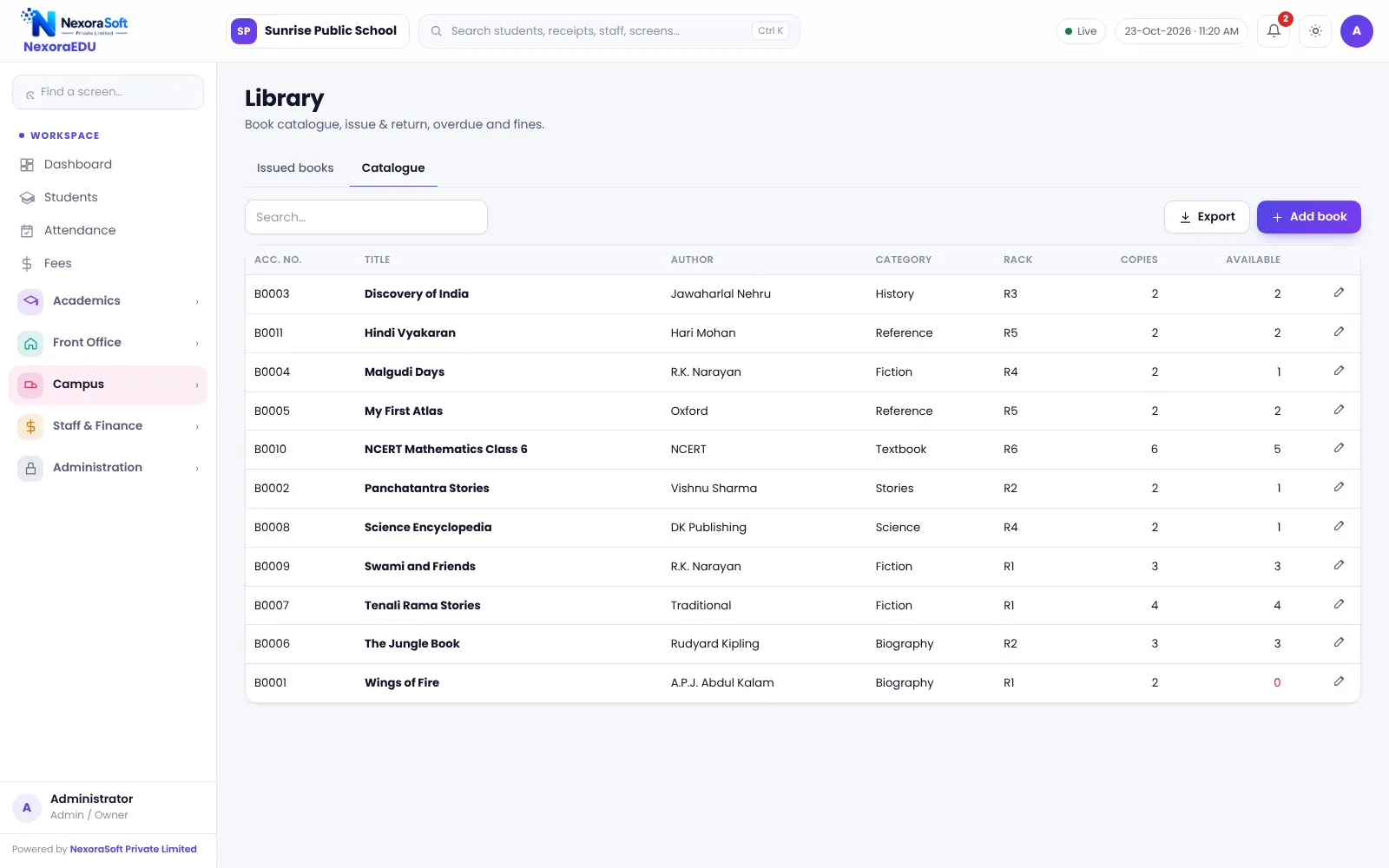
A Library Register That Does Not Get Lost
School libraries often run on a register and a card index. Books go missing, nobody knows who has what, and overdue reminders depend on memory. A student’s library dues may not reach the fee counter at all.
NexoraEDU stores the catalogue with copies and availability, links each issue to a student, and tracks due dates and fines. Because the student record is shared, there is no second database of members to maintain.
Library Features in NexoraEDU
Catalogue
Books with author, category, copies and availability.
Issue and return
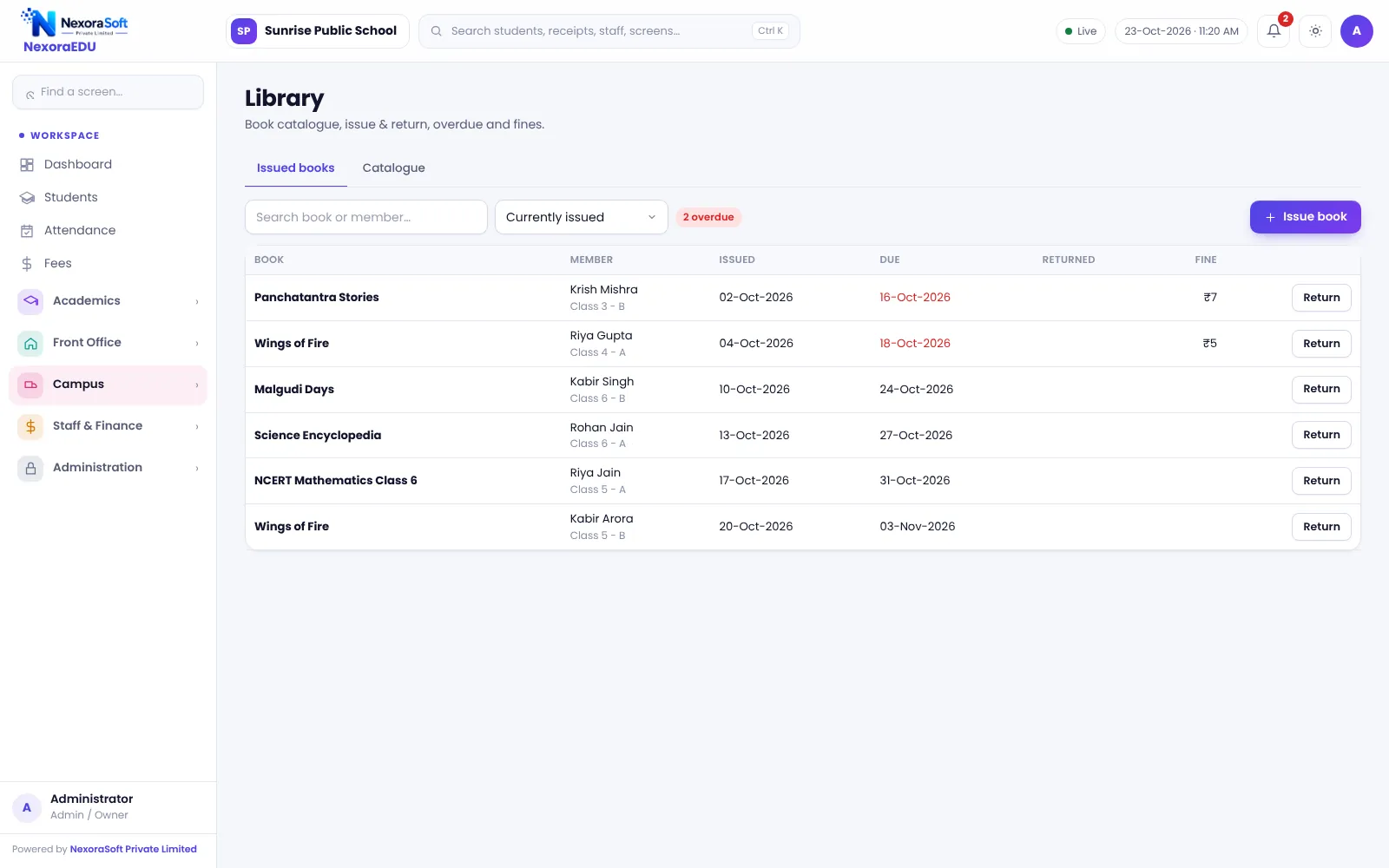
Issue a book to a student and mark the return.
Due dates
See what is due and what is overdue.
Late fines
Calculate a fine for late returns by your rule.
Search
Find a book by title, author or category.
Student link
Issues are tied to the student record, so no separate member list is needed.
Issue, Return and Fines
The librarian picks the student and the book, and the due date is set. On return, the book is marked back and any fine is calculated.
Barcode scanning of books and RFID are not part of this version. Book entry is by catalogue form or import.
- Copies and availability per title
- Issued books view with due date
- Overdue list
- Fine on late return
- Student-wise issue history
Running the Library
Catalogue
Add books or import the list.
Issue
Pick student and book; set a due date.
Return
Mark it back and charge a fine if late.
Follow up
Check the overdue list weekly.
Audit
Compare catalogue and shelf once a term.
Library at a Glance
| Need | NexoraEDU answer |
|---|---|
| Who has which book | Issued books view |
| Overdue | Due dates and list |
| Fines | Calculated on return |
| Barcode scanning | Not included |
| Members | Students already in the software |
Related School Management Software Guides
School Management Software India (full guide)Student Admission & Management SoftwareSchool Hostel Management SoftwareSchool Canteen & Prepaid Wallet SoftwareSchool Inventory & Stock Management SoftwareSchool Software for CBSE SchoolsSchool Management Software in FaridabadHow to Choose School Management SoftwareSchool Fee Collection: How to Reduce DefaultersSchool Library Management Guide
School Library Management Software – FAQ
No. This version does not include barcode or RFID scanning of books. Books are added through the catalogue and issued by searching for the title and student. Many school libraries find this adequate; if scanning matters, tell us in the demo and we can discuss custom work.
Yes. When a book is returned after the due date, the library module can calculate a fine based on the rule you set. Agree on a clear fine policy with the principal first so the librarian applies it the same way every time and parents see no surprises.
Yes. Each issue is linked to the student record, and the issued-books view shows who holds which book and when it is due. This also gives you a student-wise history, helpful for no-dues checks at the end of the year or when a student leaves.
You can build the catalogue with the form, and we can help you import a prepared list so you do not retype every title. Clean titles, categories and copy counts in a spreadsheet beforehand. Test with a few hundred books before loading the whole collection.
No. Students are already in the software, so there is no separate library member list to maintain. When a student is promoted, changes class or leaves, the student record changes in one place and library issues stay linked to it. Check pending books before issuing a transfer certificate.
See NexoraEDU Working for Your School
Share your classes, fee structure and workflow and get a free live demo of NexoraEDU. No commitment; we typically respond within 24 hours.