Home › School Management Software › School Fee Management & Collection Software
School Management SoftwareSchool Fee Management & Collection Software
A fast fee counter, correct receipts, clear dues and fewer arguments. NexoraEDU handles fee heads, instalments, part payment, concession, late fine, receipt cancellation and defaulter reminders.
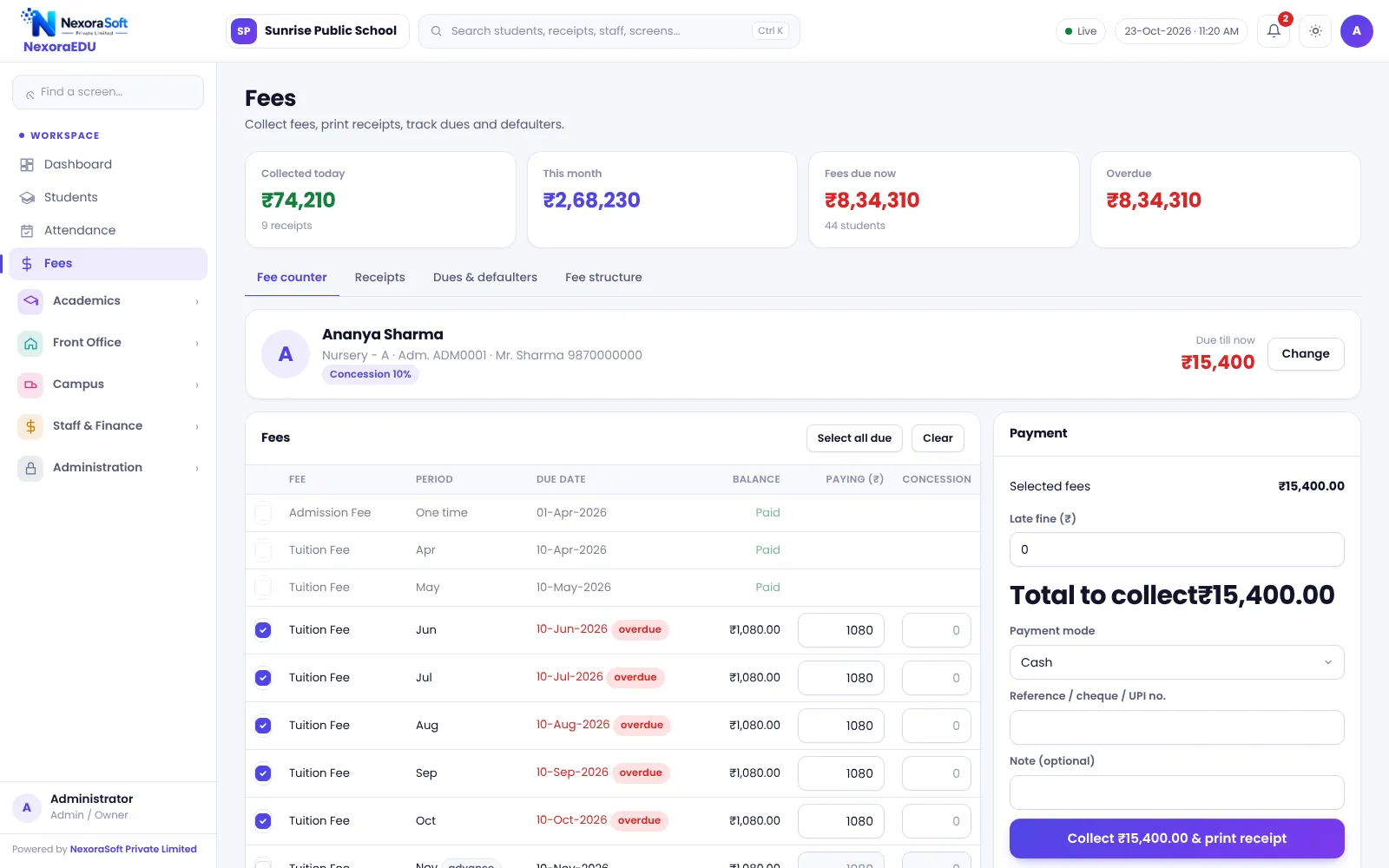
What School Fee Software Must Get Right
Fees are where schools lose time, money and goodwill. A wrong balance at the counter, a missing receipt or a concession no one can explain turns into a dispute with a parent. A manual register cannot show which classes are behind or what was collected last Tuesday.
NexoraEDU treats every fee as a ledger entry per student. The fee counter, receipts, concessions, fines and dues all read the same ledger, so the number the cashier sees is the number the principal sees.
Fee Features in NexoraEDU
Fee counter
Search a student, pick fee heads, take payment and print a receipt in a few steps.
A4 and thermal receipts
Print on A4 or a thermal roll with school name, fee heads and balance.
Part payment
Accept part of a due amount and carry the balance forward.
Concession with principal PIN
Apply a concession only with a principal approval PIN.
Late fine
Add late fine by your rule after the due date.
Receipt cancellation
Cancel a receipt with a reason, kept in the audit trail.
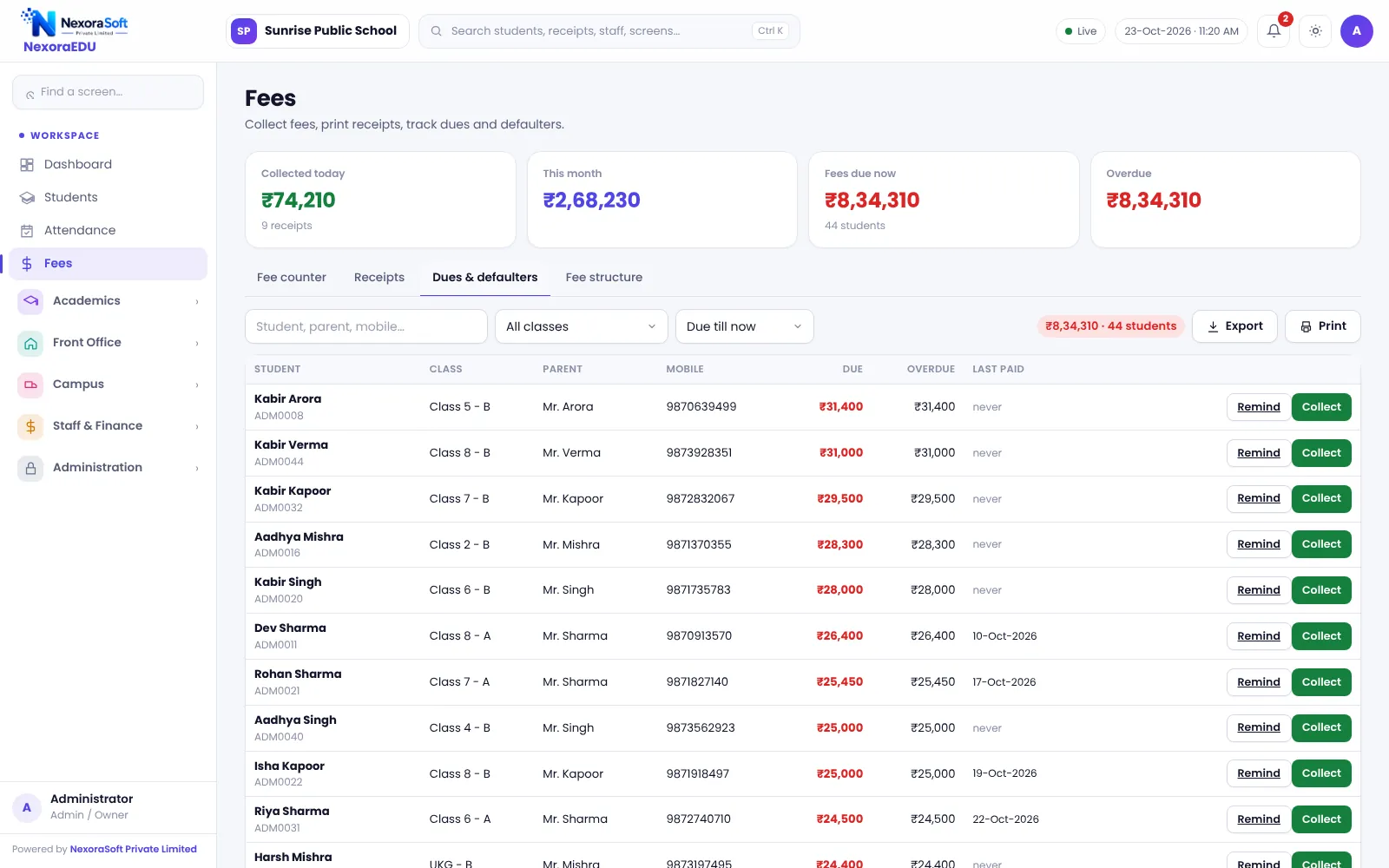
Dues, Defaulters and Reminders
The dues and defaulters screen lists pending fees by class and student. From there the front desk prepares a WhatsApp reminder for each parent and sends it by click. There is no automatic bulk messaging in this version.
Fee heads and class-wise structure are set once. The transport route fee flows into the same student ledger, and hostel or other charges can be set up as fee heads, so one receipt can cover everything.
- Fee heads and class-wise structure
- Instalment due dates
- Statements for each student
- Collection by date, class and mode
- Defaulter list with WhatsApp reminder
A Day at the Fee Counter
Search
Find the student by name, admission number or class.
Select dues
Pick fee heads or accept the suggested dues.
Adjust
Apply concession with PIN or late fine if needed.
Collect
Take cash, UPI, card or cheque details.
Receipt
Print the receipt; the ledger and reports update.
Fee Management at a Glance
| Need | NexoraEDU answer |
|---|---|
| Fast counter | Search and collect screen |
| Proof of payment | A4 and thermal receipts |
| Control | Principal PIN and cancel with reason |
| Follow-up | Defaulters with WhatsApp reminder |
| Reconciliation | Collection report by date and mode |
Related School Management Software Guides
School Management Software India (full guide)Online School Fee Payment SoftwareSchool Timetable Management SoftwareExam, Result & Report Card SoftwareSchool Transport Management SoftwareSchool Reports & Analytics SoftwareSchool Management Software Pricing in IndiaSchool Management Software in GurgaonSchool Fee Collection: How to Reduce DefaultersSchool Attendance Management GuideClash-Free School Timetable Guide
School Fee Management & Collection Software – FAQ
Yes. The fee counter supports part payment, so a parent can pay a portion today and the balance stays on the ledger. The receipt shows the paid amount and the remaining balance. Define your school’s policy for instalments and late fines first so the cashier applies the same rule for every parent.
Concessions can be protected by a principal PIN, so a cashier cannot give a discount without approval. Each concession is recorded against the student and appears in reports, which makes year-end audits simpler. Agree concession categories, such as sibling, staff ward or merit, with management before go-live.
Yes. Receipts can be printed on A4 or a thermal roll. Printing uses the browser and the printer installed on the counter computer, so test your own printer width and paper during the demo. You can add the school name, address and receipt note through the branding settings.
No. The defaulters list prepares a WhatsApp message for each parent and staff send it by click. There is no automatic bulk reminder or SMS gateway in this version. For automated messages, NexoraSoft can add the WhatsApp Business API as a separate service.
Yes. A receipt can be cancelled with a reason, and the action is logged so the cancellation is traceable. This avoids deleting entries silently. Limit the cancel permission to a senior role such as the principal or accounts head, which the roles and permissions screen lets you do.
See NexoraEDU Working for Your School
Share your classes, fee structure and workflow and get a free live demo of NexoraEDU. No commitment; we typically respond within 24 hours.